


🧠 From Header to Control Hub — Redesigning Navigation the Aera Way
Hey there, Product Hunt! 👋
I am so excited to share our latest UX update — a complete redesign of how navigation works inside Aera.
We started with a traditional full-width header — familiar, functional, and, let’s be honest… a little static.
Now? It’s gone.
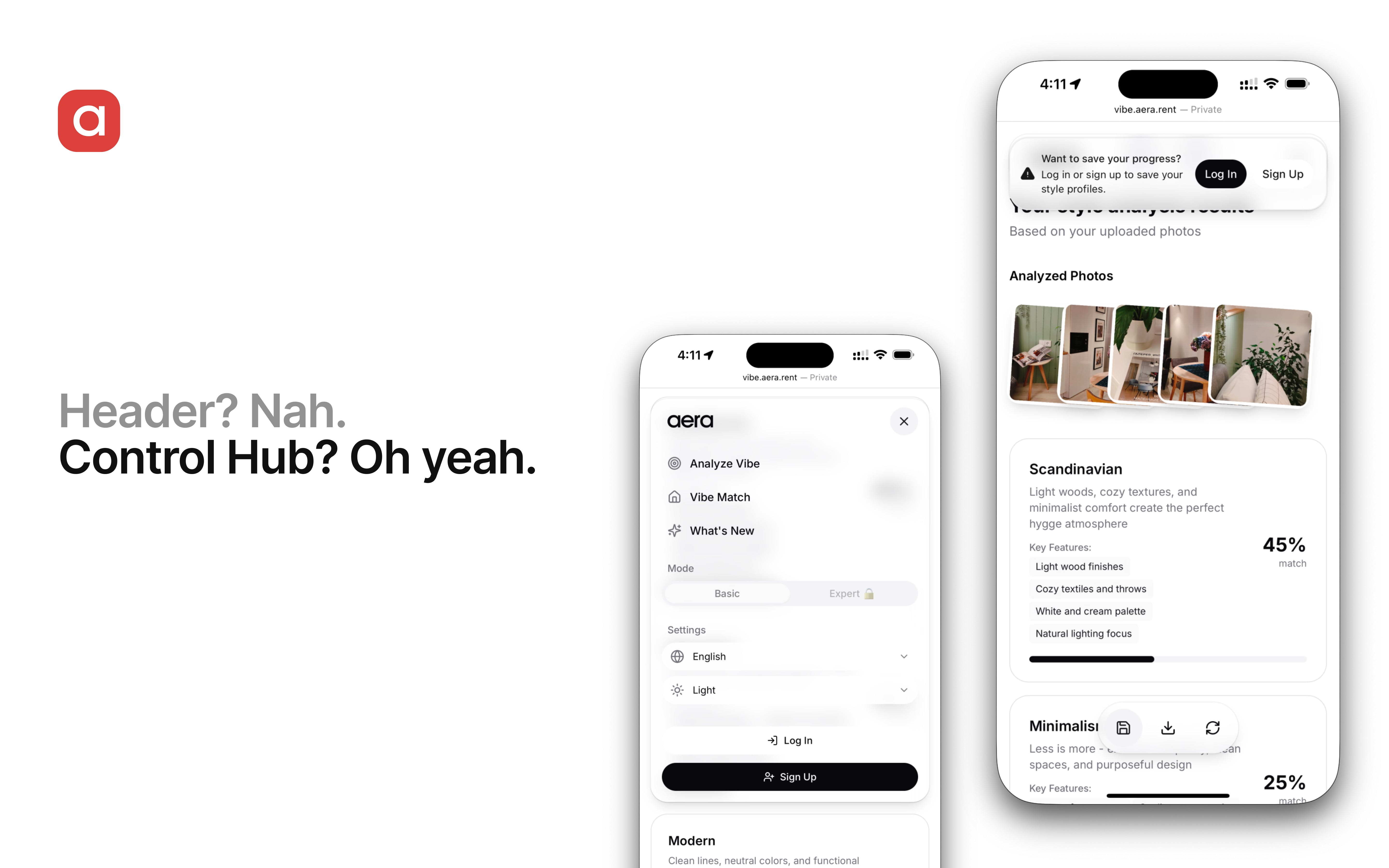
Introducing: Control Hub — a floating, adaptive capsule that only expands when you need it.
Inspired by the Dynamic Island on iPhone, our new Control Hub:
🪶 floats elegantly above the interface;
🧠 adapts to screen size and user context;
🎯 expands into a full-featured control center;
🫥 stays out of your way when you just want to focus.
It’s not just a visual upgrade — it’s a shift in interaction philosophy:
less clutter;
more clarity;
maximum flow.
👇 We’d love to hear what you think.
Try it now and tell us: does your UI breathe?
Replies
This looks super thoughtful — love how you’re rethinking the fundamentals of navigation. The floating “Control Hub” feels like a bold move, especially in complex apps where headers are traditionally packed with actions.
Curious: how does the Control Hub handle deeper navigation layers or multi-step workflows? Does it adapt dynamically based on task complexity, or is it more focused on surfacing just the essentials?
@k31mi, great question – and thank you!
The Control Hub adapts based on how complex a task is and whether the user is in Basic mode or Expert mode. It also adapts based on the function in use, such as Analyze or Match. It includes a floating control panel that can adapt to different situations.
In Basic mode, especially during style analysis (Analyze), only the essential controls are shown. These are:
Save your profile.
Save the results to your device.
Start over.
This keeps the user interface simple and easy for beginners.
In Expert mode, the panel has more layers of control.
Make changes to the results created by the AI.
You can show or hide styles that haven't been detected.
Make the most prominent features stronger.
In Match mode (where users compare interiors or neighborhoods), the current setup uses the standard Basic layout. We're planning to improve this with more advanced matching controls that will be revealed bit by bit.
The goal is progressive disclosure, which means giving users only what's relevant, when it's relevant, without sacrificing power for those who want more control.