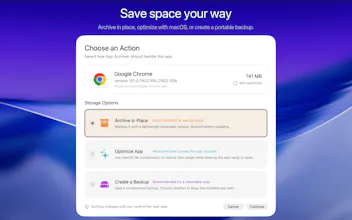
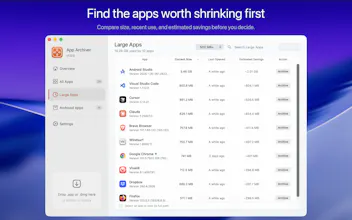
App Archiver reclaims Mac disk space from apps you rarely use. Unlike cache cleaners, it creates lasting savings by working with the apps themselves. Optimize installed apps with native macOS compression, archive them in place as lightweight restorableapp bundles, or create verified ZIP and DMG backups. Archived apps stay visible in /Applications, Spotlight, Alfred, and Raycast, ready to restore with one click. Everything runs locally with no Internet access or data collection.
I am Ighor July, the maker of App Archiver.
I like keeping useful apps on my Mac, but deleting a rarely used app means I may forget it existed. At the same time, large apps can occupy tens of gigabytes for months without being opened.
That is why I built App Archiver, my third first-of-its-kind macOS app.
Unlike cleaners that remove temporary caches which quickly return, App Archiver reduces the space used by the apps themselves.
You can
- Optimize installed apps with native macOS filesystem compression
- Archive apps in place as lightweight, restorable `.app` bundles
- Create verified ZIP or DMG backups in any folder or external drive
In-place archiving is the feature I wanted most. An archived app remains in `/Applications` and stays visible through Spotlight, Alfred, and Raycast. You do not forget it exists, and you can restore it with one click when you need it again.
Every operation is staged and verified before the original app is changed. App Archiver also has no Internet access. It does not connect anywhere, collect data, require an account, or use analytics.
I would love to know which rarely used apps consume the most space on your Mac and how you currently handle them. I am happy to answer any questions about optimization, archiving, backups, or restoration.




LockLines