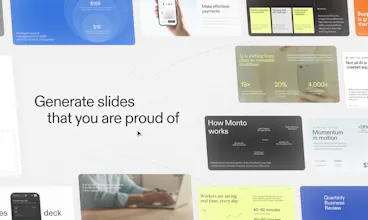
Chronicle combines AI generation with powerful editing to create stunning presentations. Start from a prompt, notes, or raw idea and generate beautiful, on-brand slides in minutes. Edit with full control and export to PPT, PDF, or any format. No design skills required.
Chronicle is your AI-powered design partner for presentations. Turn notes, prompts, or existing decks into beautiful, on-brand slides in minutes. It asks a few questions, builds an impressive first draft, and lets you refine slides through conversation.
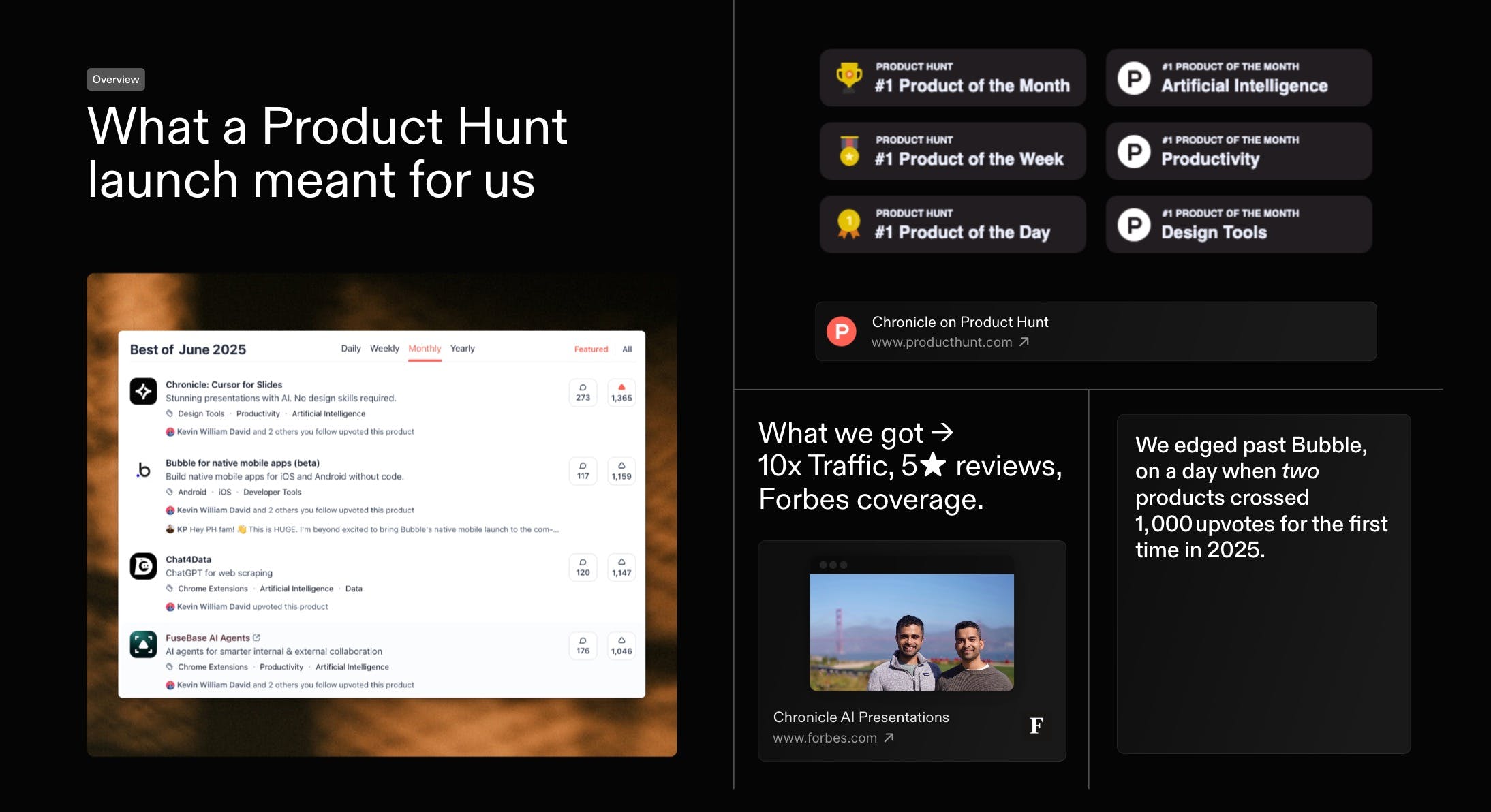
First, thank you. Everyone who voted, commented, or tried Chronicle. You helped us with a #1 finish in our first official launch on the same day Bubble also crossed 1000 votes. Massive gratitude
As a first-time founder, this was a special day. I would love to share what we've learnt. And would love to hear how we can do better, both in growing Chronicle and in improving the product itself.
Last month we kicked things off with a high-level recap of our Product of the Month launch - and you had so many questions that we went back to document every tactic in full. Today, here s the in-depth playbook: the exact strategies, experiments, and community-powered tests that took Chronicle to #1 on Product Hunt and over 1,000 upvotes within 24 hours.
Reviews praise Chronicle’s speed, clean flow, and collaboration, with many saying it turns rough notes into coherent, professional decks in minutes. Makers of
highlight fast, structured slide creation without fussy formatting, reinforcing strengths in AI-assisted narrative and layout. Users love tasteful design, templates, and team features, and report wins in pitching and internal alignment. Common asks: better exports (Keynote/PDF), image generation, auto-layout polish, looser sharing requirements. Some report glitches and weak mobile performance, plus occasional failures on structured tasks like SWOT.
It took me less than 3 minutes to create a presentation and change layout. It was quite easy to find the layout I want and change the text with the help of AI. A must try product 🙌. One feature request: I need to generate images with AI as well and directly to the layout.
What's great
ease of use (1)fast presentation creation (3)AI workflows (4)
🧠 Chronicle feels like the missing link between raw creativity and professional delivery. The AI workflows save tons of time, and the design taste is actually impressive. Would love to see deeper integration with slide tools like Keynote or PowerPoint! 🎯
Tried this AI tool for creating slide decks and it seriously delivered. In under 2 minutes, it built a clean, well-structured presentation with a professional look. I just gave it the topic and audience. No boring templates or clunky formatting — each slide had clear copy and logical flow.
Report
76 views
Framer — Launch websites with enterprise needs at startup speeds.
Launch websites with enterprise needs at startup speeds.
Promoted
The free version with 100 tokens, that is monthly or in total what you receive?
"AI slop" is basically all presentation tools right now — they generate something that looks polished until you actually read it. The conversational refinement loop is interesting, because the problem isn't usually the first draft, it's getting from draft to something you'd actually present without wrestling with a rigid editor. Curious how it handles brand guidelines — that's usually where the output falls apart.
@jscanzi Great point! One of the reasons we built Chronicle’s format the way we did is so the AI can generate content while still respecting design constraints. Teams can define the building blocks (colors, typography, layout patterns), and the AI assembles slides within those boundaries.
You can start using themes to define colors and typography and use that during generation. We're also working on making the branding experience better so would appreciate if you have any further feedback to share after trying it!
@jscanzi Completely agree that brand control matters for teams and most tools fall apart at this step. Chronicle is designed so the AI operates within defined visual constraints, which helps keep outputs consistent even as new slides are generated. We've designed a pretty robust brand theme system, and it's improving every single day!
@jscanzi exactly this - chronicle is designed to help with the first draft, and then give you the control to edit and finesse - the best of both worlds!
Report
Congrats on the PH launch! I've been testing with Chronicle extensively over the past week and I can say that the pre-built templates are far and away the best out there from a pure design and visual standpoint. However, the AI assistant part of Chronicle leaves a lot to be desired. I fed it markdown, pptx and pdf files to turn into presentations and it ended up building very basic decks - not pulling from the huge template library, even when some screens (like a timeline) were very obvious. Even when I provided explicit instructions and showed which templates to use when it created the presentation, it still churned out basic slop. Right now, Chronicle is a great zero-to-one manual presentation builder, but the AI component is more like a "baby AI" where it can just understand text but needs better training in order to know which templates (which, again, are really really nice) and layouts to apply.
@apcarpl Thank you for sharing that. We’re actively iterating, and Muse gets better every day with feedback like this. While we've noticed some brilliant outputs with our agent, it does struggle with picking more visual layouts, and that's something we're actively looking to improve.
@apcarpl Thanks for the shout Alex! I definitely am a big fan of our templates and 99% of my decks are created with them! Totally understand you though, we're working hard on making sure our underlying foundation picks from the right templates :)
@apcarpl appreciate the feedback! the way that our AI picks template is something we're actively improving daily - plus giving it better guardrails to design to our standard. Watch this space!
Report
"AI slop" is mostly framed as a visual problem — generic layouts, stock-photo energy. But I think it's structural: AI defaults to the safe presentation shape because it's optimizing for what "good" looks like across millions of decks, not for the specific argument you're trying to make.
The fix isn't better design. It's intent capture before layout. When the AI knows your actual thesis upfront — the one thing you need the audience to walk away believing — the structure that follows feels authored, not assembled.
Building an AI travel planner, I hit the exact same wall. Itineraries defaulted to Eiffel Tower / Louvre / croissants not because the design was bad but because the AI didn't know why this specific person was going to Paris. Once you capture intent first, the output becomes personal.
Curious where in your flow intent capture happens — is it before the first draft or iteratively after?
@giammbo Great question, and it's one that we've spent countless hours refining. When you ask our AI agent muse to build a presentation, it surfaces a bunch of point of view options before it starts to even think about an outline.
You can then work with the AI to iteratively refine that outline before we think about the visual aspects of a deck.
Chronicle is meant for serious work, so yes the outputs look good, but your data and viewpoint matter most. Of course, you can start from a well researched document, or even another presentation, and it'll pick up the same outline for you.
@giammbo love this consideration and yes, that's the intent with Chronicle - we don't jump straight to design, first it understands your intent, your preferences, then creates a structured outline.
Not everyone is a designer, but everyone has the capacity to be a storyteller - we want to help more people tell stories to get their ideas heard, whether it be to convince someone of something, get funding, or do a talk.
Report
@clairetaylor The 'storyteller not designer' framing shifts the whole problem correctly — design skill is rare, the impulse to convince someone of something is universal. That's the actual job to be done.
What Vishnu's screenshot makes clear is that the POV selection before the outline isn't just aesthetic preference — it's narrative frame selection. 'Investment Case' and 'Market Overview' are structurally different story arcs, not just different content. Does Chronicle's outline actually vary in structure depending on which POV you pick (setup/tension/resolution for an investor, breadth-first for an overview), or does POV mainly influence what content gets surfaced?
Just wanted to jump in and say a massive thank you to this community. The previous launch was my first ever product launch yet - seeing the love and support was really special.
In the last few months, we have seen 200K+ users doing sales, proposals, research reports, QBRs, MBRs, all hands and more with Chronicle! We are back with tons of improvements and some big upgrades.
1. We have built a whole new generation experience with AI that works like you are used to (digests files, looks up, goes back and forth to iterate with you). We rebuilt this ground up to make sure it is truly powerful. 2. We have added tons of small features that give you speed and customisability, made overall editing easier and faster (e.g. gridlines, better colours, better themes, tidy up options) 3. Export to PPT is in :) its a first cut - we will continue improving fidelity. There's more export options too. 4. We built our own charts - fun story @praveendinesh shipped this literally in 2 days.
A lot of the improvements in Chronicle 2.0 came directly from all your feedback, so please keep it coming. We read everything.
The charts feature was a fun (and fast) build. Curious to hear from everyone - what kinds of charts or interactions would make your life easier. We’re actively looking to expand this.
How does Chronicle’s widget-based architecture ensure that layout integrity and interactive elements remain intact when exporting to static or legacy formats like PPTX and PDF, and does it allow for the ingestion of existing corporate master slides to maintain strict brand compliance?
When exporting to PPTX, widgets are converted into native PowerPoint elements while preserving layout, position, and size. For PDF exports, the conversion ensures the output is pixel-identical to what you see on screen. Neither PPTX nor PDF support advanced interactivity but we ensure that all links remain clickable. In the case of PPTX, rich text is exported natively (and remains editable), some video embeds are playable directly within PowerPoint, and all embeds remain clickable.
Brand consistency in exported decks is driven by colors, fonts, and layout patterns which teams can customize and lock in on Chronicle. Currently, we don't support ingesting external PPTX master templates - we're happy to hear more on your use case as we look to actively improve our export capabilities.
@mordrag great question! @niranjan_u has made a lot of our widgets fully interactive in ppt (as much as possible). We're working on adding even more support - so happy to get this feature out for our users!
@chazmee Thank you! It’s something we spent a lot of time obsessing over 🔥
Report
@praveendinesh Yeah I wasn't an early user but it's been really great. I think being able to create custom covers would be useful for branding and customizing some of the shapes and charts but overall it's headed in the right direction.
It's much better than google slides, way easier to collaborate and I like being able to setup templates. Love the Claude integration especially since most of my assistants I use for work are there. Slick product and very worth the $15 / mo.
For custom cover pages, you can create them and save them as templates in Chronicle so they’re easy to reuse. We’ve also just introduced the first version of charts in the product - would love to hear if there are specific chart types or interactions you’d like to see.
Report
Maker
@chazmee Thank you! A lot of the work behind Chronicle has been obsessing over the small details that make presentations feel polished, so it means a lot hearing support like this.
Chronicle
Thanks Raushan. Generative images coming super soon.