Chronicle combines AI generation with powerful editing to create stunning presentations. Start from a prompt, notes, or raw idea and generate beautiful, on-brand slides in minutes. Edit with full control and export to PPT, PDF, or any format. No design skills required.
Chronicle is your AI-powered design partner for presentations. Turn notes, prompts, or existing decks into beautiful, on-brand slides in minutes. It asks a few questions, builds an impressive first draft, and lets you refine slides through conversation.
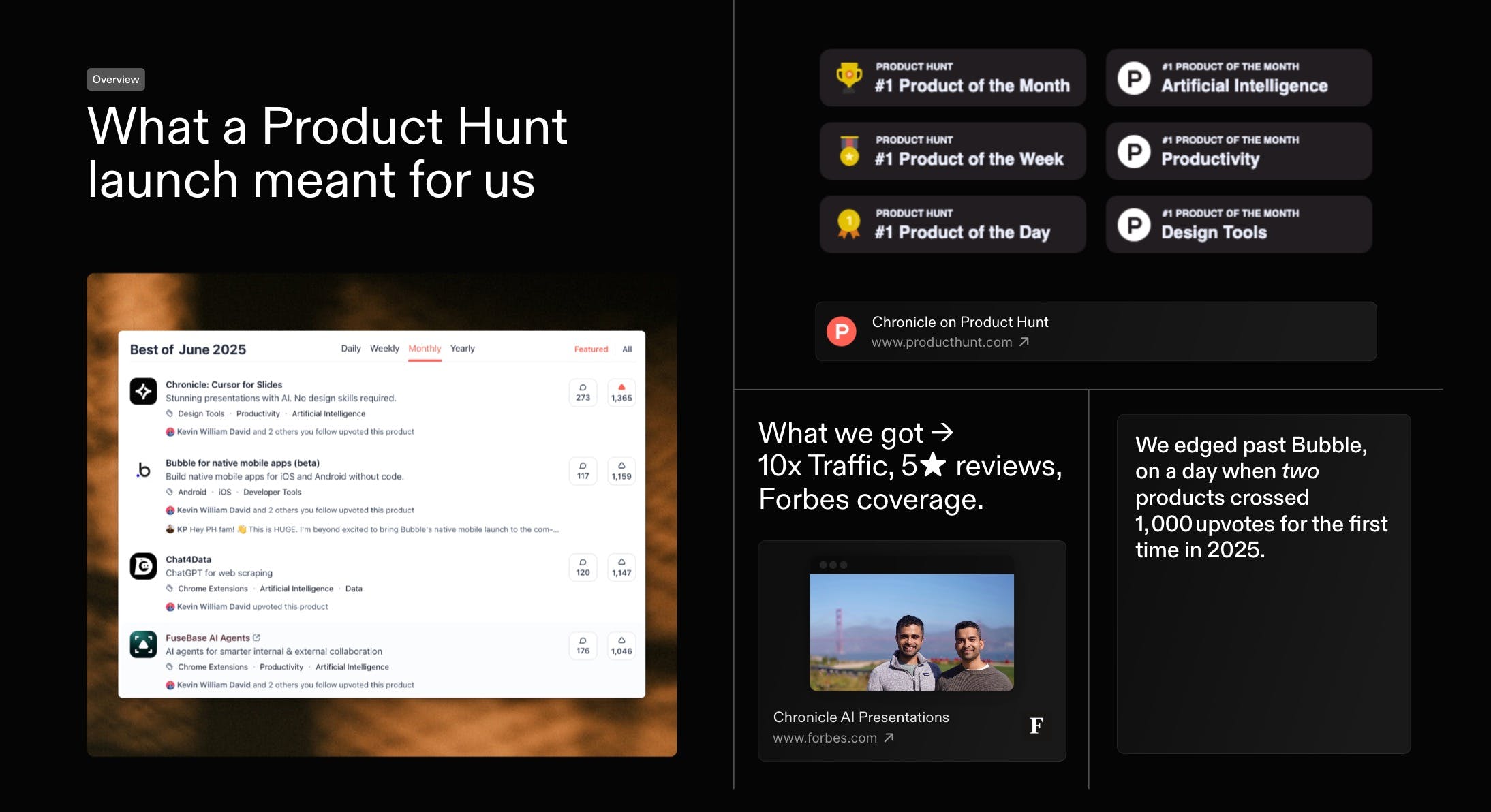
First, thank you. Everyone who voted, commented, or tried Chronicle. You helped us with a #1 finish in our first official launch on the same day Bubble also crossed 1000 votes. Massive gratitude
As a first-time founder, this was a special day. I would love to share what we've learnt. And would love to hear how we can do better, both in growing Chronicle and in improving the product itself.
Last month we kicked things off with a high-level recap of our Product of the Month launch - and you had so many questions that we went back to document every tactic in full. Today, here s the in-depth playbook: the exact strategies, experiments, and community-powered tests that took Chronicle to #1 on Product Hunt and over 1,000 upvotes within 24 hours.
Reviews praise Chronicleβs speed, clean flow, and collaboration, with many saying it turns rough notes into coherent, professional decks in minutes. Makers of
highlight fast, structured slide creation without fussy formatting, reinforcing strengths in AI-assisted narrative and layout. Users love tasteful design, templates, and team features, and report wins in pitching and internal alignment. Common asks: better exports (Keynote/PDF), image generation, auto-layout polish, looser sharing requirements. Some report glitches and weak mobile performance, plus occasional failures on structured tasks like SWOT.
+14
Summarized with AI
Pros
Cons
Reviews
Most Informative
Pros
design quality (5)
AI workflows (4)
fast presentation creation (3)
template availability (3)
collaborative features (2)
storytelling focus (2)
visual presentation (2)
Cons
image generation issues (2)
Framer β Launch websites with enterprise needs at startup speeds.
Launch websites with enterprise needs at startup speeds.
Promoted
Been loving it for my investor updates and all hands. Go Chronicle ποΈ
Report
Maker
@ypranayΒ Thank you so much! Glad that Chronicle has been your go-to choice. We care deeply about the craft behind storytelling, so itβs really special seeing people respond to it today.
Congrats on the 2.0! Everything is looking really solid. Iβve spent 15+ years in product design and the biggest issue with generated slides is usually the lack of 'intentional' white space (something that usually falls apart the second it leaves a designer's hands!). Looks like youβve really focused on the structural side of things here.
Question: How much control does the user have over the underlying grid system once the AI generates the initial layout? Looking forward to playing with this! π
@joeharrisonΒ really glad you asked. We have built a fully freeform canvas - so you get all the AI superpowers without sacrificing the control and flexibility.
1. You can reposition widgets like you are used to - assisted by a grid and some smart reordering 2. You resize things easily 3. You can use quick Tidy Up actions to quickly make things uniform or organise them in a click
The combo of AI generation + full editing control is interesting a lot of tools lean heavily one way or the other. Starting from just a prompt or rough notes and getting on-brand slides that you can still properly tweak sounds like a big time saver. Curious how does Chronicle handle brand consistency (fonts, colors, templates) across different decks?
@zerodarkhubΒ Yes, Chronicle lets teams define brand presets for fonts, colors, and layouts, and the AI always builds on top of those so new decks stay on-brand while still being easy to tweak.
Report
I went through a few of these presentation apps - after leaving Keynote behind almost 4 years ago. Gamma and Pitch felt easier for the way I think/work. Then I stumbled across Chronicle at a webinar and haven't looked back since. The only thing I get frustrated by is that you can't go back to a previous version - if you by mistake delete or move anything - command Z doesn't always bring it back. But my fave feature is having Claude with as a slide builder companion. An intelligent deck maker that always delivers effortlessly designed presentations - something I think most designers would appreciate.
Report
Designer here, I jumped on Chronicle early because the starting templates were leagues ahead of anything else in this space. Real typography choices, balanced layouts, consistent spacing. You could tell the team has actual design backgrounds (the DNA shows).
What's exciting about Chronicle 2 is Muse. Having a conversational AI agent that can iterate on specific slides without blowing up the whole deck is exactly how I want to work as a designer in refinement stages.
LOVE how the freeform canvas still gives me full control when I need to fine-tune spacing or hierarchy, which matters when you're presenting to clients, comes in clutch!
This isn't just another AI slide generator. It's the first one I'd actually use for work I put my name on.
I knew this launch would be special, we've been listening to your feedback and created a tasteful way to create presentations. Templates, image gen, themes, and new widgets are just the tip of the iceberg.
I'm so proud of this team and can't wait to hear what you all think! Would love to hear your feedback!
@clairetaylorΒ Such big leaps in our ai capabilities, templates, image gen, charts & graphs, exports and so much more by our small but mighty team πͺ
Report
Maker
@clairetaylorΒ youβve been such an inspiration to all of us! from design to raising PRs β youβve come such a long way. really looking forward to collaborating more, itβs always super fun working with you <3
Just tried Chronicle β and itβs a total game changer for anyone who needs to turn messy thoughts into structured, compelling presentations.
What sets it apart is not just the AI β it's how tastefully that AI is applied. From thoughtfully designed templates to collaborative workflows, Chronicle doesn't just automate content creation, it elevates it. Feels less like using a tool, and more like working with a creative partner who gets your intent.
For founders, marketers, or anyone who pitches ideas for a living β this might just become your new secret weapon. π‘β¨
What's great
collaborative features (2)template availability (3)AI workflows (4)
Used this twice and already won two deals for my business. An incredible and transformative change in experience for pitching prospects. Im not sure what "cursor for slides" means but honestly for me it was a "turn your slides into a Christopher Nolan movie" (at least that's how my prospects felt when they gave me the immediate sign off).
I'd call this the future, but to be honest, feel like this is the standard for winning business. Can't wait to implement it internally in my team.
Just wish this came sooner so it would've saved me from having 100 tabs of Pitch and beautiful.ai tabs opened scouring for templates and stitching good design from scratch
Chronicle has been making it so fast for me to create short, sharp and beautiful pitch decks to explain new products and get alignment with my team. No more playing around in Google Slides, crying while I try to use PowerPoint or getting lost in the back hole that is my MIRO boards. Thanks Chronicle!
Been loving it for my investor updates and all hands. Go Chronicle ποΈ
@ypranayΒ Thank you so much! Glad that Chronicle has been your go-to choice. We care deeply about the craft behind storytelling, so itβs really special seeing people respond to it today.
Chronicle
@ypranayΒ Let's go π₯π
Chronicle
@ypranayΒ πͺπͺπͺ
Chronicle
@ypranayΒ EPIC! thanks for the support!
Pinnacle
Chronicle
@joeharrisonΒ really glad you asked.
We have built a fully freeform canvas - so you get all the AI superpowers without sacrificing the control and flexibility.
1. You can reposition widgets like you are used to - assisted by a grid and some smart reordering
2. You resize things easily
3. You can use quick Tidy Up actions to quickly make things uniform or organise them in a click
Chronicle
@joeharrisonΒ @mayuresh_patoleΒ so good!!
Congrats on the launch! π
The combo of AI generation + full editing control is interesting a lot of tools lean heavily one way or the other. Starting from just a prompt or rough notes and getting on-brand slides that you can still properly tweak sounds like a big time saver. Curious how does Chronicle handle brand consistency (fonts, colors, templates) across different decks?
Chronicle
@zerodarkhubΒ Yes, Chronicle lets teams define brand presets for fonts, colors, and layouts, and the AI always builds on top of those so new decks stay on-brand while still being easy to tweak.
I went through a few of these presentation apps - after leaving Keynote behind almost 4 years ago. Gamma and Pitch felt easier for the way I think/work. Then I stumbled across Chronicle at a webinar and haven't looked back since. The only thing I get frustrated by is that you can't go back to a previous version - if you by mistake delete or move anything - command Z doesn't always bring it back. But my fave feature is having Claude with as a slide builder companion. An intelligent deck maker that always delivers effortlessly designed presentations - something I think most designers would appreciate.
Designer here, I jumped on Chronicle early because the starting templates were leagues ahead of anything else in this space. Real typography choices, balanced layouts, consistent spacing. You could tell the team has actual design backgrounds (the DNA shows).
What's exciting about Chronicle 2 is Muse. Having a conversational AI agent that can iterate on specific slides without blowing up the whole deck is exactly how I want to work as a designer in refinement stages.
LOVE how the freeform canvas still gives me full control when I need to fine-tune spacing or hierarchy, which matters when you're presenting to clients, comes in clutch!
This isn't just another AI slide generator. It's the first one I'd actually use for work I put my name on.
Congrats to the team on the launch!
Chronicle
Seeing Chronicle launch today is really special π β this team has spent a lot of time thinking about how ideas should be communicated visually.
Chronicle
@pavan_tirumaniΒ You're the real MVP Pavan π
Chronicle
@pavan_tirumaniΒ @reneezhang23Β it's been so special to create this alongside you and your insane brain Pavan <3
AutoSend
@pavan_tirumaniΒ almost 3-4 years if I am not wrong. Congratulations on the launch!
Chronicle
@pavan_tirumaniΒ @designerdadaΒ yes! he's the goat.
Chronicle
@pavan_tirumaniΒ @designerdadaΒ πͺ πͺ
Chronicle
@pavan_tirumaniΒ @designerdadaΒ He's the best π―
Chronicle
@pavan_tirumaniΒ Thank you Pavan π and honestly, that's the core of what we've all obsessed over together. Proud to be building this with you!
Chronicle
I knew this launch would be special, we've been listening to your feedback and created a tasteful way to create presentations. Templates, image gen, themes, and new widgets are just the tip of the iceberg.
I'm so proud of this team and can't wait to hear what you all think! Would love to hear your feedback!
Chronicle
@clairetaylorΒ Such big leaps in our ai capabilities, templates, image gen, charts & graphs, exports and so much more by our small but mighty team πͺ
@clairetaylorΒ youβve been such an inspiration to all of us! from design to raising PRs β youβve come such a long way. really looking forward to collaborating more, itβs always super fun working with you <3
Chronicle
@clairetaylorΒ So proud βπ―