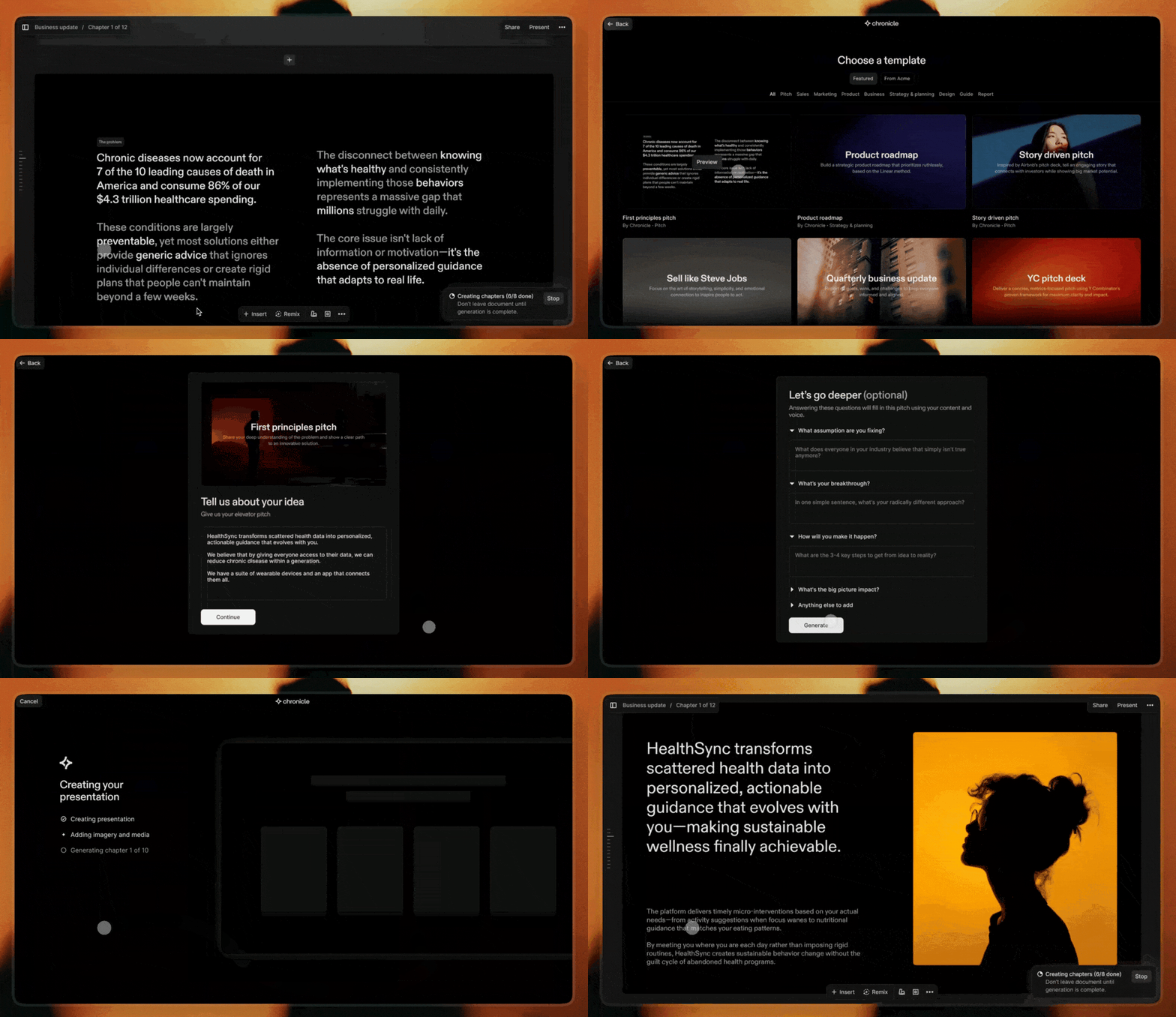
Chronicle combines AI generation with powerful editing to create stunning presentations. Start from a prompt, notes, or raw idea and generate beautiful, on-brand slides in minutes. Edit with full control and export to PPT, PDF, or any format. No design skills required.
Chronicle is your AI-powered design partner for presentations. Turn notes, prompts, or existing decks into beautiful, on-brand slides in minutes. It asks a few questions, builds an impressive first draft, and lets you refine slides through conversation.
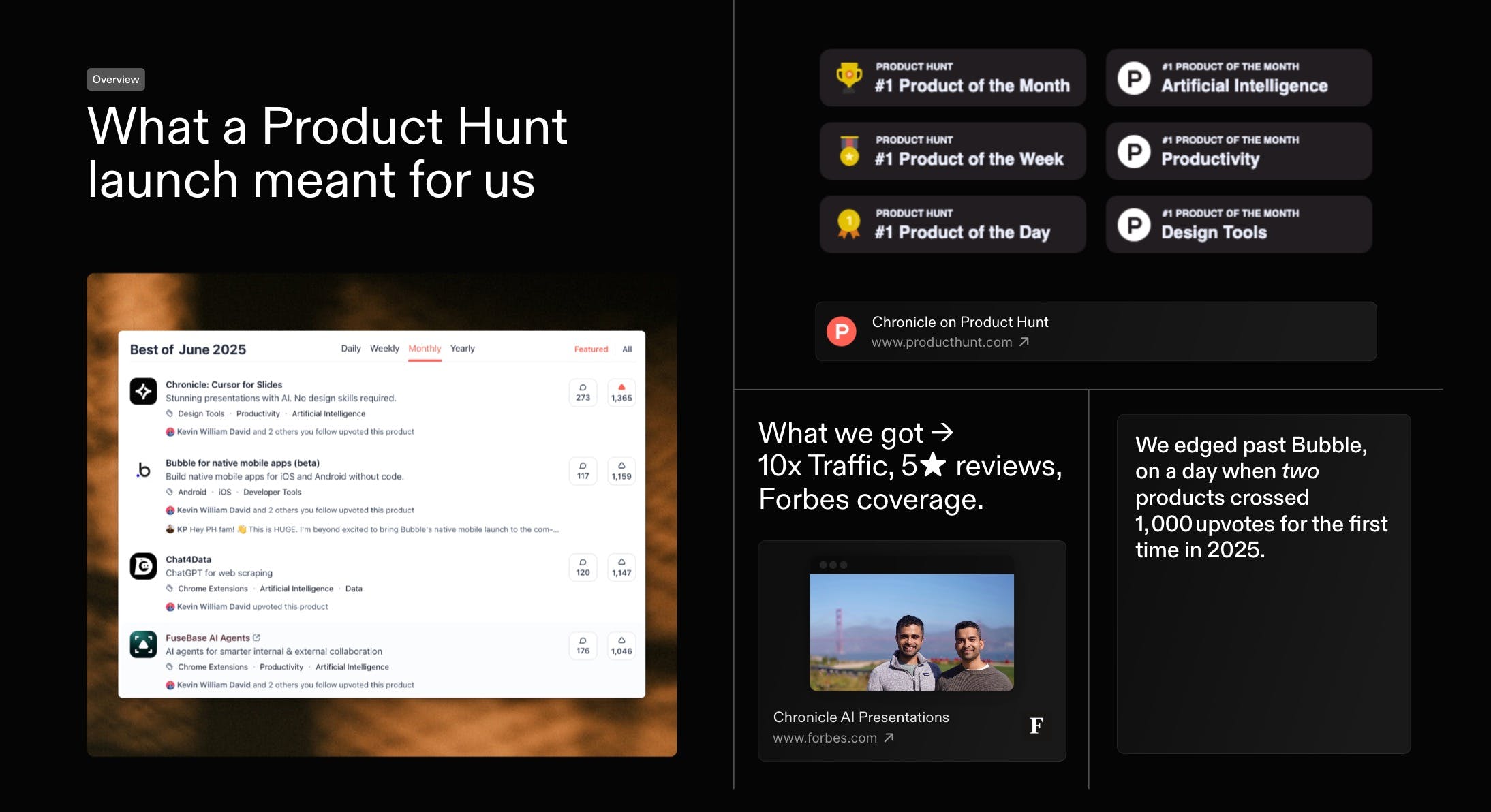
First, thank you. Everyone who voted, commented, or tried Chronicle. You helped us with a #1 finish in our first official launch on the same day Bubble also crossed 1000 votes. Massive gratitude
As a first-time founder, this was a special day. I would love to share what we've learnt. And would love to hear how we can do better, both in growing Chronicle and in improving the product itself.
Last month we kicked things off with a high-level recap of our Product of the Month launch - and you had so many questions that we went back to document every tactic in full. Today, here s the in-depth playbook: the exact strategies, experiments, and community-powered tests that took Chronicle to #1 on Product Hunt and over 1,000 upvotes within 24 hours.
Reviews praise Chronicle’s speed, clean flow, and collaboration, with many saying it turns rough notes into coherent, professional decks in minutes. Makers of
highlight fast, structured slide creation without fussy formatting, reinforcing strengths in AI-assisted narrative and layout. Users love tasteful design, templates, and team features, and report wins in pitching and internal alignment. Common asks: better exports (Keynote/PDF), image generation, auto-layout polish, looser sharing requirements. Some report glitches and weak mobile performance, plus occasional failures on structured tasks like SWOT.
The product shows tremendous potential. I really like the concept of starting with a few notes, refining them into a structured narrative, and then moving seamlessly into visual presentation. That said, there are some key areas that still need refinement. For example, I expected an automatic layout optimization feature to clean up the design after manually adding individual widgets. Unfortunately, viewing the presentation on my iPhone 13 was a poor experience—glitches and a lack of smooth performance made it frustrating to use. Also, requiring users to log in just to share their work feels unnecessarily restrictive.
What's great
visual presentation (2)
What needs improvement
mobile performance issues (1)automatic layout optimization (1)login requirement for sharing (1)
Thanks for the feedback Hugo. We haven't worked on the mobile experience yet - we have big dreams for it and surely we will get to it soon. There is an automatic layout optimisation. It is called remix. There is also a tidy up feature for simpler layouts.
Re: requiring users to login just to share: you can publish your work to the web and others can see it without logging in. Presentations need to be secure and private more often than not. Logging in is the safest way to do that. If you have alternative ideas or examples would love to hear.
I just started trying out Chronicle, and I'm already super impressed by what it offers. For me something that really stood out is the story. I love that this tool has been built with so much care by people who enjoy storytelling.
In our team, we use Canva Pro to make presentations and one of the main reasons for us to use it - is the access to so many beautiful templates that we can build on top of. In addition to that, there is access to lot of illustrations and graphics that we can just pick from.
But I always felt the layout aspect and the ease of storytelling missing, which you guys are doing so well. Eg: I can't even run the slides bullet point by bullet point on Canva. For that, I have to duplicate the slides.
Will you be able to give us templates on Chronicle? I couldn't find any so far. Especially since Mayuresh is a pro at presentations, if you templatise some of his presentations and let us re-use them, it will be super valuable!
Thanks a lot @gayathri_meka1 We are working on some curated templates made by experts right now. It is coming to the product very soon. Here is a sneak peek:
Chronicle has basically elevated how I present anything to my product team. My previous workflow of creating a presentation from a product document now takes 1-10th of the time as I can just add the content to the prompt and watch it create a visually striking presentation. Can't see myself going back to slides ever again.
What's great
fast presentation creation (3)visual presentation (2)
A few months ago you helped Chronicle become #1 Product of the Month, and later #4 Product of the Year. Since then, the product has grown to 200k+ users. With that, came a huge amount of honest feedback. Hundreds of you told us where Chronicle worked, where it didn’t, and where it could be much better. We read all of it.
Today, we're excited to launch Chronicle 2.0 to all of you! Chronicle turns notes, prompts, or existing slide decks into stunning, on-brand presentations, generates an impressive first draft, and lets you refine slides through conversation. There are a lot of AI presentation tools popping up right now. But most of them generate what we’ve started calling AI slide slop: generic layouts, messy structure, and decks you still have to spend hours fixing. Our ambition is simple: to build the best storytelling tool for teams.
Here are a few things I’m most excited for you to try:
✴️ Chronicle AI: Think of it as a slide design coworker. Give it anything: notes, a prompt, or a rough idea, and it builds an impressive first draft you can refine and iterate on together.
🖼️ Custom branding & themes: Dozens of beautiful templates with real design taste, plus full brand customization so teams can stay on-brand.
📊 Charts & graphs: You can now add and customize charts directly inside Chronicle. They automatically adapt to your presentation’s theme.
🗃️ Export to PowerPoint & PDF: One of the most requested features, now live.
🪄 Hundreds of world-class templates: Created by designers from places like Apple, IDEO, McKinsey and BCG.
Special thanks to @benln for hunting us. And honestly, thank you. The feedback from this community is the reason Chronicle 2.0 exists. As a small thank you, use code PHPRO this week for 1 month of free PRO on any new account.
We’re shipping updates every single day, and will be hanging out in the comments all day. We’d genuinely love your thoughts. What should we build next?
PS. We also have a Slack community where you can interact with the team directly, get early access to new features, and shape what we build next. Would love to see you there: chr.so/slackcommunity
@benln@tejgw This is so exciting! 👏 It's been inspiring to see the team launch so many new capabilities + improvements. Cannot wait for everyone to try it out! 💖
@benln@tejgw And a lot of what Chronicle 2.0 became came directly from feedback from this community. We’re grateful for it! Can't wait for everyone to try the new product.
"AI presentations without the AI slop" is a great tagline and a real problem worth solving. The conversational refinement approach feels like the right way to do it instead of one-shot generation. Are you seeing teams use it more for building decks from scratch or cleaning up existing ones?
@dparrelli great question! we're seeing a mixture of both! folks coming with a new idea wanting to finesse positioning or brainstorm how to structure their deck. And also people with existing decks, import via pdf or ppt, and then our AI helps them turn it into a well designed presentation with our templates as a base.
@dparrelli Definitely a bit of both! With our templates + AI features, users can build a first draft really quickly. Others also like to bring in their existing templates from PPT, or Google Slides and save them into their Chronicle workspace, so every time they're creating a new but similar deck, they can just use their templates and slightly tweak the content. This is a pretty common workflow across sales, strategy, product, and marketing folks, as well as founders!
Report
I've used Chronicle, and I've used Gamma, but I felt that Chronicle fits my vibe much better than Gamma.
Both tools are good, but for me, Chronicle is a better fit. I really enjoy using the app, but if there's one thing I would improve, it is the customer support. I feel the customer support has a lot of scope for improvement. And a bad experience (delayed response) can leave a bitter taste.
Anyhow, wish you guys the very best! Onwards and upwards...
Report
Maker
@bhavvikminhas Really appreciate this - glad Chronicle fits your vibe better! That’s exactly what we’re aiming for: helping people take rough thinking and turn it into something that feels polished and ready to present.
Also hear you on the customer support - that’s on us and something we’re actively working to improve. Thanks for calling it out, and for the kind words. Onwards and upwards 🙌
On the customer support side, thanks for calling that out. Feedback like this is super helpful, and it’s something we’ve already been talking about internally.
@bhavvikminhas Hey Bhavvik, we're a small team + an overwhelmingly large user base, so we're not able to get to all our support requests immediately. Thanks for your patience!
@bhavvikminhas thanks for the feedback! We're a small team, but being more active on customer support is something we're definitely looking at improving <3
I really like how Chronicle is focused on how information flows throughout the deck. Especially since a slidedeck is meant to tell a story.
Are there ways to give further context to Chronicle such as the specific target audience, tone, or even the type of narrative/story I want my slides to convey? For example, "a startup pitch deck that is meant to be playful but concise and to the point for investors"
@lienchueh You’re touching on something we're actively working on! When you start creating a deck with Chronicle AI, the agent asks you to pick a narrative style if there isn't one already. You can also just include this in your initial prompt, and it should be picked up.
Would love your thoughts on how we can make this better once you've had a chance to try it out!
@lienchueh@harrispjose thanks for the support! I like the idea of asking about the tone. we're trying to find the balance between asking too many upfront questions, and getting you to see a first draft. Would love to know what you think!
@lienchueh Absolutely! you can curate the storyline with Chronicle at the start of every project. There, you can choose to narrate your story, add cues for target audience and tone. Muse will research and ask for your input simultaneously creating the slides.
@zerotox Hi Abhishek, Chronicle allows you to start from anywhere, meaning you can import your excel/csv files (or images, pdf, ppptx, plain text notes, etc) directly into Chronicle and start building beautiful decks right away. You can choose multiple models from Claude Opus, GPT 5.2, Gemini 3 Pro and more.
For images, you can use our inbuilt image-gen widget with multiple models including Nano Banana 2.0, Flux, Seedream, GPT, etc to create high-res images within Chronicle.
@roopreddy Chronicle is a purpose-built, AI-first presentation platform designed for professional teams, think polished board decks, investor updates, and sales deck, with features like text-to-slides, brand kits, real-time collaboration, and designer-quality layout automation.
Google Mixboard 2.0, by contrast, is still an experimental Google Labs tool centered on visual brainstorming and mood-boarding, with slide export added as a secondary feature in its 2.0 update.
If you need repeatable, boardroom-ready decks, Chronicle is the more serious and mature choice; Mixboard is better suited for casual ideation that occasionally needs to be shared.
Chronicle
Thanks for the feedback Hugo. We haven't worked on the mobile experience yet - we have big dreams for it and surely we will get to it soon.
There is an automatic layout optimisation. It is called remix. There is also a tidy up feature for simpler layouts.
Re: requiring users to login just to share: you can publish your work to the web and others can see it without logging in. Presentations need to be secure and private more often than not. Logging in is the safest way to do that. If you have alternative ideas or examples would love to hear.