Cleanton reclaims disk space from build caches, apps, and system junk, then scans your installed npm and pip packages for supply-chain attacks. It learns what is normal for your Mac and only warns when something new or changed looks dangerous. You review everything before it acts. Trash by default, signed and notarized by Apple, Apple Silicon.
Hi Product Hunt,
I built Cleanton because my Mac kept filling up with build caches and half-uninstalled apps, and the existing cleaners either did too little or asked me to trust them with a one-click "optimize" that I could not see into. I wanted something that shows me the full plan, lets me pick, and sends things to the Trash so I can undo a mistake.
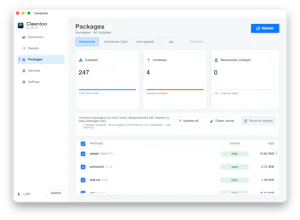
Then the npm and pip supply-chain attacks started landing, one after another, and it hit me that the same tool sitting on top of my package folders was in the right place to check them. So Cleanton now scans your installed packages for the signs of a compromise. The part I am most happy with is that it learns your machine first: the initial scan records what you already have as trusted, so instead of screaming "malicious" at your whole toolchain, it stays quiet until something new or changed shows up. A package that mutates on disk without a version bump is the loudest signal, because that is exactly how a poisoned update tries to slip in. It only ever reports; it never removes or changes a package.
A few things worth knowing:
- Native macOS app, plus a command-line tool that shares the same engine.
- Trash by default, and you confirm every removal.
- The app is notarized by Apple and opens without a Gatekeeper override.
- Apple Silicon only for now.
I would love your feedback, especially on the security scanning: what packages you run, whether the results feel trustworthy, and what would make you reach for this over doing it by hand. I will be here all day answering.
Thanks for taking a look.
Report
No reviews yetBe the first to leave a review for Cleanton



Owl Browser