Launching today

FastRouter.ai
Route requests to the right LLM for cost, latency & quality
452 followers
Route requests to the right LLM for cost, latency & quality
452 followers
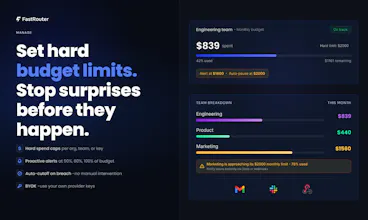
FastRouter is a unified AI gateway and control plane for developers and enterprise teams building with LLMs. It routes every request to the right model across 200+ LLMs through one OpenAI-compatible API, optimizing for cost, latency, quality, and reliability. With intelligent routing, failover, observability, and governance, teams can scale AI apps without vendor lock-in or code changes.




Free Options
Launch Team / Built With


TinyFishSearch, fetch and browse for AI agents. Claim 30% bonus!
Promoted
Can devs prioritise which criteria they want to optimise for: cost, latency, quality, and reliability at the routing layer?
@nuseir_yassin1 Yes, you can configure routing policies using Virtual Model Aliases. These include Lowest Latency, Highest Throughput, Lowest Price, Lowest Usage, Priority Routing, Category-Based Routing, and Random Shuffle. For example, you can prioritize a preferred provider with fallback to the next ordered provider on an error, or choose the lowest-cost option from a selected set of providers.
In the next couple of days, we’re also launching Optimization Settings, which you can assign specific settings to individual model choices within an alias so you have greater control on how you access a model within a provider - for e.g. use the flex tier from OpenAI for model X.
For Quality, our AI Custom Evaluations feature and Insights help you compare models on your actual requests, so you can decide which models to opt for based on cost or speed or quality or combination thereof. Insights gives you recommendations to act on with evidence. The actual switching is a decision you can take based on reviewing the data.
Really like the failover functionality. If a provider becomes unavailable or throttles during the request process, how quickly is it done and is the streaming capability and tool calls maintained for all the models?
Btw, Congratulations @ritprasad , @andrej_gamser2 and team FastRouter 🚀✌️
@aymi_malik The retry is immediate as soon as we get an error from the provider. For more context, please see an article we wrote up recently: https://fastrouter.ai/blog/posts/anthropic-went-down-fastrouter-didnt-150-requests-one-live-outage-zero-downtime
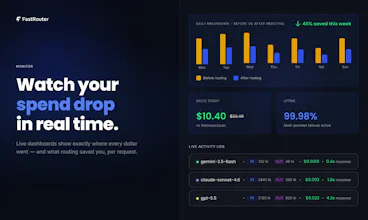
Further, on the Activity Log, you get the full retry chain of the request including the failed attempts with other providers and the overall request level response time and latencies as this is what matters to your end-user. As regards, streaming capability and tool calls - both work across the working provider. Happy to discuss any specific use case - please do send us an email at support@fastrouter.ai.
What is the exact mechanism behind the product that decides which model would be the best fit for specific request?
Great question, @himani_sah1! There are two different features:
Insights: We replay a sample of your requests, grouped by use case, against alternative models that perform well for those task types and complexity levels. You get a comparison of cost, latency, and quality scores from an LLM judge and a recommendation so you can evaluate the trade-offs before switching.
Auto-Router (per-request selection): While you can route to various models, you can also route to fastrouter/auto. In this case, the auto-router identifies the matching task/complexity cluster for the incoming request and selects a model based on its scores for this task/complexity level - balancing performance and cost.
In short: Insights helps you validate model choices on your actual traffic. It runs on the underlying Custom Evaluations product feature; whereas the auto-router uses task and complexity scoring to make the selection automatically.
How quickly does it react when a model suddenly gets slower or starts giving weaker results?
Congrats @ritprasad & team!
Thanks for hunting another cool product @rohanrecommends :)
@rohanrecommends @hamza_afzal_butt
Every request is measured for latency and response time including all the intermediate attempts if any provider is down for example. This way, you are not measuring the wrong thing i.e. an individual attempt at a single provider rather than the overall time it took at the request level as that is what your end user is waiting. Moreover, FastRouter helps you set up custom alerts in real time that can get delivered on Slack, PagerDuty or your webhook so you can react immediately.
For quality, AI Evals or Insights continuously evaluates a sample of your production traffic by replaying requests against other capable models. It proactively delivers insights and recommendations when it identifies models that better fit your use case.
Curious. Which is harder for your team to catch today: latency spikes or spend spikes or drops in response quality?
grouping retries under the original request is useful. if a stream fails halfway through, can failover continue it or does the user get a new response from scratch?
we ended up building a crude version of this internally last month wish we found you guys earlier haha.
@adams_parker Haha, totally get it. The first version is one thing; maintaining it as providers and models change is another 😅 It’s worth keeping an eye on the ongoing DevOps work and the latency the router itself adds.
With FastRouter, you get a lightning fast gateway and also useful features such as AI evals, prompt optimization, and real-time alerts without having to build those separately. Would love to hear what you built and see whether we can save your team some work! Reach us at support@fastrouter.ai.
The first users usually seem to come from places where the problem is already being discusses. Curious if anyone has had better results from communities than from posting on their own profiles.