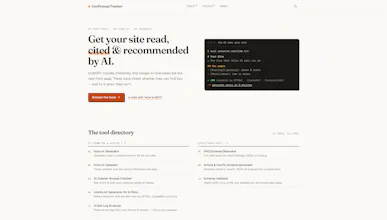
19 free tools to check whether ChatGPT, Claude, Perplexity & Gemini can actually find, read, and cite your site — llms.txt generator, AI-crawler access checker, schema validators, and a directory of every AI bot. No signup, runs in your browser.
No reviews yetBe the first to leave a review for GeoPromptTracker
Maker
📌
Hey Product Hunt 👋
I built GeoPromptTracker because I kept hitting the same wall: I couldn't tell whether AI assistants could actually see a site I was working on. Can ChatGPT read it? Am I accidentally blocking Perplexity? Is my content structured so it gets cited, or just ignored?
The existing "AI SEO" tools are mostly $30-500/mo SaaS, and I just wanted to answer those questions. So I built free versions of the pieces I needed - 19 of them:
🔍 Check - an AI-crawler access checker (which of 15 bots your robots.txt allows), an AI-readiness audit, and a snippet simulator that shows how an AI model would describe and cite your page
🛠 Fix - llms.txt generator/validator, robots.txt generator with per-bot toggles, schema generators
📖 Understand - a directory of every AI crawler with notes on which ones actually respect robots.txt (spoiler: Bytespider doesn't, and Perplexity-User skips it on purpose)
A few things I care about: everything runs in your browser or through a rate-limited proxy, there are no accounts, no signup, and nothing is stored. Built on Next.js, hosted on Vercel.
One genuine surprise from building it: "blocking GPTBot" doesn't remove you from ChatGPT - that's training. ChatGPT's search answers use a completely separate crawler. Half the sites I checked had accidentally de-indexed themselves from the AI answers that actually send traffic.
Would love feedback - especially on the bot-compliance data if you've got server logs showing different behavior. This space changes monthly and I'm keeping the list updated.
Happy to answer anything!
Report
Love that there's no signup and everything runs in the browser. One thing that would really help is adding a comparison view where I can paste a URL and see side by side how ChatGPT, Claude, Perplexity, and Gemini each treat the page. That would make it way easier to spot which models are missing key content versus which ones are picking things up fine.
Report
Maker
@niyaziybvr Great suggestion, and you're close to something that's already half-there: the AI Snippet Simulator does exactly this for one model - fetches your page and shows how it'd read/cite it. A side-by-side across ChatGPT / Claude / Perplexity / Gemini is the obvious next step, and it'd make "which model is missing my key content" super visible like you said.
Honest tradeoff so I'm not overselling: each model is a separate API call (so a 4-up view costs 4×), and it's an approximation - the real ChatGPT/Perplexity pipelines do retrieval + ranking I can't fully replicate, so it'd show "how each model reads the same content," not literally what each product would output. Still genuinely useful for spotting gaps. It's now on the shortlist. Quick q: is it the reading differences you care about most (what each extracts), or the citation differences (which would quote you)?
Report
A scheduled monitor that re-runs the AI-crawler access check weekly and emails you when a new bot (or a sudden block) shows up would be incredibly useful — right now you only know your site is being scraped or ignored at the moment you manually run the tool.
Report
Maker
@erdem532247 This is exactly where I want to take it - the name's "Tracker" for a reason, and right now it doesn't actually track anything, which is fair to call out. A scheduled monitor that re-checks crawler access + your logs weekly and pings you when a new bot appears or something suddenly gets blocked is high on my list. Honest tradeoff: that's the first feature that needs accounts + storage + a notification channel, so it's a real build rather than a weekend one - but it's the direction. Quick q since you clearly get the problem: would you want that as email, or something like a Slack/Discord ping? And is it the "new bot appeared" alert or the "I got blocked" alert that'd actually make you check?
Report
The in-browser crawler access checker is such a smart move, no signup or server hop needed and you can paste a domain and immediately see which AI bots actually got through. That kind of instant feedback makes the whole suite feel genuinely useful instead of another dashboard.
Report
Maker
@yunusonmazssrc instead of another dashboard" - that's the nicest thing you could've said, honestly. The whole reason it's paste-a-domain-and-go is that I got tired of tools that make you sign up, connect your site, and wait for a crawl just to answer a yes/no question. Instant feedback with nothing to configure was the entire design goal, so it's really good to hear it lands that way. Thanks for taking the time 🙏
Report
love how everything runs right in the browser with zero signup friction, and the ai bot directory is something i didn't know i needed until now
Report
Maker
@ebubekir112502 Thank you - "no signup" was almost a religious rule while building it; I've bounced off too many tools that make you create an account just to check one thing. Funny you single out the bot directory, it started as a scratchpad for me to stop re-googling which crawler was which, then turned into the part people mention most. Just expanded it to 28 crawlers this week (including a few that openly ignore robots.txt, which is its own rabbit hole). If you hit anything missing or wrong in there, tell me - keeping it accurate is the whole point.



Love that there's no signup and everything runs in the browser. One thing that would really help is adding a comparison view where I can paste a URL and see side by side how ChatGPT, Claude, Perplexity, and Gemini each treat the page. That would make it way easier to spot which models are missing key content versus which ones are picking things up fine.
@niyaziybvr Great suggestion, and you're close to something that's already half-there: the AI Snippet Simulator does exactly this for one model - fetches your page and shows how it'd read/cite it. A side-by-side across ChatGPT / Claude / Perplexity / Gemini is the obvious next step, and it'd make "which model is missing my key content" super visible like you said.
Honest tradeoff so I'm not overselling: each model is a separate API call (so a 4-up view costs 4×), and it's an approximation - the real ChatGPT/Perplexity pipelines do retrieval + ranking I can't fully replicate, so it'd show "how each model reads the same content," not literally what each product would output. Still genuinely useful for spotting gaps. It's now on the shortlist. Quick q: is it the reading differences you care about most (what each extracts), or the citation differences (which would quote you)?
A scheduled monitor that re-runs the AI-crawler access check weekly and emails you when a new bot (or a sudden block) shows up would be incredibly useful — right now you only know your site is being scraped or ignored at the moment you manually run the tool.
@erdem532247 This is exactly where I want to take it - the name's "Tracker" for a reason, and right now it doesn't actually track anything, which is fair to call out. A scheduled monitor that re-checks crawler access + your logs weekly and pings you when a new bot appears or something suddenly gets blocked is high on my list. Honest tradeoff: that's the first feature that needs accounts + storage + a notification channel, so it's a real build rather than a weekend one - but it's the direction. Quick q since you clearly get the problem: would you want that as email, or something like a Slack/Discord ping? And is it the "new bot appeared" alert or the "I got blocked" alert that'd actually make you check?
The in-browser crawler access checker is such a smart move, no signup or server hop needed and you can paste a domain and immediately see which AI bots actually got through. That kind of instant feedback makes the whole suite feel genuinely useful instead of another dashboard.
@yunusonmazssrc instead of another dashboard" - that's the nicest thing you could've said, honestly. The whole reason it's paste-a-domain-and-go is that I got tired of tools that make you sign up, connect your site, and wait for a crawl just to answer a yes/no question. Instant feedback with nothing to configure was the entire design goal, so it's really good to hear it lands that way. Thanks for taking the time 🙏
love how everything runs right in the browser with zero signup friction, and the ai bot directory is something i didn't know i needed until now
@ebubekir112502 Thank you - "no signup" was almost a religious rule while building it; I've bounced off too many tools that make you create an account just to check one thing. Funny you single out the bot directory, it started as a scratchpad for me to stop re-googling which crawler was which, then turned into the part people mention most. Just expanded it to 28 crawlers this week (including a few that openly ignore robots.txt, which is its own rabbit hole). If you hit anything missing or wrong in there, tell me - keeping it accurate is the whole point.