Hey everyone!
I published a new tutorial on building a custom agent using Giselle no code required.
What it covers
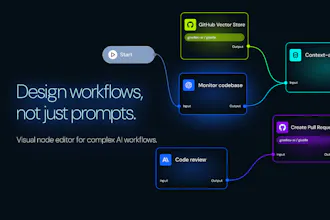
Setting up a GitHub trigger that fires when a PR is opened
Using Agentic RAG to query your existing codebase for context
Generating reviews that understand your code conventions
Automatically posting review comments back to the PR




Giselle
@richard_wang18 Great question! Right now, we offer token visibility, but model selection and workflow design are up to the user. We're exploring features where AI could recommend optimal workflows and model choices based on your use case—definitely something we want to build toward.
Giselle
@richard_wang18 san, Thank you for your comment!
Currently, we don't have intelligent model selection—users choose their preferred model themselves. That said, smart auto-selection and switching sounds like a great idea, so we'll definitely consider adding it. Thanks for the suggestion!
Giselle
@richard_wang18 Thanks a lot — really appreciate it!
Right now, our “model selection” is intentionally manual. As we’ve been building Giselle, we’ve developed a pretty practical sense of each model’s strengths (quality vs. latency vs. cost, tool-use reliability, long-context behavior, etc.), and we wanted to make it easy for builders to choose the right model per node/workflow step—especially since different parts of a long-running workflow often benefit from different models/providers.
So to answer your question: we don’t have a single routing algorithm in place today that automatically optimizes across cost / speed / cache hits. Giselle focuses on making multi-model orchestration visible and controllable rather than “magic.”
That said, we agree this is a great direction. We’re seeing how popular modes like Cursor’s “Auto” are, and we’re actively considering adding an Auto Mode / model router in the future that could optimize for things like:
- execution cost
- latency / speed
- cache hits / token efficiency
- (and potentially reliability per task type)
If you have a specific workflow in mind (e.g., classify → extract → write → verify), I’d love to hear what signals you’d want the router to prioritize.
Giselle
@samtheanalyst Thanks for the feedback!
Our website seems to be loading fine on our end, but we'll look into it just to be sure.
We expect most early users to start by experimenting with Chain of Models. Once they get comfortable, we'd love for them to try out workflows with GitHub integration—that's actually how we use it internally. We're also planning to add more tool integrations and APIs down the road.
So far, the visual canvas has been getting the most appreciation. That said, we know there's room to make things simpler and more intuitive, and we're planning to improve our documentation and guidance going forward
Giselle
@samtheanalyst san, Thank you for the kind words!
Sorry to hear about the website loading issue. If you're still experiencing problems, please reach out to us at support@giselles.ai, or you can also report bugs directly on our GitHub at https://github.com/giselles-ai/giselle/issues/new/choose — we'll look into it right away.
Thanks also for the suggestion about improving onboarding — we'll definitely take that to heart!
Giselle
Hey Product Hunt 👋
I’m part of the Giselle team now, but I actually started as an external contributor.
Giselle is fully open source. My journey began with a simple typo fix. From there, I started contributing small features, got feedback, and gradually understood the system. Eventually, I was invited to work closely with the team on the core product.
We want to create that same experience for everyone. Whether you write code, share ideas, or report bugs, every contribution moves Giselle forward.
If you want to help shape the future of AI workflows, come join us! Giselle is the perfect place to start contributing to an AI project.
Giselle
I also shared a blog post diving deeper into this, if anyone’s interested:
https://giselles.ai/blog/from-oss-contributor-to-team-member-at-giselle
Giselle
@washizuryo san, Thanks for sharing this one too!
It was great to read about your journey from OSS contributor to team member. Really glad to have you on the team!
Giselle
@washizuryo san, Thank you for all your contributions!
Your journey from a typo fix to a core team member is exactly the kind of story we want to create with Giselle. Let's keep building together! 🙌
Giselle
Hi Product Hunt 👋
I’m one of the creators of Giselle. Thanks for checking us out.
When we looked at existing AI workflow tools, they mostly fell into two camps.
Some are extremely easy to start with. You can build something quickly and see results right away — but once you try to use them for real work, they start to feel fragile. Long-running jobs and failures make you nervous, and it’s hard to understand what’s happening while they run.
Others are built for durable execution, with strong telemetry and observability. They’re powerful and reliable, but the first step is heavy, often requiring engineering effort before you can even try an idea.
We couldn’t find something that was easy to start and still safe to rely on.
That gap is exactly why we built Giselle.
Giselle lets you design AI-powered apps and workflows intuitively, while treating them as real jobs — with clear progress, structure, and visibility, even when they run for hours across many steps.
If you’ve ever felt that your AI workflow works “until you actually need to depend on it,” we’d love to hear your thoughts and feedback.
Giselle
@toyamarinyon san, Thank you for writing so much code as a Core committer and driving the development all the way to launch. Giselle wouldn't be where it is today without your contributions. Excited to keep building this together!
It would be great if we got a Demo Video, because it looks like it solves real issues with current AI workflow builders
DiffSense
I'm curiouse: What's the 3 coolest things that has been built with this?
Giselle
@conduit_design san! Thanks for asking!!
Our team's been building all sorts of cool stuff, but my personal favorites are:
Giselle's QA Assistant
An implementation planning app for Giselle
A blog post drafting app
Since Giselle is fully open source, you can actually see the QA Assistant in action here: https://github.com/giselles-ai/giselle/pull/2582#issuecomment-3695472517
Giselle
Love those examples, especially the QA Assistant.
It’s become an essential part of our development workflow, and we use it every day to review changes and maintain quality.
It’s been incredibly helpful for our own development process.
Giselle
@washizuryo Indeed! It's been a game-changer for our workflow too—glad the example connected with you.
Giselle
@conduit_design san
It's still early days, so I don't have three examples yet, but I can share a personal favorite - I used Giselle to build a stylish media site for my dog! It really showcased how versatile Giselle can be for passion projects. You can check it out here: https://giselles.ai/blog/making-stylish-dog-media-with-giselle
More cool projects are being built as we speak, so stay tuned!✨
Giselle
@conduit_design Thanks for the question.
Here are three things I personally use Giselle for most often:
Generating PR titles and descriptions from diffs
This is probably my most-used workflow. When I saw DiffSense, I immediately understood the value — generating structured context from diffs is incredibly practical. I also think the Apple Silicon–native, local-first approach you took is very elegant.
Design reviews from onboarding screenshots
I often capture screenshots of product onboarding flows and run design review workflows on them to identify UX issues, inconsistencies, or areas to refine. It’s been useful for iterating quickly and objectively.
Lightweight research to catch up on artists
As a more casual use case, I use it to collect and summarize recent updates about artists I like from multiple sources. It’s especially helpful for catching up on artists I haven’t followed closely in a while.
Looking forward to seeing more real-world use cases emerge.
Giselle
@conduit_design Thanks for the question — and your product is cool too!
Might overlap with what others have shared, but here are my personal favorites that I use daily:
PR review agent
PRD analysis agent
Team meeting agenda agent
Vuetify for Figma
@conduit_design @gyu07 I’m not getting what the QA assist does. The GitHub link doesn’t open due to many requests. :)
Giselle
@conduit_design @muhammad_satar QA Assist is an agent designed for people reviewing pull requests — it helps figure out what to review and in what order. Going through commit logs, comments, and code manually to determine what needs QA is a lot of work. Especially these days, with AI writing more code, human review is getting harder.
As for the GitHub connection — I hear you. We've tried to keep it simple with a standard auth flow for developer tools, but if you're running into issues, please don't hesitate to let us know!
Giselle
@muhammad_satar san, Thanks for your comment! If you need any help, feel free to reach out to our support team anytime.
Congrats on the launch! Building something you actually wanted to use really shows in how you’ve framed the problem. The focus on visibility and debuggability especially hits that’s where most workflow tools fall apart in real use.
Giselle
@syed_hassan9 san, Thank you so much!
I'm really glad it resonates with you. We've built this to handle our own use case—running complex workflows for extended periods—and we believe it's now at a level where others can benefit from it too.
Today marks just the beginning, and we'll keep refining the product from here.
@codenote Love that mindset. Building it for sustained, real-world use is usually what separates tools that look good from ones that actually stick. Excited to see how it evolves as more people put it through real workflows best of luck with what’s ahead 🙌
Giselle
@syed_hassan9 Totally agree — great look & feel matters a lot, but we’re even more focused on making sure Giselle holds up in real, day-to-day workflows (not just demos).
There are definitely some technical challenges in building something that can reliably run complex, long-running tasks end-to-end, but we’re tackling them head-on as a team — and using AI where it genuinely helps us iterate faster and make better decisions.
Really excited to keep improving it as more people put it through real use cases. Thanks again for the encouragement!
Giselle
@syed_hassan9 san! We'll keep pursuing the balance between great design, usability, and building something we actually use ourselves in real-world workflows. Thank you! 🙌
Giselle
@syed_hassan9 Really appreciate this — means a lot to hear. We'll keep pushing!
Giselle
@syed_hassan9 Thank you so much. We’ll keep pushing to improve the quality and polish of the product.