
Launched this week

GStack
Use Garry Tan's exact Claude Code setup
496 followers
Use Garry Tan's exact Claude Code setup
496 followers
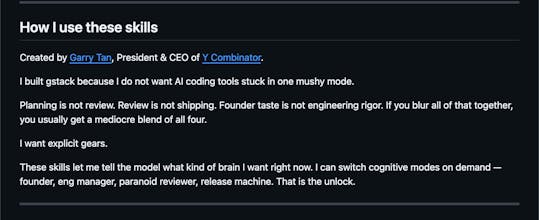
gstack turns Claude Code from one generic assistant into a team of specialists you can summon on demand. Six opinionated workflow skills for Claude Code. Plan review, code review, one-command shipping, browser automation, and engineering retrospectives — all as slash commands.


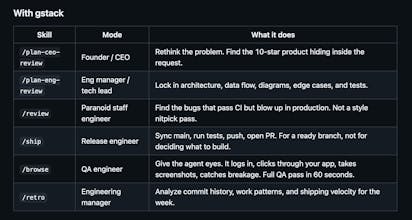
Splitting Claude Code into role-specific slash commands like plan review, code review, and shipping is a practical pattern — it enforces structure that most developers skip when using a single generic agent. How opinionated are the workflow skills under the hood — are they rigid step-by-step procedures, or do they adapt based on the codebase context and project size?
the slash command approach is really smart. I've been using Claude Code for a while and the biggest friction is always starting from scratch with context every time. having pre-built workflows for common tasks like code review and shipping saves so much time. curious if you're planning to add custom skill creation so teams can build their own workflows too?
we arrived at the same pattern independently building health data infrastructure. curious how /browse handles auth behind enterprise tenant boundaries, we test clinical platforms behind NHS and pharma logins.
Love seeing developer environment setups shared like this.
Is this mainly optimized for Claude Code workflows or does it also work well with Cursor / other AI coding tools?
I've been using Claude Code for months and my setup is held together with scattered markdown files and random CLAUDE.md instructions. The idea of a curated, tested configuration from someone who actually pushes it hard is appealing. My main question: how opinionated is this? Half the value of Claude Code is customizing it to your specific codebase. If this overwrites my existing CLAUDE.md and memory files, that's a dealbreaker. Does it layer on top of existing config or replace it?
Prava
This is amazing, Garry!
I am curious how you use it. do you usually run things sequentially, or is it parallel most of the time? And in the parallel case, how do you keep the flow in sync when each sub-agent is continuously making changes- do you use git worktree?
The real gem here isn't just replicating Garry's setup—it's that someone finally packaged the actual prompt engineering patterns that separate "AI writes hello world" from "AI builds production features." I've been manually maintaining a similar Claude configuration for months and the context switching overhead is brutal. Does this handle multi-file refactoring across large codebases, or is it optimized for the YC startup sweet spot of <50 file projects?