

Hearica
Turn all computer audio into captions for the deaf
102 followers
Turn all computer audio into captions for the deaf
102 followers
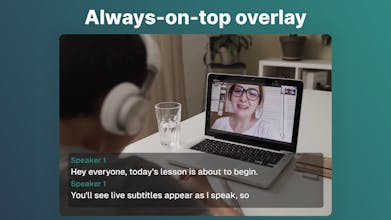
Most captioning tools only work inside one app. Hearica works across your entire computer. Any call, any video, any voice. It sits as a floating overlay on your screen and transcribes whatever you're hearing in real time. Save and replay with audio, export, translate into 60+ languages, add custom context for perfect accuracy. Never miss a word again 👂



Hearica
I started in 2024 with an open-source project, System Captioner, tinkering with OpenAI Whisper models to create a tool that could caption live streams and help me with my hearing loss. Although quite accurate, the size and clunkiness of the models meant the app wasn't as accessible to the public as I had wished.
Since then, I have been working on Hearica. It leverages cloud to run on any PC while being significantly more accurate than YouTube auto-captions or built-in transcription models that come with some operating systems. And adding context, even a short note like "A live stream of a medical lecture", makes it even more accurate.
What's your experience with real-time captioning and translation tools? Have you ever been in a situation where you wish you had real-time captions?
I'm bootstrapping Hearica solo and it's a passion project years in the making. I would love to hear your thoughts. Hearica is out on Windows today, with a macOS launch soon.
@evermoving Lovely tool. Congrats on launching. How do you balance real-time cloud transcription with user privacy and local performance, especially on sensitive calls or content?
Nice! Curious how it handles multiple speakers in the same room vs. remote calls — does it differentiate voices or just transcribe everything as one stream?
Hearica
@denious Hi Denis, Hearica can do either. If you enable speaker separation, it identifies speakers by the slight differences in their voices, and shows which speaker is talking. If you disable speaker separation and break detection, you get a simple continuous caption stream.
@evermoving Cool) The option to toggle speaker separation is smart — especially for mixed in-room + remote setups. Nicely thought through
Accessibility applications are always a win in my book. Can you filter out certain applications or no?
Hearica
@thegreatphon Hi Phon, no it's currently not possible to filter out applications directly in the app. Though you can select which audio device you want Hearica to listen to, and I suppose you could set up a virtual audio device that is configured to receive audio from certain apps only.
The system wide approach is what makes this actually useful every other captioning tool I've tried requires you to be in their specific app or meeting platform which defeats the purpose entirely. The floating overlay means it works for the random YouTube video, the podcast you're half listening to while working, the phone call on speaker all the cases that dedicated tools miss.
Curious how it handles overlapping speakers in a group call where two people talk at the same time, that's usually where real time transcription falls apart fastest. Also wondering about the custom context feature can you feed it technical vocabulary or proper nouns specific to your industry so it stops mangling them? That would make it genuinely useful for medical or legal professionals who deal with terminology that trips up every transcription engine I've ever used
There's a huge difference between generic transcription and telling the system "this is a medical lecture" and getting accurate terminology. The fact that this works across all computer audio and not just inside one app makes it actually usable in real workflows. Good luck with the macOS launch.