
Build consistent websites and apps with 70,000+ free, open source SVG icons in 6 weights and 31 categories. Download SVG, PNG, WebP or PDF, or use packages for React, Vue, Flutter, SwiftUI and Jetpack Compose. MIT licensed for personal and commercial projects. No account required.




Free
Launch Team

CloudflareDeploy serverless functions globally in seconds
Promoted
Hi Product Hunt! 👋
I’m Atiq, Founder of Design Monks. We built Icon Monks to help designers and developers keep their websites, web apps and mobile apps visually consistent with one free icon library.
Icon Monks brings together 70,000+ free, open source SVG icons across 31 categories, from interface controls and arrows to commerce, communication and development.
Here’s what you can explore:
1. Six matching weights: thin, light, regular, bold, fill and duotone. Switch styles while keeping the same visual language.
2. Flexible exports: copy SVG markup or download SVG, PNG, WebP and PDF for your designs, presentations and products.
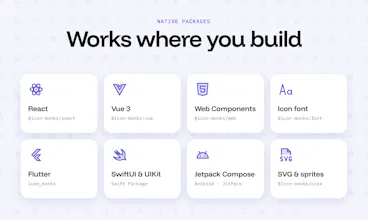
3. Packages for your stack: React, Vue, Web Components, icon fonts, Flutter, SwiftUI and Jetpack Compose, plus raw SVG files.
4. Consistent design: a shared 256 unit grid, scalable vectors and customizable colors help icons fit naturally into your UI.
5. Free for personal and commercial projects under the MIT license. Browse and download without creating an account.
For designers, you can bring SVG icons into Figma, Sketch, Illustrator or Framer. For developers, use the packages or raw assets to keep web, iOS and Android experiences aligned.
Explore the library: https://www.iconmonks.co/
Get started: https://www.iconmonks.co/getting-started/
We would love your feedback: Which icons or categories are missing from your workflow? How do the icons look at small UI sizes? Which framework integration should we improve next?
Thanks for trying Icon Monks and helping us make it more useful!
Built by Design Monks
For the SwiftUI package, do the icon names stay the same across the six weights, so I can swap weight without renaming everything? And do the icons scale with Dynamic Type, or do I need to size them manually for accessibility sizes?
@jcbuilds Hi JC, thanks for the great questions!
1. Names across weights: Yes, they stay the same. Each icon is one case (IconMonk.house) and the weight is only a parameter, so switching weights means changing a single value and no renaming:
2. Dynamic Type: Honest answer: not automatically yet. The icons are vector template images, so they stay sharp at any size and take your tint color, but you set the size yourself. @ScaledMetric (iOS 14+) makes them follow the user’s text size:
We’re planning to add a built-in Dynamic Type option to the package so this works without the extra code. Thanks for pushing us on accessibility! 🙏
@jcbuilds Hi JC,
Your question pushed us to build it in. The new IconMonkImage view scales with the user’s text size automatically:
It’s out now in v0.4.2, so just update the package. Thanks for helping make Icon Monks more accessible! 🙏
We had fun creating this project. It’s for the open source community to use and contribute to make it useful for everyone