Launching today

IQ
The dashboard for your team's AI use
18 followers
The dashboard for your team's AI use
18 followers
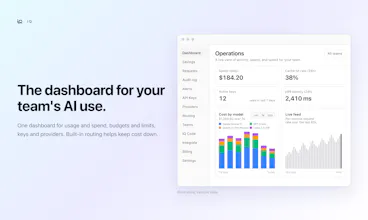
See usage, spend and every request in one place. Give each app or teammate its own key and limits. On Team, add budgets, alerts and an audit log. Built-in routing helps keep cost down. Plus IQ Code, our plugin for Claude Code. Free to start.



Free Options
Launch Team

AWS Activate CreditsCredits that fuel your startup’s next milestone
Promoted
Hi, I'm the maker of IQ.
IQ is a dashboard for your team's AI use. You connect your own provider keys and use one IQ key in your app. You then see what is being used and what it costs.
What you can do today:
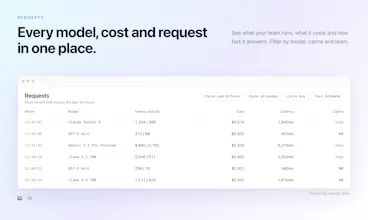
- See every request: the model, tokens, cost, latency and whether the cache answered.
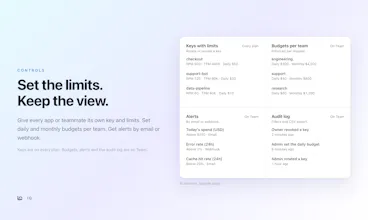
- Give each app or teammate its own key, with request, token and daily dollar limits. Rotate or revoke it any time. This is on every plan.
- On the Team plan, set daily and monthly budgets per team, get alerts by email or webhook, and keep an audit log.
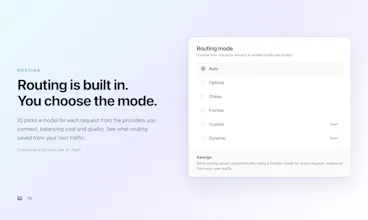
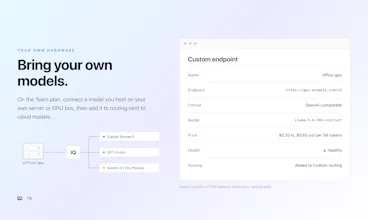
- Choose a routing mode: Auto, Optimal, Cheap or Frontier. Custom and Dynamic are on Team. The Savings page shows what routing saved compared with using a frontier model for every request, measured from your own traffic.
New in this launch: IQ Steward is your AI spend watchdog. It spots wasted spend and setup mistakes across your keys and teams, then tells you what to fix next. IQ Vexla protects against model decay. It tests a model change on your own examples before you switch, and shows what got better and what got worse.
Plans: Free is $0. Team is $70 per organization a month, up to 10 members. Personal is $6 a month and adds IQ Code routing. Your providers bill model usage separately.
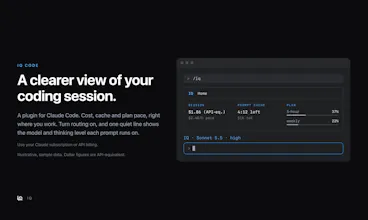
IQ Code is our plugin for Claude Code. It works with your Claude subscription or API billing. It shows session cost, the prompt cache clock and plan pace. With routing on, one line shows the model and thinking level each prompt runs on.
Feedback welcome: what is missing from the dashboard, and what would you want to see first?