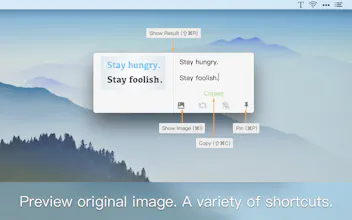
An incredibly convenient OCR and translation tool that lives on your menu bar. Doing OCR on macOS has never been easier, you just need to capture screen (default shortcut: ⇧⌘1), iText will transfer the image to Google's outstanding OCR service. The recognized texts would show up and translate in no time. It's just that simple!
Greetings, hunters!
This is Jason, an independent macOS developer. Having released a whole bunch of macOS tools including Klib, iPic, iPaste, iHosts and iTimer, I'm really excited today to announce a new member to the iTools family: iText.
iText is an OCR tool that makes recognizing texts easier than ever. Capture any screen area with text in it, and a split second later it's done.
Use it to extract texts from all kinds of sources: PDF, documents in paper, pages in a book or images of any other kind.
Utilizing Google's ever powerful OCR service, iText supports 50+ languages, and achieves amazingly high recognition accuracy.
Learn more at: https://en.toolinbox.net/iText/
Your feedback are vital to the improvement of iText. Contact me via:
Twitter: @hereisjason
Email: iToolinbox@gmail.com
Telegram: https://telegram.me/itoolinbox
BR,
Jason
Report
As far as I can tell, the accuracy rate is much better than ABBYY's so-called professional OCR tools. It's an awesome deal at $4.99/year now.
Pros:
Lighting Fast, Simple and intuitive to use, Impressive accuracy




iPaste
As far as I can tell, the accuracy rate is much better than ABBYY's so-called professional OCR tools. It's an awesome deal at $4.99/year now.
Pros:Lighting Fast, Simple and intuitive to use, Impressive accuracy
Cons:Could use a better menu bar icon though…