
Launching today

LaunchCut
Interactive iOS Demo Builder
58 followers
Interactive iOS Demo Builder
58 followers
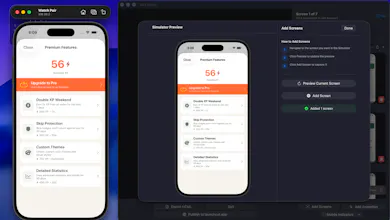
This is an interactive demo builder that leverages the Xcode simulator directly from macOS. It capture what you want how you want and allows you to link hotspots (clickable areas) to screens or animations. It then allows you to either export to a self contained html file or publish to a shareable link that you can also embed into any site. This gives your landing page a interactive demo sitting right there for users!




LaunchCut
Hey PH! I'm the maker of LaunchCut and wanted to share a bit about why I built it.
If you build iOS apps and want to show them off, you're basically limited to screenshots or a screen recording. Both get the point across but neither lets someone actually feel the app before they download it. I went looking for something better and couldn't find it, so LaunchCut is what came out of that.
You run your app in Xcode Simulator, open LaunchCut alongside it, and click through your screens to capture them. From there you map hotspots to recreate your real navigation flow including animations, and export a fully interactive demo. It outputs as a self-contained HTML file or a shareable web link you can embed anywhere. The simulator chrome comes through in the output so it looks and feels like someone using a real device, not a mockup.
This is useful for anyone who makes apps and wants a better way to share them. An indie dev putting a live demo on their site, a team pitching to stakeholders, a company giving visitors a real feel for their app before they ever hit the App Store. Screenshots and videos only go so far.
The app is free to download and the HTML file it exports is the same experience as the shareable link, so you can have a working interactive demo of your app in about 5 minutes at no cost. If it clicks for you, the subscription is there when you're ready. Would love to hear from anyone who has run into this same gap. Happy to answer any questions about how it works. Thanks for checking it out!
The hotspot-to-animation linking is the part I want to understand better. Can you trigger a sequence — like tap button → micro-animation plays → transitions to next screen? Or is it strictly tap → jump to screen, with animations handled separately? The difference matters a lot for showing off gestures or loading states.
LaunchCut
@sounak_bhattacharya thanks for the question. Currently during the recording phase you capture screens and animations separately. Animation capture allows you to edit down frame by frame and preview. Once your to the main edit screen you can set a sequence screen hotspot -> animation (animation runs once and ends on final frame or loops) with a hotspot -> to any other animation or screen.
Once you play with it I feel it makes better sense. Animations capture isn’t paywalled either so you can tune in your work flow all in a free workflow.
I like the idea of animation completing and having the option to auto transition to a new screen without a hotspot though. I’ll have to add this in the next update.
Congrats Andrew. Japan-based iOS founder here.
One Japan-specific thought: this could be especially useful for Japanese indie iOS makers because many App Store pages here still rely heavily on static screenshots. Showing QR/payment/onboarding-style app flows interactively could be a stronger local angle than a generic “interactive demo” pitch.
Happy to share a few more Japan-specific adoption blockers if useful.