Launched this week

Marv
An AI cursor companion that shows you what to click
97 followers
An AI cursor companion that shows you what to click
97 followers
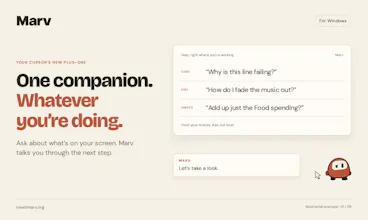
Meet Marv, your cursor’s new plus-one. Hold a hotkey and ask about anything on your screen. Marv answers out loud while drawing arrows, circling buttons and writing notes directly on your screen to walk you through it. Debug some code, work out a spreadsheet formula or find the right control in your video editor, all without leaving the app you’re using.



Free Options
Launch Team / Built With


Customer.ioAutomate Messaging Everywhere — Startups Get 12 Months Free
Promoted


@cameron_mchardy Reading three forum threads just to find one setting is so annoying, lol. Asking about what's already on my screen makes way more sense than typing it all out..
I run into this problem all the time. I can’t find the button the LLM is referring to, waste a lot of time looking for it, and eventually just let it control my screen, which burns even more time and tokens. Great product idea, joined the waitlist!
@chenbenari Amazing, thank you so much! Really glad you like the idea, and thanks for joining the waitlist
That’s exactly the problem I kept running into too. Sometimes being told where something is just isn’t enough, especially when you’re staring at a busy UI trying to work out which button it means. Having something actually point it out or give you a visual cue just feels so much quicker.
i joined the waitlist! congrats for the launch!
i think ur strategy of launching before actually releasing the product makes a lot of sense!
This is awesome, and I love the angle where it helps you actually do the actions yourself, not for you like every other agent people are building. That way you get the work done AND can reproduce it later without AI, love it!
Hhehe loved the character, and even more the idea. Wish you all the best here!
@german_merlo1 Thank you! Really appreciate that! Glad you like Marv and the idea behind it!
the "draws arrows and circles buttons on your actual screen" part is the thing that would make this stick for me over a wall of text explanation. most AI help ends up describing where to click in words, and words are a bad medium for pointing at a specific pixel. does Marv work across multiple monitors, or does the overlay get confused about which screen you're actually looking at when it draws the arrow
good to know it's per-screen not global, that's the right default to ship with. this is on my list to actually try, not just ask questions about from the sidelines
Drawing the arrow is a much stronger claim than saying the answer, and that's the part I'd be careful with. If a chat reply is wrong I argue with it, but a circle around a button reads as certainty and I'll have clicked before I've thought about it. The feature I'd want is Marv visibly hedging when it's guessing, because confidently pointing at the wrong control is the failure that actually costs someone their afternoon.