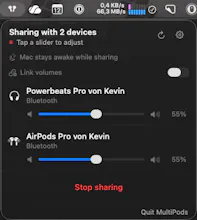
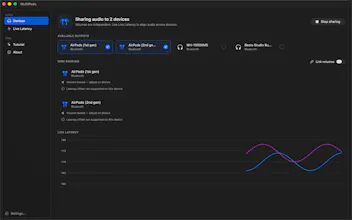
Two people, one Mac, one movie, a baby asleep next door. macOS only talks to one Bluetooth headphone at a time — MultiPods fixes that. Pick two pairs from your menu bar, hit Start, get independent volume sliders, battery levels, and a live latency chart. No driver. No kext. No admin password. Just public CoreAudio APIs, fully sandboxed, on the Mac App Store.
Hi Product Hunt 👋
I built MultiPods because my partner and I kept watching movies on
a laptop with one earbud each, while a sleeping baby vetoed any
actual speakers. macOS's hidden Multi-Output Device almost solves
this — but the single shared volume slider was a dealbreaker (her
headphones are louder than mine), and it leaks aggregate devices
like crazy if you don't tear them down right.
The tricky part was doing this without a virtual audio driver.
Every comparable tool on the Mac ships a kext or a HAL plug-in.
Apple confirmed at WWDC21 they won't grant the entitlements to
ship one through the App Store. So MultiPods is the version that
lives entirely inside the sandbox — public CoreAudio APIs only, no
installer, no admin password, no kernel extension to update every
macOS release.
A few honest caveats (also surfaced inside the app): AirPods
volume is routed through AVRCP and frequently read-only at the
CoreAudio level — when that's the case, the slider locks and the
app tells you to adjust on the device itself. macOS may also
downgrade the codec to SBC when more than one Bluetooth headphone
is connected. These are platform limits, not bugs, and I'd rather
be upfront about them than fake it.
v1.1 just landed short after the initial release just a few days prior: per-device battery, transient alerts, a
hidden-devices list, a smoother live latency chart, and
localization into 39+ languages.
Happy to answer anything about the CoreAudio internals, the App
Store side (no entitlements needed!), or the late-night dad-driven
product decisions behind it.
Report
No reviews yetBe the first to leave a review for MultiPods