
Launching today

Parallel Code
Ten agents. Ten branches. One afternoon.
121 followers
Ten agents. Ten branches. One afternoon.
121 followers
Run 10 AI coding agents at once. Ship in an afternoon what used to take a week.
Parallel Code runs your agents in parallel, each in its own isolated git worktree. No conflicts, no juggling terminals. Review diffs, compare outcomes, keep the best result.
Your agents run as real terminal CLIs - same behavior, same config, nothing changes. Works with Claude Code, Codex CLI, Gemini CLI, or any CLI-based agent. Monitor everything from your phone. Free, open source, MIT licensed.


40+ keyboard shortcuts?? ok you have my attention 😂 I'm building a productivity app myself and I'm obsessed with keyboard-first workflows — reaching for the mouse when you're deep in flow is painful. The Alt+Arrow navigation between panes sounds super smooth. Definitely trying this out, congrats on the launch! 🚀
Parallel Code
Why I built Parallel Code
I've been maintaining an open source productivity app (Super Productivity) for 9 years and working as a programmer for much longer than that. When AI coding agents came along, they changed how I work - but the other tools and habits I grow comfortable with over the years, weren't a good fit anymore.
One agent works on a feature. I wait, get distracted, start something else. Finally, I come back, review, start the next one. Wait again. I had a backlog of ideas and the tools to build them, but things got messy. I was doing a lot, but I felt like I'd lost control compared to how I used to code.
I tried the obvious fixes. Multiple terminal windows were my new go-to solution, but got chaotic fast - which terminal was working on what? Tmux helped organize it, but I was still cycling through panes, switching tools for reviewing diffs and history, losing track of context, and dealing with merge conflicts when agents touched the same files.
So I built Parallel Code to fix this for myself.
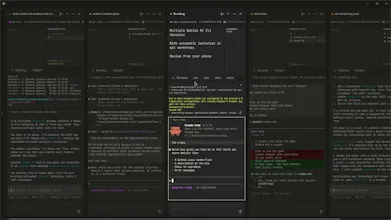
The core idea: every task gets its own git branch and worktree automatically. Agents work in complete isolation - they can't conflict. I kick off 5, 8, 10 at a time, watch them all in a tiled view, and review diffs as they finish.
One design decision I'm particularly proud of: it runs your real terminal CLIs. Claude Code, Codex CLI, Gemini CLI - whatever you use today works exactly the same inside Parallel Code. Same behavior, same config, nothing changes. I didn't want to build another wrapper or chat UI. If you don't like the app, go back to raw terminals. Zero switching cost.
Some things I added along the way also turned out very useful:
- Phone monitoring - Scan a QR code, watch all your agent terminals from your phone. Sure there are other ways to do this, but this is really comfortable.
- Keyboard-first design - 40+ shortcuts. When you're managing 10 agents, reaching for the mouse is too slow. Best part is to navigate panes with just Alt+Arrow-keys.
- Built-in diff review and merge - The merge step is where quality happens. So having a quick way to do a code review is very useuful.
Parallel Code is free, open source (MIT), and always will be. No subscriptions, no platform fees, no telemetry. Your API keys stay on your machine.
I built this because I needed it. I'm sharing it because I think other developers - especially solo devs and indie hackers - hit the same problems I did. If you're running AI coding agents one at a time and don't have your tools setup in an optimal way, you're leaving a lot on the table.
macOS and Linux. Windows is on the roadmap.
Happy to answer any questions about the tool, the technical decisions, or why I chose to make it free.
Clipboard Canvas v2.0
The automatic git branching is a solid idea, but how do you handle potential merge conflicts when multiple AIs are working on the same codebase?
Parallel Code
@trydoff I just tell AI to rebase on master/main (there is also a button for it in the merge dialog). It usually autofixes any merge conflicts very well.
This looks great for solo devs. Any plans to support team setups where multiple people dispatch agents to the same repo?
Parallel Code
@ermakovich_sergey Interesting direction! This hasn't popped up yet as a feature request tbh, but if there is interest, I am definitely open in exploring that option.
Running Claude Code and Codex side-by-side has become my default for anything non-trivial - they catch different things and the diff between their outputs is often the most useful signal. The context handoff between models is where it gets tricky, especially when they diverge on architecture decisions.
Parallel Code
@mykola_kondratiuk Yes, I feel you. Model handoff is still tricky to solve. Personally I do this via dedicated skills (on claude code's end, which my main agent these days).
I've been doing this manually with tmux panes and git worktrees, so seeing it packaged as a proper tool with diff review is nice. The "zero switching cost" angle is key -- keeping agents as raw terminal CLIs instead of wrapping them in some custom UI means you're not betting against the pace these tools evolve at. What does the mobile monitoring actually show you -- just status, or can you intervene mid-task?
The isolated git worktree approach for running 10 agents in parallel is genuinely clever — no conflicts because each agent works in its own branch is the kind of thing that sounds obvious in hindsight but takes real thought to execute well.
I'm building CVDebug, an ATS resume scanner with Robot View that shows candidates exactly what Workday, Taleo and 50+ ATS bots see when they parse their CV, with an ATS score 0–100. Very different space, but I love the MIT open-source angle — transparency in how tools work is something I try to bring to the resume/hiring side too. Great launch Johannes!
Parallel Code
@aherme13 Thank you very much albert! <3 Best of luck in your endevours!