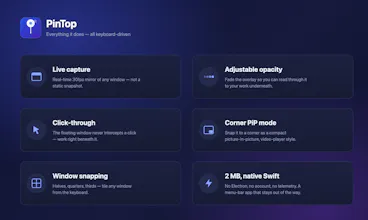
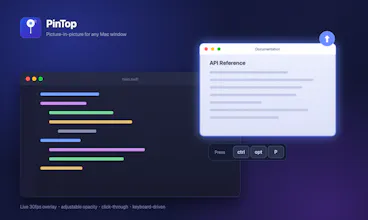
Pin any window as a live floating overlay — docs, Figma, a build log — and keep working underneath it. Real-time capture, click-through, opacity control, corner PiP mode, all keyboard-driven. Native Swift menu bar app, ~2MB. 7-day in-app trial after install. $9.99 once, 30-day refund.
No reviews yetBe the first to leave a review for PinTop
Maker
📌
Hey PH 👋
I built PinTop because I was alt-tabbing between my editor and documentation a hundred times a day, and macOS only gives picture-in-picture to video players.
Hit ctrl+opt+P on any window and it floats above everything as a live 30fps overlay. Scroll on it to resize, drop the opacity to see through it, and click-through means it never blocks what you're doing. There's window snapping too, because I was already elbow-deep in the window management APIs.
The weirdest bug I fixed while building it: my global hotkey listener could freeze every keyboard on the machine if the main thread blocked. Turns out that's just how active event taps work on macOS. Moved it to its own thread, learned some humility.
Free 7-day trial in the app, no account needed. $9.99 one-time if it sticks. Brutal feedback welcome — I'm here all day.
Report
finally something that lets me pin my build log over my editor without it eating focus. the corner pip mode is kind of perfect for monitoring scripts while i actually get work done
Report
Maker
@erdemhshe Thanks Erdem! Build-log-over-editor is exactly why I made it. What stack are you monitoring — would love to hear if the hotkey feels natural or if anything is missing. Happy launch day 🙌
Report
honestly this looks super useful, especially the click-through option. one thing though, would be great if you could save preset window sizes or positions for different apps, like snap my slack to the bottom right and figma to the top left automatically each time i open them. would save me a few seconds every setup
Report
Maker
@dugenciogl23408 Saved presets is a great shout — that's on the list. Do you find yourself pinning the same set of windows every morning, or more ad hoc? Trying to figure out if it should be per-app or per-workspace.
Report
Would love a saved workspace feature so I can recall specific window layouts (positions, opacity, which windows are pinned) with a single shortcut. Juggling between coding and design modes is painful without it.
Report
Maker
@kadir40ak Coding vs design mode — that's a solid use case. Workspace presets are definitely something I'm thinking about. How many layouts do you usually switch between in a typical day?
Report
Finally, a PiP tool that actually passes clicks through without freezing the window underneath. The keyboard shortcuts for toggling opacity make it feel really polished for a 2MB app.
Report
Maker
@eyupsapc10102 Appreciate that! Click-through was the hardest part to get right — ScreenCaptureKit doesn't make it easy. What are you mostly pinning, docs or something else?


finally something that lets me pin my build log over my editor without it eating focus. the corner pip mode is kind of perfect for monitoring scripts while i actually get work done
@erdemhshe Thanks Erdem! Build-log-over-editor is exactly why I made it. What stack are you monitoring — would love to hear if the hotkey feels natural or if anything is missing. Happy launch day 🙌
honestly this looks super useful, especially the click-through option. one thing though, would be great if you could save preset window sizes or positions for different apps, like snap my slack to the bottom right and figma to the top left automatically each time i open them. would save me a few seconds every setup
@dugenciogl23408 Saved presets is a great shout — that's on the list. Do you find yourself pinning the same set of windows every morning, or more ad hoc? Trying to figure out if it should be per-app or per-workspace.
Would love a saved workspace feature so I can recall specific window layouts (positions, opacity, which windows are pinned) with a single shortcut. Juggling between coding and design modes is painful without it.
@kadir40ak Coding vs design mode — that's a solid use case. Workspace presets are definitely something I'm thinking about. How many layouts do you usually switch between in a typical day?
Finally, a PiP tool that actually passes clicks through without freezing the window underneath. The keyboard shortcuts for toggling opacity make it feel really polished for a 2MB app.
@eyupsapc10102 Appreciate that! Click-through was the hardest part to get right — ScreenCaptureKit doesn't make it easy. What are you mostly pinning, docs or something else?