Launching today

Porch
local project summaries and cost tracking for AI coding
22 followers
local project summaries and cost tracking for AI coding
22 followers
Porch turns your Claude Code and Codex work into daily, weekly, and monthly summaries by project, with estimated task time and blockers. See sessions across terminals and editors, know which need your attention, track tokens and API-equivalent costs, and save summaries as Markdown to Obsidian or any folder. Open source, with no Porch account required. Session status and usage stay on your Mac; summaries use your installed, signed-in Claude Code or Codex.


Hey Product Hunt! I built porch because I wanted a clearer picture of my own work with coding agents.
I use Claude Code and Codex across projects and terminals. By the end of the day, I wanted to know: What did I work on? Where did the time go? What got stuck?
And which sessions still needed me?
Porch brings that into a Mac menu bar app:
• Work summaries: Daily, weekly, and monthly reports by project, with estimated time per task and blockers grounded in the records.
• Live sessions: See sessions across terminals and editors, including which ones are waiting on you.
• Usage: Track tokens, API-equivalent costs, and Claude/Codex usage limits.
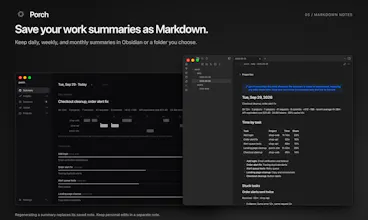
• Markdown notes: Save summaries to an Obsidian vault or any folder you choose.
I recently open-sourced porch. You don’t need a Porch account or a server for your work records.
Session status comes from agent-reported events, rather than guesses based on conversation text. Session status and token/cost data stay on your Mac. Written summaries and evaluations send the records they need through your installed Claude Code or Codex to its model provider. Anonymous app usage analytics can be disabled in Settings.
Porch currently supports Apple Silicon Macs. Written summaries need Claude Code or Codex installed and signed in.
I’d love your feedback: Does the summary reflect what you actually worked on? And what would help you better understand how you use coding agents?
Download: https://getporch.pages.dev/
Source: https://github.com/amone-labs/porch
API equivalent cost is the number I'd be careful with here. If someone's on a Max plan that figure isn't what they spent, it's what they'd have spent going direct to the API, and people will read it as their bill. As a usage signal it's genuinely useful, as a cost it's a counterfactual. Worth labelling it that way in the UI before someone screenshots it as their spend.