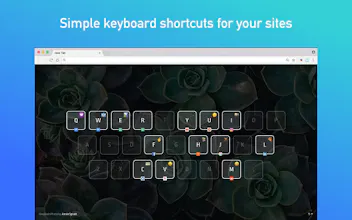
Quickey New Tab is an elegant dashboard of customizable keyboard shortcuts that launch your favorite websites/bookmarks instantly 🚀 and eliminates unnecessary clicking & typing from your workflow ⏳
No reviews yetBe the first to leave a review for Quickey Tab for Chrome
Not a big hotkey person, only because I’m super fast the “normal” way already so don’t feel the pain point as much. But Quickey has managed to convince me of the power of hotkeys moreso than anything else related to hotkeys I’ve experimented with. Somehow Quickey has become my default browser tab despite how much i love Momentum. That’s says a lot about Quickey.
Also, super talented team behind this product that iterates quickly on feedback (I’ve experienced that firsthand)! Excited to see where this can go (add to do list pls!) 👏
@tim061693 Thanks Tim!! Next, we're considering new ways to improve productivity with hotkeys beyond just bookmark launching!
Report
One problem I have with it is that I have to click at the page first for the shortcuts to appear and function. Also, the global shortcut, ALT+KEY, only works when I'm on the tab. I have to say I don't find much reason to use it as it is.
Thanks for the feedback, @gustavo_hagenbeck. We haven't found a way to immediately focus on the page (instead of the search bar) when you open a New Tab—but you can hit "Tab" to focus too, which I find way faster than clicking.
As for global shortcut not working, we're learning today that newly-created global shortcuts do NOT register on already-open tabs...old tabs have to refresh first (otherwise they work on any tab created after that)
Let me know if those tips work for you. Thanks for pointing them out, we'll try to make communicate those tips more clearly in our onboarding!
Report
I've launched 1419 tabs and saved more than an hour from typing these websites/finding on bookmark list. I always have the Quickey tab as a default when I am just chilling so I get to see the cool background pictures- or even shuffle them. I also have fun remembering these keys that I've set and launch websites without even looking at the keyboard- like a memory game!
Pros:
cool background pictures, quick launch to websites, personalizing with cute emojis, easy swapping/editing
Cons:
Some pictures are really awesome I want to keep it all the time but can't when windows shut down automatically..
Report
It just does what it should. Its surprising that no one thought to make this yet. Hot keyed bookmarks
Pros:
Simple, useful
Cons:
Nothing, it just does what its supposed to
Report
Looking forward to trying this! I've been using Google Chrome's custom search engines feature all along. But, I think this one (and other suggestions here) will help better. Good luck on your launch!




Quickey Tab for Chrome
Quickey Tab for Chrome
I've launched 1419 tabs and saved more than an hour from typing these websites/finding on bookmark list. I always have the Quickey tab as a default when I am just chilling so I get to see the cool background pictures- or even shuffle them. I also have fun remembering these keys that I've set and launch websites without even looking at the keyboard- like a memory game!
Pros:cool background pictures, quick launch to websites, personalizing with cute emojis, easy swapping/editing
Cons:Some pictures are really awesome I want to keep it all the time but can't when windows shut down automatically..
It just does what it should. Its surprising that no one thought to make this yet. Hot keyed bookmarks
Pros:Simple, useful
Cons:Nothing, it just does what its supposed to
Raise Millions Book
Quickey Tab for Chrome