
TalkFlowy
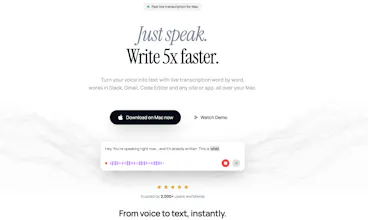
Local real-time voice transcription for Mac
38 followers
Local real-time voice transcription for Mac
38 followers
Real-time voice transcription for Mac. Words appear as you speak 99% accuracy, AutoPaste anywhere, any app and copy to clipboard automatically., 50+ languages, fully offline. No cloud. No subscription. One payment, yours forever. → Works in any app — Slack, Notion, Word, anywhere → AutoPaste to any text field automatically → Native Mac shortcuts & menu bar → Your voice never leaves your device → History for all your transcription "all Local on your device"




@hi_amg01 Useful and more cost effective compared to paying monthly subscription. My only hesitation now is how well it works if I replace my existing tool. Will it meet / exceed the current transcription quality? Anyway to try before buy?
Hi @chintant thank you for your comment and Totally fair question - you can actually try it for free first with free usage and see how it performs with your own mac.
That’s the best way to compare it directly with your current tool and judge the transcription quality yourself.
And if you do decide to purchase but aren’t happy with the results, no stress at all - just email me at contact@talkflowy.com. I’ll personally get back to you and can refund you in full. i wrote this using, and Btw im adding a new feature "not released yet" "image below" to add LLMs with your own api to rewrite it in any style, also will be adding local llms after, just still testing on my daily usage to make it as simple as possible :)
Solo founder, built it for yourself, girlfriend told you to launch — that's the best origin story. I'm building a Mac-native video editor and rely on cloud transcription right now. 99% accuracy fully offline with Whisper is exactly what I'd want to offer my users as an option. How does it handle longer audio — say 60+ minutes of a lecture or interview? And how's the Japanese accuracy
@cyberseeds Haha yeah that’s pretty much exactly how it started 😄
For longer audio (60+ min lectures or interviews), it handles it really well. Since everything runs locally, there are no API limits or time caps — it just depends on your machine’s performance. It processes things in chunks behind the scenes, so you don’t get crashes or cut-offs even with long files.
For Japanese - I’ll be honest, I don’t personally speak Japanese so I haven’t deeply tested it myself. But since it’s powered by Whisper (especially the large and turbo models we have in the app), it’s known to handle multiple languages really well, including Japanese. From what I’ve seen and tested in other languages, the accuracy is strong as long as the audio is clean.
Also, there’s a free usage tier, so you can just try it yourself with your own files - that’s honestly the best way to see if it fits your workflow and your users’ expectations.
I really think you’re going to like it, but if not, no worries at all - feel free to email me anytime and I’ll personally help out 🙂
I've built similar local Whisper pipelines on macOS—the system integration work here is really solid. One thing that's tricky: keeping transcription latency low while maintaining accuracy when competing with system audio routing, especially in conferencing apps. How are you handling the audio capture layer? Are you using AVAudioEngine or going lower-level, and have you hit any issues with certain apps (Teams, Zoom, etc.) that route audio differently?