
Turn repetitive typing into instant text shortcuts. Save hours every week. Works in every app, keeps your data private. Trusted by individuals and teams. Now available on iOS.




What's great
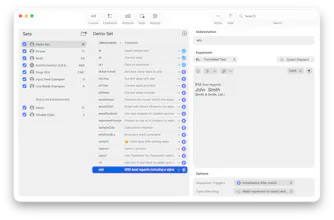
Typinator 10 is a great improvement over previous versions. The new UI feels modern and the app overall feels noticeably faster in daily use. I also really like the new AI features and the improved sync options. Being able to sync sets using my own self-hosted NAS solution is a huge plus for people who care about controlling their own data.
Typinator has been an essential productivity tool in my workflow for years, and this release continues to refine and improve it. Great work by the whole team!
What needs improvement
onboarding process (1)
The new iOS app is nice to have, but I haven’t found a clear use case for it yet in my workflow. It will be interesting to see how it evolves.
The switch to a subscription model is understandable from a business perspective, but many users already manage a large number of subscriptions, so this might be a concern for some.
It would also be great to see better onboarding or tutorials. Typinator has many powerful features (like advanced date insertion and formatting), and more guides or examples would help users discover and use these capabilities more effectively.
vs Alternatives
 TextExpander
I’ve tried other text expansion tools in the past, but Typinator has always stood out for its reliability, flexibility, and powerful feature set. The ability to create complex expansions and automate repetitive typing tasks makes it hard to replace once it becomes part of your workflow.
The new syncing options in version 10 also make it even more attractive compared to other solutions.
Ratings
Ease of use
Reliability
Value for money
Customization
Report
22 viewsWhat's great
Typinator is one of those tools that quietly saves hours of time. Version 10 feels faster, the UI refresh is very welcome, and the new AI features add interesting possibilities for automation. The syncing improvements are also a big deal for users who prefer self-hosted solutions.
Ratings
Ease of use
Reliability
Value for money
Customization
Report
19 views

Thank you @runner_action
Really glad Version 10 is hitting the mark for you, especially the sync improvements. We'll keep building on it! 😊
Report


Typinator 10
@melanie_sween thank you for this detailed and thoughtful review. We really appreciated it! 🙏
Great to hear the new UI and sync options are working well for you.
On the subscription: just a quick note that the one-time purchase option for Typinator itself is still very much alive, the subscription is optional, mainly for those who want iOS.
We have done some great new tutorial videos. Have a look at them: Tutorial
Hope this will help people to get better to know the possibilities we offer.