Hey Product Hunt! 🚀
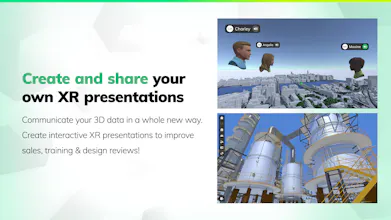
I'm Andre, the lead developer of 𝗩𝗶𝗿𝘁𝗼𝗳𝘆, and we're thrilled to introduce our B2B XR presentation app to you. With 𝗩𝗶𝗿𝘁𝗼𝗳𝘆, you can transform your 3D files into stunning presentations for your clients, reducing feedback loops and enhancing understanding of complex designs, architecture, and project planning.
𝗪𝗵𝗮𝘁 𝗶𝘀 𝗩𝗶𝗿𝘁𝗼𝗳𝘆? 💚
Virtofy helps you present your 3D data seamlessly. Use it for product and process virtualization, design reviews, showcasing challenging environments, or simple walkthroughs.
𝗩𝗶𝗿𝘁𝗼𝗳𝘆 𝗦𝘁𝘂𝗱𝗶𝗼 🎨
Unleash your creativity with the Tour Creator. Import over 30 file formats to craft impressive tours, store, and share them in the cloud or locally on your devices. Includes all the features of Virtofy Viewer.
𝗩𝗶𝗿𝘁𝗼𝗳𝘆 𝗩𝗶𝗲𝘄𝗲𝗿 👀
Utilize a wide range of presentation tools, join or host online meetings from anywhere, and guide clients through your tours or let them explore on their own – all for free.
𝗞𝗲𝘆 𝗙𝗲𝗮𝘁𝘂𝗿𝗲𝘀: ✨
🖥️ User-Friendly UI: Easy to navigate and use.
👫 Meeting Functionality: Perfect for collaborative work.
📊 Robust Presentation Tools: Showcase your 3D data effectively.
📁 Wide File Format Support: Import and work with over 30 different file formats.
☁️ Cloud & Local Storage: Choose the best option for your needs, with support for sensitive data.
🌐 Cross-Platform Compatibility: Available on Windows, Meta-Quest, Pico, and Android, with more platforms coming soon.
𝗪𝗵𝗼 𝗶𝘀 𝗩𝗶𝗿𝘁𝗼𝗳𝘆 𝗙𝗼𝗿?
Perfect for marketing, sales, desingers, developers, and anyone needing to organize and visualize large amounts of 3D information quickly and effectively.
𝗪𝗵𝘆 𝗧𝗿𝘆 𝗩𝗶𝗿𝘁𝗼𝗳𝘆 𝗧𝗼𝗱𝗮𝘆?
Get started with a demo login – no account creation necessary. If you want to create your own tours, just request a free trial version from us. Experience the ease of turning any 3D content into powerful presentations that leave a lasting impression.
Transform your 3D content into an unforgettable experience with 𝗩𝗶𝗿𝘁𝗼𝗳𝘆. Try it for free today! 🎉
Thank you!
Report
Can I export my 3D designs from Virtofy to other software easily? Can Virtofy be integrated with other software or tools commonly used for 3D design?
Congrats on the launch!!!
@claudyah Thank you for your congrats and message. 😊
Export: You can later export PDFs for annotations. You can stick to your 3D software and workflows and import your 3D data into Virtofy.
Integration: Yes, you can use Virtofy with a lot of other 3D design software: https://www.virtofy.com/en/highl...
If you want to try, just send us an email (contact@virtofy.com).
Report
Congratulations on the launch of Virtofy! How does Virtofy handle complex file formats and ensure smooth performance across different platforms like Windows and Meta-Quest?
Thank you. When importing a 3D file, we merge meshes and materials (can be disabled). When rendering the model to the screen, we do some special batching to allow maximum performance. Besides that, Virtofy will lower the render resolution on mobile VR devices, if the frame rate is not optimal.




Virtofy
Virtofy
Virtofy
ClothingAI
Virtofy
Virtofy