

Cekura
Automated QA for Voice AI and Chat AI agents
1.8K followers
Automated QA for Voice AI and Chat AI agents
1.8K followers
Cekura enables Conversational AI teams to automate QA across the entire agent lifecycle—from pre-production simulation and evaluation to monitoring of production calls. We also support seamless integration into CI/CD pipelines, ensuring consistent quality and reliability at every stage of development and deployment.
This is the 3rd launch from Cekura. View more
Cekura
Launched this week
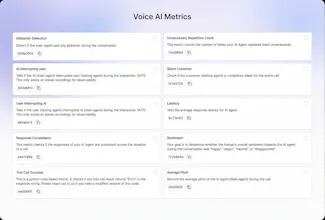
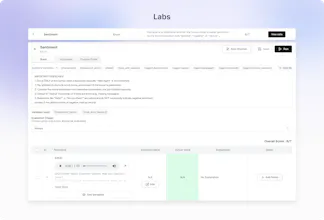
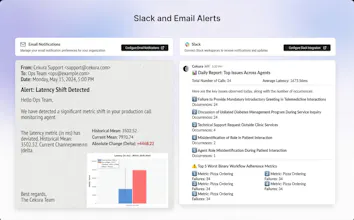
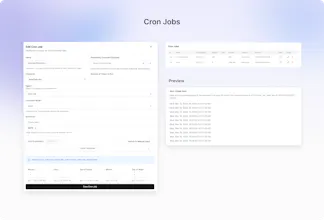
Out-of-the-box 30+ predefined metrics for analysis on CX, accuracy, conversation and voice quality. Compile perfect LLM judges by annotating just ~20 conversations and auto-improve in Cekura labs. Real-time, segmented dashboards to identify trends in Conversational AI. Smart statistical alerts so that you get notified only when metrics shift from historical baselines. Automated system pings to catch silent production failures.



Free Options
Launch Team / Built With


Is the metrics customizable ? For example I need to define success criteria by peak latency and not mean latency
Cekura
@rishav_mishra3 Yes, Cekura is modular in a way that lets you go from full automation to full control, depending on your needs.
One of our key features is Python based metrics with access to all processed data, so you can measure exactly what you care about, like peak latency instead of mean latency. We also support defining your own success criteria using a flexible rubric style configuration.
Cekura
@rishav_mishra3 yes they are customisable. We expose the code of our latency metric which you can customise to get peak latency instead.
The silent production failure detection is what catches my eye. When you're running AI agents in prod, the scariest failures are the ones where nothing errors out - it just gives bad output for days without anyone noticing. Curious how Cekura handles the baseline drift problem - do you need a human to label 'good' vs 'bad' outputs, or does it pick that up automatically?
Cekura
@mykola_kondratiuk Human labelling is recommended for any metric you define - you label only 20 calls in our optimizer to ensure the LLM-as-a-judge covers all the edge cases
20 calls to bootstrap the judge is surprisingly low - that's actually pretty approachable for most teams. The LLM-as-judge approach makes sense for scale once you've got those calibration samples.
Cekura
@mykola_kondratiuk Human labelling help fine tune the metric and make it highly accurate for the good/bad identification. And at scale this metric then goes on and evaluate 1000s of calls with very high accuracy
Right - the labelling bootstraps the judge, then the judge scales. Makes sense as a two-phase approach.
Cekura
@mykola_kondratiuk Exactly!
glad it landed well. good luck with the launch!
Congrats on #2, @Cekura
Just flagged a UX loop on mobile signup ,it's showing 'User Not Found' and forcing a logout for new users. It looks like a system crash rather than a filter.
I've got the fix details ready to help you keep your conversion high today. Where can I send the report?
Cekura
@sergioding Oh Can you share a report at support@cekura.ai - will be really helpful
@kabra_sidhant Thanks, Just sent the fix report and the UX optimization steps to your support email.
Cekura
@sergioding Likely caused by unsupported email domains Gmail, iCloud, and other public providers aren’t allowed, which triggers the ‘User Not Found’ . Recommend using a work email (e.g., @cekura.ai).
@dddharamveeer Exactly, it’s the Gmail/iCloud filter triggering a 'User Not Found' state. On mobile, that feels like a system crash to a new user. I've mapped out the fix to keep your enterprise funnel clean while you're at #3. Let's keep the momentum going!
Cekura
@kabra_sidhant @randhir_kumar7 We find that all conversational agents (chat or voice) need similar metrics to evaluate the content of the conversation - metrics like relevancy, hallucination and customer satisfaction .
Voice agents add complexity, so we have metrics for interruption, latency, pronunciation, and voice quality.
For use-case-specific evaluation (did the agent book the appointment? collect insurance info?) teams can write custom LLM Judge metrics in plain English
When Cekura flags an issue in production, what does fixing it actually look like in practice? Do teams usually retrain models, tweak prompts, or handle it more on a case‑by‑case basis?
Cekura
@jared_salois There are 3 types of issues:
prompt level - you tweak
model level - you A/B test and measure tradeoffs
config level - it is case by case. for eg: there is abrupt silence during a certain tool call - that's because the connection was not setup correctly
Nas.io
How do you handle false positives in sentiment or hallucination detection?
Cekura
@nuseir_yassin1 that's where our metric optimizer comes in. You can use it not only for your custom metrics but can also give feedback to our pre-defined metric in case of false positives and auto-improve
Congratulations on the launch!!
Do you guys also support on prem deployment to ensure privacy?
Cekura
@nikunjagarwal321 We support VPC deployments on customer instance. Additionally:
We sign BAA and DPA with customers
We have PII redaction on our side both from audio as well as transcript
Cekura
@nikunjagarwal321 yes we do