
Launched this week

WithSubtitles
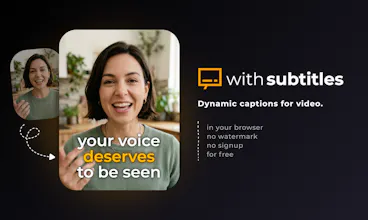
Free dynamic captions for video - no watermark, no signup
30 followers
Free dynamic captions for video - no watermark, no signup
30 followers
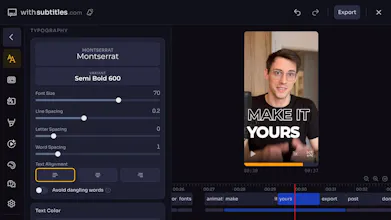
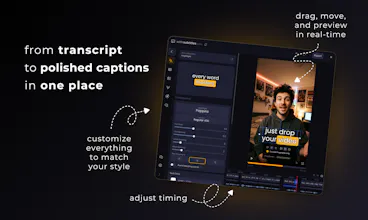
When your video already looks good - captions can make it great. Drop your video, pick a style, customize it the way you like, and share. Every caption syncs perfectly with your voice without tedious editing. Right in the browser, 100+ languages, for free and 100% private.


Been burned by too many "free" caption tools that watermark your exports or cap you at 2 minutes. The local processing angle is a real differentiator - especially for anyone working with client footage.
Ran a quick test and the accuracy on my footage was genuinely good. The editor feels clean too, not overwhelming.
Solid launch, @artur_rosa!
Following this one closely.
One more thing I forgot to ask - does this work well for language learning content? Thinking about recording lessons where you'd want captions in two languages simultaneously, or at least be able to switch between them easily. That's a use case I haven't seen many tools handle gracefully.
@rafal_giemza1 thanks! the client footage point is a big one - that's actually why local processing matters so much. nobody wants to upload someone else's content to a random server.
regarding your question, not natively yet, but dual language captions is actually a really interesting idea. what would your ideal setup look like - side by side, stacked? And also, is it something that should work for the whole video or just for particular captions?
there's a feature on the roadmap for multiple caption layers - originally planned for overlapping speakers, but it would probably work perfectly for bilingual captions too
@artur_rosa
That makes total sense on the client footage front, it's a non-starter otherwise.
For the bilingual setup: stacked would be my preference, with the source language on top and translation below in a slightly smaller or lighter style. Side by side gets messy on vertical formats.
As for scope - whole video, not per caption. When you're teaching a language, the learner needs that visual anchor consistently, not just on selected lines.
The multi-layer approach sounds like it could cover this perfectly. I'd love to test it when it's ready - happy to give feedback from a language content angle if that's useful.
@rafal_giemza1 really helpful breakdown, thanks. With multi-layers it should be doable - I'll think how to make it also straightforward. Definitely counting you in as a tester 😉
@rafal_giemza1 I do captioning for foreign-language videos and I can see With Subtitles handling this very easily in exactly its present form using two passes.
In With Subtitles, configure the subtitles exactly the way you want in the original language using a pre-built or custom caption style.
Download the captioned MP4 and the SRT with the exact timing of the subtitles you used.
Translate the SRT without touching the timestamps.
In With Subtitles, load the MP4 you created in Step 2 and the translated SRT you created in Step 3.
Use the same caption style for consistency (or a different style, doesn't really matter) and position the captions either above or below the original captions already shown in the MP4. (I recommend turning off caption animations if it's not the original language.)
Download the double-captioned MP4 and you're done. :)
Sure, doing it in one pass might be a "nice to have" but I'm honestly worried with a product this perfect and simple suffering from feature bloat in future releases. I'd rather have it lean and DIY double subtitles than slow it down and add complexity, to be honest.
I was so happy to know that I was one of the first supporters of the project. I’ve seen a lot of potential since the very first time I visited your website, Artur. The app has become my favorite—it helps me a lot with many short videos, especially with great subtitles.
I was also really happy to hear that the Linux version is now in an experimental stage—I literally screamed with joy! Wishing you lots of success, dear. May you reach an even wider audience.
Signed,
Little witch Hepena 🖤✨
@bruxa_hepena this made my day, thank you Hepena ❤️ people like you are the reason this project is still going
Been using this for a while now. Started with the free web version and quickly upgraded to the paid desktop version.
Have kept recommending this to others as its one of the best for non-english subtitles out there.
Highly recommended.
Дізнався про браузерну версію з соцмереж. Спробував для роботи і дуже сподобалася програма. Простота, відсутність реклами, водяного знаку, зайвих реєстрації. Після тривалого використання придбав десктопну версію за доступною ціною і що головне разовою оплатою. Вважаю, що розробнику варто окремо подякувати за цей сервіс. Простота, функціональність та доступність.
Zilly
An early user here as well. I found this to be the easiest to use tool of its kind and also the most accurate. it doesn't try to upsell you on thousands of different things or display tons of ads - like many other tools do. I hope it'll stay that way. Great tool!
@carlosinho that means a lot, thank you! and yeah - no plans to change that. keeping it clean and simple is kind of the whole point. curious what kind of videos do you usually use it for?
I love this tool ! I use it for my shorts and reels and the transcription is perfect, good job 🔥
@arnaud8 thanks! shorts and reels is exactly what i built it for, glad the transcription is working well for you
html.earth
happy to support this launch. it’s one of my favorite products, and i’m glad to be an early supporter! thanks for creating such a solid app. the recent major update is excellent, btw. cheers.
@jotzilla cheers! hearing "solid" from an early user is the best kind of feedback! how long have you been using it? curious what it looked like when you first tried it vs now