
Find tabs like files
gm legends, happy Monday.
ArkTabs gives your browser a Spotlight-style search bar so you can jump to any tab, workspace, or history entry without digging, Qwen Image Layered lets you generate AI images as real editable layers instead of one flat blob, and Claude in Chrome puts Claude directly into your browser so it can actually help with the pages and flows you are already stuck in.
Spotlight for your tabs

ArkTabs is a Spotlight-style tab manager for your browser. Hit Alt + P to fuzzy search across open tabs, bookmarks, history, recently closed sessions and custom workspaces, with live previews and an omnibar for web search and direct navigation.
🔥 Our Take: Tab managers love sidebars, trees and new UI concepts that you forget a week later. This goes with something your hands already know: a fast launcher and good search. If you live in Alfred or Spotlight all day, having that same flow for tabs, history and workspaces inside the browser feels like the right level of ambition.
Business advice for your 2026 self

Nika kicked off a thread asking: if you could send one piece of business advice forward to your 2026 self, what would it be? Her own is about not sleeping on LinkedIn as a place where people actually pay, and replies so far orbit the same themes: do fewer things at once, double down on one channel that already works, talk to more people, build community, and sharpen your critical thinking.
It’s basically a time capsule in progress,drop the one lesson you’d actually want future-you to remember.
Your agents stopped answering and started doing
Your agents call tools, write to databases and move money, so a wrong answer is now a wrong action, which is a considerably worse meeting. Arcjet runs policy before every LLM call, tool call, query and API request: prompt injection, sensitive data, bots, rate limits, spend quotas, and your own rules in Rego on top. It reads the OpenTelemetry you already emit, so switching it on is one environment variable, no code changes and nothing to deploy. Each check also reads the earlier steps in the same workflow, so an agent's tenth action gets judged against the first nine and not on its own. JavaScript, Python and Go SDKs all at 1.0, agent framework guards included, free tier to start on.
AI images, now in pieces
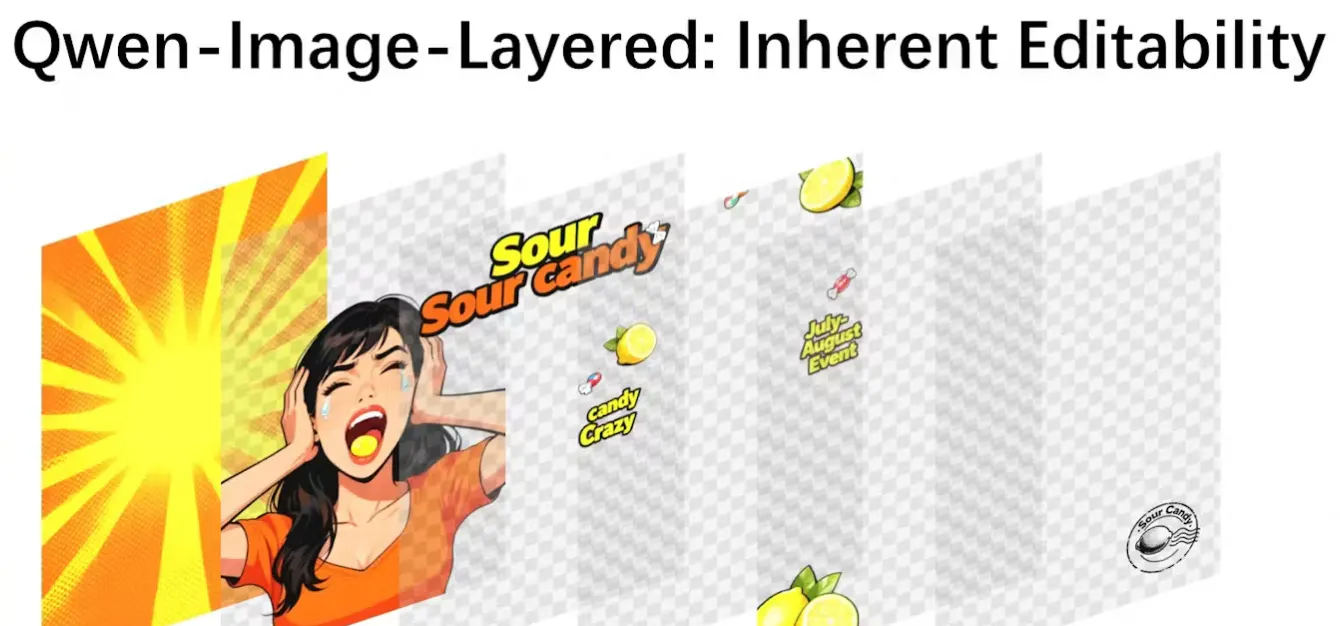
Qwen Image Layered lets you generate or upload an image and get it back as real RGBA layers instead of one flattened file. Foreground, background, objects and text land on separate layers so you can move, recolor, resize or delete parts without regenerating the whole thing.
🔥 Our Take: This makes AI art behave more like a design file than a poster you’re stuck with. You can keep the 90% that worked, fix the 10% that didn’t, and stop playing prompt roulette just because you wanted to nudge one object or line of text.
Tabs get a new brain

Claude in Chrome brings Claude straight into your browser instead of yet another detached chat tab. You can have it read the page you’re on, work across multiple tabs, help with forms and workflows, and keep context as you bounce around the web. It plugs into the rest of the Claude setup, so you’re not copying URLs back and forth just to get help.
🔥 Our Take: Giving an AI real access to your browser is both exciting and a little sketchy. On a good day it means “please handle this boring flow while I do something else.” On a bad day it’s you double-checking what it touched because you don’t fully trust it yet. The interesting part now is seeing where people actually let it run free and where they still want full manual control.
Daily Top Products


Monday through Friday
Our ultra-fast Daily: Three takes on new products. Yesterday’s top ten launches. That’s it.