

New update - Multiple custom prompts!

Hello Product Hunt!
Following our launch earlier this week, we’re back with the most requested feature so far: multiple custom prompts.
💡 The challenge
In the first version of Rewrait, you could choose from our built-in prompts or create your own. That worked for single use cases, but not for users who switch tones depending on context.
Different tone for support, leadership, or async Slack? You had to retype your prompt each time.
✅ The solution
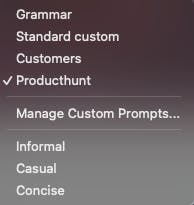
Now when you open the Writing Style menu, you’ll see:
Your custom prompts at the top
Our built-in prompts at the bottom
A new Manage Custom Prompts button in the middle to create, edit, and organize them
Personally, I use several: one for checking grammar only, and others for different audiences.
🔧 How to get it
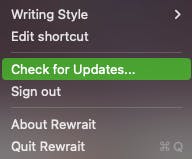
Make sure you’re on the latest version. You can update Rewrait by clicking Check for updates in the main menu.
We also added a Pricing section to the website so everything is clear and transparent.
We’re actively shaping the next version based on your input, so please share what’s working and what’s missing.
Happy rewraiting!
The Rewrait team
Replies
Nice, love to see the quick iteration! The custom prompts is actually a huge unlock and might make me try rewrait again. Does this also support multiple languages? I often have to go to another AI tool to help me improve my Japanese writing/responses!
@gabe Absolutely! Rewrait supports most languages and will detect your input language, then rewrite in that same language. If you need translation (for example, write in English and get Japanese output) you can create a custom prompt to do that. To correct spelling or tone, just write in Japanese (or any supported language) and Rewrait will apply your instructions in that language.
Next up, we’re exploring a built-in output language selector so you can translate or draft in languages you don’t speak without creating custom prompts.
Hope this helps!