

Dev Ports now supports LAN sharing, QR codes, and better local server context 🚀

A little while ago I shared Dev Ports in Room Service as a way to see and manage active local development servers across a Mac.

Since then, I have made it much more useful.
Dev Ports now does a much better job of telling you not just that a local server is running, but whether it is actually shareable on your network and what you can do with it.

The biggest additions in this update:
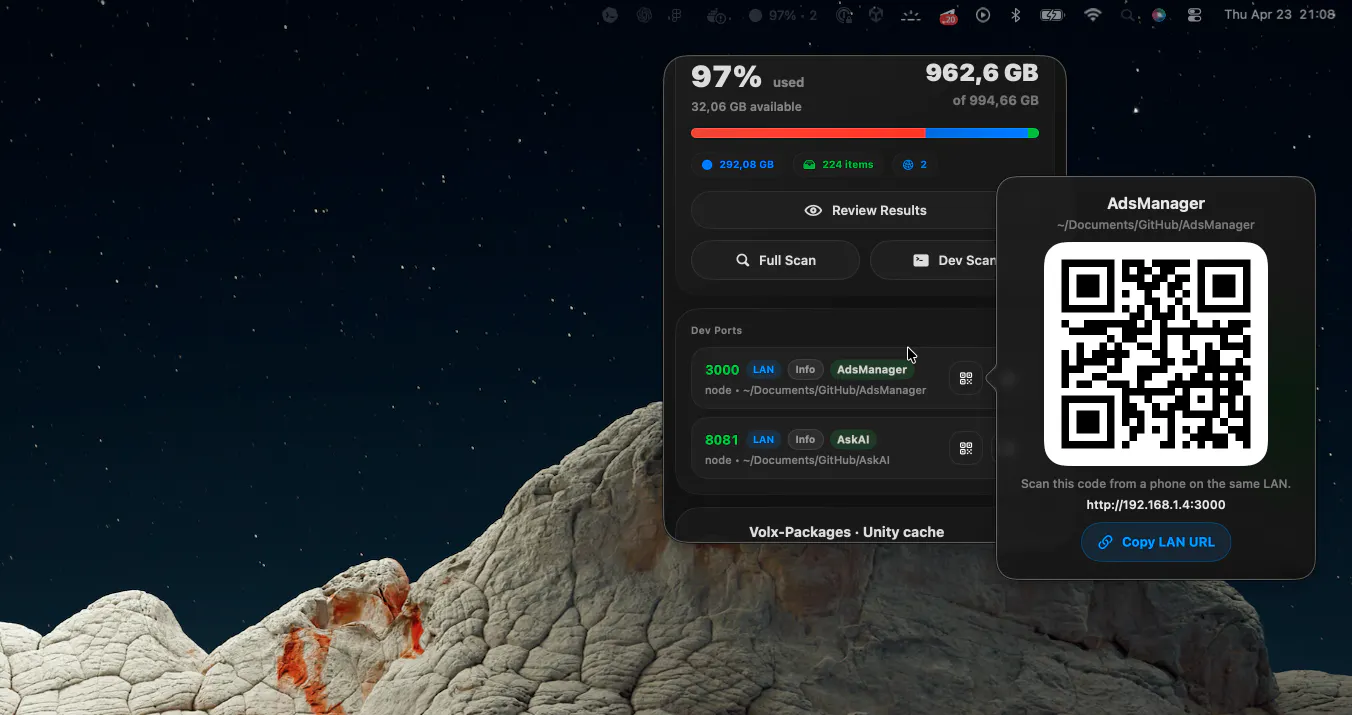
Copy LAN URL for shareable local servers
QR codes so a nearby phone can open the local server without typing the address manually
Clearer LAN vs Local only states
Better guidance when a server is bound in a way that prevents sharing
Open now respects the real bound host instead of treating everything like localhost
That made the feature much more useful in practice, especially when I want to quickly test something on a phone or share a local preview with another device on the same network.
I also shipped Project Health, which brings repository checks into the app alongside storage review. Projects can now surface things like missing local dependencies, stale build output, stale caches, and other environment issues, and those signals can also show up in Home, Smart Advisor, Ops Feed, and the sidebar.

So the product keeps moving further away from being “just a cleaner” and more toward helping developers understand and manage what is happening on their machines.
Curious:
how do you usually share or sanity-check local dev servers across devices today?
Full changelog:
Replies