


Eseer 1.0.21 — Blending Modes + Overlays Update
Hey Product Hunt 👋
Today I’m shipping a pretty big update for Eseer, my 3D Live Wallpaper creator + Android app.
Two features I’ve wanted for a long time are finally here — and they change how wallpapers can look:
1. Blending Modes (Screen / Multiply / Add)
You can now control how each layer interacts with the ones behind it.
It makes glow, lighting, shadows, atmosphere and neon effects way easier to create.
Great for:
Ambient fog
Neon accents
Extra contrast & depth
Light rays
Cinematic shading
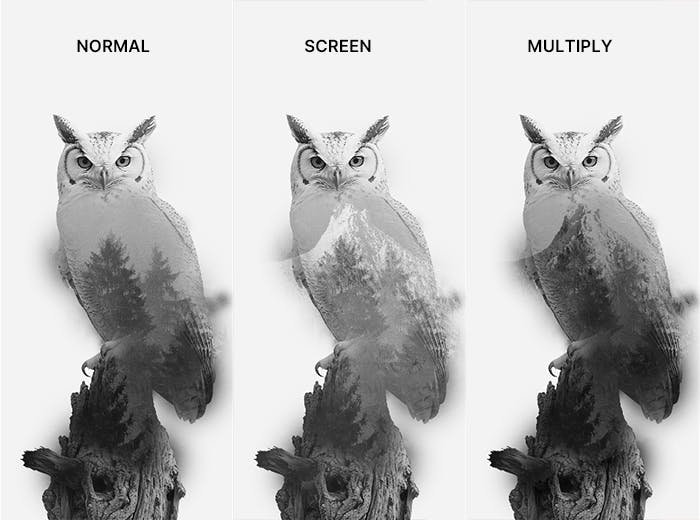
Blending turns even simple images into something with much more “style”.
2. Overlays (Static PNG/WebP on top of everything)
Overlays stay fixed and don’t move with parallax — perfect for:
Double exposure effects
UI/HUD frames
Borders & corners
Dust, grain, scratches
Lens flares
Text banners
You can use PNG or WEBP (with transparency), adjust opacity, and combine it with blending modes.

Works in both the PC Creator + Android App
These features are fully supported on:
Eseer Galileo — the PC Creator
The Eseer Android app (just import your .es wallpaper)
No extra setup. No external Photoshop work needed.
I also published a Quickstart Guide
If you want to create your first 3D live wallpaper, I wrote a step-by-step tutorial.
👉 You can read the full update + guide on seerobs.com
Join the community
If you make something cool, feel free to share it!
There’s also a Discord if you want help, feedback or to show your creations.
Replies