The only local config hub for syncing MCP servers, agent skills, custom rules, and credentials across popular AI tools. Configure once, then auto-sync to AI tools like Claude Code, Cursor and others. Everything stays on your machine—zero privacy or security concerns. Completely free and open source.
No reviews yetBe the first to leave a review for AI Tool Center
Maker
📌
Over the past year, I've been experimenting with different AI coding assistants: Claude Code, Cursor, VS Code, etc. Each one is powerful, but they all have the same friction point: they can be extended with MCP servers, custom skills, rules, hooks, subagents and more. The problem? Every time I found a useful MCP server or wanted to sync my custom instructions and rules, I had to manually configure it in each tool separately. Add a new server to Claude? Now I have to update Cursor, VS Code, and OpenCode. Update your rules? Copy-paste into multiple config files across different directories with different formats. It felt like I was managing the same configurations in different places, with no way to keep them in sync. And it wasn't just tedious—it was error-prone. I'd inevitably forget to update one tool, or accidentally sync an old version of a config. One weekend, instead of manually syncing yet again, I asked myself: why doesn't this just... exist? Why isn't there a single source of truth for AI tool configurations? So I built one.
What's in v1.0:
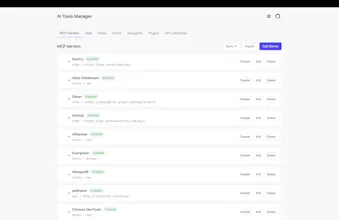
- MCP Server management — Add, edit, enable/disable, reorder, and health-check servers
- Sync to multiple tools — Instantly push configs to Claude Code, Cursor, Windsurf, VS Code
- Skills & rules — Manage agent skills and custom rules; they sync too
- Subagents & hooks — Support for subagent files and Claude Code hook configs
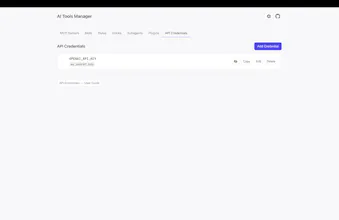
- API credentials — Securely store and manage sensitive keys (masked, with reveal toggle)
- Export/backup & import — Full config portability
- Everything stays local — No data leaves your machine
Full Disclaimer:
This tool is only useful if you're actually using multiple AI tools and MCP servers. If you're purely on Claude, or never use custom MCP servers, you probably don't need this yet. But if you're like me (juggling Claude Code, Cursor, and others, and you've built custom skills or integrated specific MCP servers) then this should save you hours of manual syncing. It's free, open source, and is purely local.
I'd love to hear from you: What AI tools are you using? Are there MCP servers or configurations you wish you could sync across tools? What's missing? The best feedback will shape what we build next.
Thanks for checking it out. Let's make AI tool management less painful together. 🚀