
Alias Bot
Replace repeated @mentions in Slack with channel aliases
80 followers
Replace repeated @mentions in Slack with channel aliases
80 followers
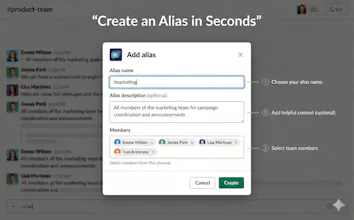
Teams often end up typing long @Alice @Bob @Charlie mentions cluttering the channel. Sometimes, some people get missed or the wrong person gets tagged. This gets worse with rotating or short-lived teams (on-call, releases, incidents). Alias Bot lets you define channel-scoped aliases (e.g. !reviewers, !oncall) so mentions expand to the right people for that channel, without needing to manage org-wide user groups.



Free Options
Launch Team

Atlassian LoomShow, don't just tell with Loom
Promoted
does it work between different workspaces? I need it desperately 🙌
@kate_ramakaieva Aliases are channel-specific. So you can set up !reviewers as an alias in multiple channels and they can refer to different people.
Could you elaborate what you mean by working between different workspaces? Thanks!
@sanketnadhani I’m a member of 18 Slack workspaces, so I need constantly switch between them to check mentions
@kate_ramakaieva You will have to install them individually in every workspace you need. Aliases are channel-specific.