

Aqua Voice
Fast Voice Input for Mac and Windows
5.0•14 reviews•622 followers
Fast Voice Input for Mac and Windows
5.0•14 reviews•622 followers
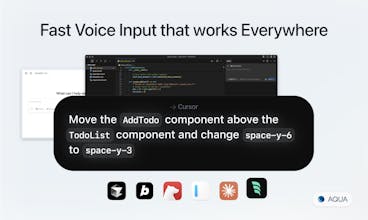
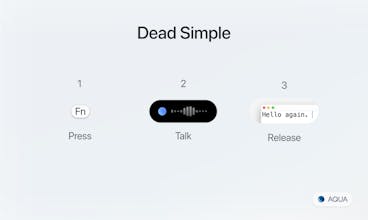
Aqua is fast AI dictation that lets you talk into any text field -- Cursor, Gmail, Slack, even your terminal. It starts up in under 50ms, inserts text in about a second (sometimes as fast as 450ms), and has state-of-the-art accuracy.



 Nuance Communications
Aqua Voice
It’s Finn from Aqua!
Aqua lets you talk into any text box. It's our attempt to make voice a first-class input method.
Watch the Video.
Live Demo.
I'm dyslexic and have been using dictation software since 6th grade. For over a decade, I've been chasing a dream that never quite worked - using your voice instead of your keyboard.
It's always been awkward, clunky, and just not actually better than typing. Siri is a complete joke, and a lot of well-meaning alternatives (I've tried them all) don't actually transform where you can use your voice.
Aqua lives on your desktop, and it lets you talk into any text field -- Cursor, Gmail, Slack, even your terminal. It does a lot more, but that’s the core. We’d love your feedback!
(Written with Aqua)
Product Hunt Favorites
@finn_brown Congrats on the launch Finn! I had started testing out @Wispr Flow and felt it was much more accurate than using iOS dictation. How is @Aqua differentiating itself from @Wispr Flow ?
Aqua Voice
@ph_leeanntrang Thanks! We're going to do iOS, but we're going to do iOS the right way. You might prefer Aqua over Flow Voice if you want:
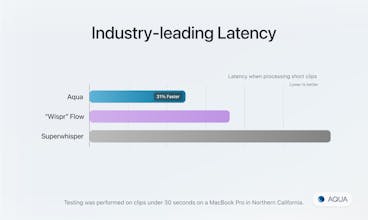
⚡ Faster Inference. Fewer mistakes(see benchmarks). More tuned output.
🎙️ Streaming mode: the dream for longer stuff, pacing around and dictating Churchill style.
🧠 Deep Context: increases accuracy when coding, messaging, and other complex scenarios by privately using what's on your screen. Think of it like MCP for every app that you don't have to setup.
🎛️ Custom Instructions: You can fine tune your output to get it just right:
Example: "Use lowercase in iMessage. In Figma, don't add periods or ending punctuation. Often used commands when in terminal, cursor, vscode: ..."
As you can see from some of the other comments, a lot of people have tried both and we've been having waves of people switch from Flow and then email us and say, "I've tried them all - you guys are #1."
(i posted this in another comment too but wanted ppl to see because this at the top!)
Product Hunt Favorites
@finn_brown awesome, thanks! I did notice the usecase of the different "styles" in diff apps. I haven't needed that yet, but that may grow on me. I will def give it a try!
reap
@finn_brown
Congrats on the launch — I recently gave Aqua a spin recently and I have to say, it’s hands down one of the most seamless and polished tools I’ve used. Incredible job building something that just works.
I’d love to make it part of my daily workflow, but I’m still a bit cautious about how Aqua handles data — especially with the deep context features that tap into what’s on my screen. That said, the transcription quality is unmatched. Nothing else like it out there -- will use that as daily driver.
@finn_brown Aqua looks great and could potentially replace @Wispr Flow for me. However, I was wondering about data privacy, as I couldn't find any details on your website. Flow explicitly states that "none of your transcripts will be stored by us." How does Aqua handle this? For example, are user audio files used for model training?
Raycast
Love Aqua Voice — it's super fast, accurate, and clever. Big fan.
Aqua Voice
@chrismessina Thanks Chris!
Aqua Voice
@chrismessina Thank you for the support Chris!
I have been using Aqua Voice for three months now. In fact, I'm dictating this with Aqua Voice. I would say for the most part, it's been super useful, but it does have some kinks, which I'm hoping the team will fix in the coming months. The biggest issue I have with it is that it doesn't always respond to the shortcut. And if it does respond to the shortcut, it doesn't always produce the transcription. I would say in my case, for each of those steps, it fails roughly 5 or 10 percent of the time for no obvious reason, so as a result, it works about 85 to 90 percent of the time. Not bad, still saves me a ton of time, but can get a bit frustrating when I've dictated something and then realize nothing has been generated.
Another issue is the occasional mistakes in transcription. Ironically, as I was dictating the above paragraph, I said, "it fails roughly 5 to 10% of the time," but what was generated was much more ominous: "it fails constantly, roughly five or ten percent of the time." It's encouraging that the tool is so self-deprecating :)
This product has a major problem. Maybe 70% - 80% percent of all transcriptions contain significant errors. About 20% of the time the errors are so bad that it's really obvious and easy to catch. It literally is in gibberish, foreign language, Chinese, just nonsensical words or text. So at least that is so obvious it can be picked up. But the problem is the other fifty to sixty percent of the time the errors are a bit more subtle baked into the text. So the end result is you just really can't trust this product
They have built a feature in where you can go to the history and do a re-transcribe. And when you do that, it actually fixes the transcription completely. You can copy it and paste it into whatever you were doing. But as a workflow, that's pretty terrible to have to do the whole time.
I've messaged their customer support many times. I've reached out to a guy called Pablo Penich and they just simply don't reply. They don't follow up. I've attached a loom video as an example here (and another LOOM VIDEO). He didn't bother looking at any examples I showed him.
Initially, I actually thought let me help them improve their products. We'll all benefit. If you see watch the Loom videos, you'll see that the re-transcribe feature works really well. So why not just use it first time around? My bet is they're trying to use a really cheap LLM to do the job so they can maximize money while delivering a shitty product.
On customer service... they don't pay attention, they just don't care, they're completely NON responsive. Frankly I've had better customer support from ATT.
So after 3-4 months of trying to make this a usable product and trying to see give them time to see if they can improve this, I've given up. I deleted the product, canceled my subscription. I went back to VoiceInk and it turns out they really have ironed all the kinks out of their product and it's 98%+ accurate transcription first time round.
So my advice, save yourself the pain and hassle of trying to use this product. If you're on a Mac, just go to VoiceInk. It'll save you a lot of hassle. If you're on a PC, I'm sure there are some good alternatives.
Quite frankly, I could have coded this better myself.
It looks fast!
Nice presentation, nice UI. Congrats for the launch.
What is your presentation tool ? It's like embed app in clean presentation slides.
Aqua Voice
@barnabed thanks! What do you mean? Do you mean the slides or do you mean the video?
I've tried virtually every modern dictation tool for macos and Aqua blows them all out of the water (pun intended). They've got the right team behind it, too—they ship quick and they don't miss.
Aqua Voice
@vinsidious Thanks Vince 🫡
Product Hunt
I've heard good things about Aqua. Going to give this a try and hoping it increases my email velocity. :)
Product Hunt
@rrhoover I'm especially curious what you think about email because I feel like Aqua is quite good in longer form dictation. It's still fast and snappy, but in longer form, it lets you kind of see what you're writing as you compose it and also seems to learn contextually from the app that's in focus.