
Beauty Diagram
Diagrams that don't look like they were auto-generated
117 followers
Diagrams that don't look like they were auto-generated
117 followers
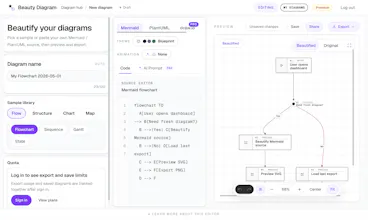
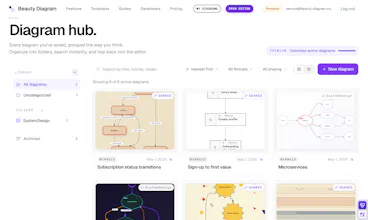
Beauty Diagram makes your Mermaid and PlantUML diagrams beautiful. Pick from curated themes, animate the flow, and export as SVG, PNG, or GIF. Use the web editor, CLI, or API to drop diagrams straight into docs, PRs, and presentations.




the Figma detour is the tax every Mermaid user knows too well. the CLI/API angle is the right call for making this actually stick in a workflow rather than being a one-off tool. curious about the GIF export specifically for animated playback: is the animation sequenced to follow the actual logic flow of the diagram, or is it more of a visual fade-in? that distinction matters a lot for whether it communicates the flow or just looks nice
@liviu_chita Sharp distinction — and honestly one we’ve thought a lot about.
The version live today uses a unified visual reveal: the same animation language works across flowcharts, sequence diagrams, swimlane, mind maps, etc. So it’s consistent across diagram types, but it’s not yet semantically following the actual logic flow.
We did experiment with flow-driven animation, where nodes/edges reveal in the diagram’s logical order. It works really well for flowcharts, but gets trickier across other diagram types because “logic flow” means different things in a sequence diagram, swimlane, or mind map.
So for v1, I chose consistency as the default. It should make the diagram easier to present, but I agree with your distinction: for some use cases, animation should communicate the flow, not just look nice.
That’s where I want to take it next: opt-in flow-aware animation per diagram type, and eventually more control over sequence/timing. The goal is: nice by default, with manual controls for timing, sequence, and effects when you need the animation to communicate a specific flow.
And yeah, glad the CLI/API direction lands.
@levi840714 the "nice by default, flow-aware as opt-in" framing is exactly the right call and honestly relieved to hear you're thinking about it that way. forcing semantic sequencing across every diagram type would create more problems than it solves since a swimlane and a flowchart have completely different ideas of what comes next. the opt-in approach also gives you a really natural moment where basic animation works out of the box and precise flow control becomes the thing teams actually want to pay for once they feel the difference. on the roadmap side, the batch mode with markdown extraction is the one i would push up the list. that workflow is where people will stop treating it as a one-off tool and start relying on it every day. genuinely rooting for this one 🙌
A great idea as a SaaS solution. Especially since I recently needed a mind map.
I tested your tool and have a question: Can fonts and colors be customized individually to match your own corporate design? Or are you currently limited to the theme settings?
Thanks @alex_spitz , really appreciate you testing it.
Our default goal is still the one-click flow: pick a theme and get a polished diagram quickly, without manually tuning every node.
But we also support interactive customization on the canvas for cases like yours. Right now the customization options are still limited, but you can already click elements and adjust things like block/line borders, backgrounds, and text colors.
We’ll keep expanding this, including more font and brand-style controls over time. For your mind map use case, would saved brand presets be enough, or would you prefer detailed per-element control?
@levi840714 Thanks for your reply. And to answer your question: I prefer detailed per-element control.
Congrats on the launch Levi! The GIF export for exec reviews is such a specific and real pain point, that alone would've saved me multiple "let me just screenshot this real quick" moments. Notion's rendering frustrates me the most honestly, which theme works best for dark mode docs?
Thanks @vishal7017
And yes, Notion’s Mermaid rendering is one of the cases I had in mind. The output can get pretty rough sometimes, even down to edges/lines looking slightly off, so I totally get the frustration.
For dark mode docs, I usually reach for the Obsidian theme first. It has that subtle glowing-on-dark look, which tends to fit dark documents really well.
Another option is to use one of the lighter, more colorful themes and export it with a transparent background. That way you don’t end up with a bright diagram sitting awkwardly inside a dark doc.
One small tip: before exporting a light theme with transparency, it may help to use Customize mode to lighten any darker lines or strokes on the canvas, so they stay readable on a dark background.
The CLI integration is the one I want to understand better. If I've got Mermaid diagrams living inside markdown files in a repo, can the CLI watch a directory and output styled SVGs automatically as part of a build step? Or is it more of a manual "run this, get that" thing?
@sounak_bhattacharya Great question — today `bd` CLI is single-shot:
`bd input.mmd -o output.svg --theme obsidian`
So right now it’s one file in, one styled SVG out. That works well inside a build step or GitHub Action if you wire it around specific files, but directory watch / native batch processing isn’t in the CLI yet.
Batch mode is actively in the works though, and the goal is exactly your scenario: point `bd` at a directory or glob, regenerate all diagrams in one pass, and make it part of `npm run build` or CI.
Longer term, I also want this to fit into automated docs workflows more broadly. I’ve written a Beauty Diagram SKILL for agent workflows too, so an agent can watch what changed and regenerate the right diagrams
Quick question back: are your Mermaid diagrams usually inline code blocks inside Markdown, or standalone `.mmd` files? That affects whether batch mode should start as a simple glob, or include a Markdown extraction step too.
Congrats on the launch.
Japan-based founder here. One Japan-specific thought: diagram tools often need CJK text checks before they feel reliable here. Japanese fonts, line breaks, labels, and dense stakeholder diagrams can break the experience quietly.
The strongest local angle may be dev docs / PRDs / stakeholder presentations with Japanese templates, rather than only “beautiful diagrams.”
Thank you, @wakuta . This is really valuable feedback.
You’re right that for Japanese/CJK use cases, 'beautiful' is not enough if fonts, line breaks, labels or dense stakeholder diagrams are unreliable. For developer documentation, PRDs and stakeholder presentations, the output needs to look native to the document.
I’ll take this on board: CJK font handling, line wrapping and Japanese-friendly templates and presets are now on my list of things to explore more deliberately.
@levi840714 Glad it was useful.
For Japanese docs, I’d probably test with 3 concrete samples:
1. a dense PRD flow with Japanese labels,
2. a stakeholder-facing architecture diagram with mixed English/Japanese terms,
3. a Notion/GitHub-style export where line wrapping and font weight matter.
If those look native, the Japan angle becomes much stronger than just “CJK support.”
ngl this is something I didn’t realize I wanted but makes sense
I always end up screenshotting or redoing diagrams when they need to look decent 😅
this feels like a shortcut for that
@noahzeph Exactly. That screenshot/redraw step is the whole pain point I wanted to remove.
Mermaid/PlantUML are great for quickly creating diagrams, especially with the AI, but the output often needs extra polish before it is ready for docs or decks.
@levi840714 Yeah, that makes sense
It's not even the diagram itself, it's that last 10-20% where you're like "ok this looks kinda rough now" and then suddenly you're in Figma for 20 mins.
If this cuts that step out, that's actually pretty valuable.
Also feels like this could fit nicely into a docs workflow if the output stays consistent across tools especially with the CLI/API side.
Curious how you're thinking about that long term and if you're planning to expand the team around it.
@noahzeph Absolutely, that “last 10-20%” is the pain I’m trying to remove.
Long term, I don’t want Beauty Diagram to be just a one-off beautifier. The direction is more like a consistent diagram rendering layer for the tools teams already use: web editor for quick work, CLI for docs/README workflows, and API for CI or internal tooling.
Team-wise, it’s still early and lean right now, but I’m treating this as a real product, not just a weekend demo.
I’m also planning to push it further into automated workflows. The CLI/API side matters a lot there, especially with AI agents: agents can already generate Mermaid/PlantUML, so the next step is letting them produce polished diagrams automatically.
I even wrote a Beauty Diagram SKILL for that, so an agent can call it directly in the workflow instead of leaving someone to clean up the diagram manually afterward.