
Bench for Claude Code
Store, review, and share your Claude Code sessions
599 followers
Store, review, and share your Claude Code sessions
599 followers
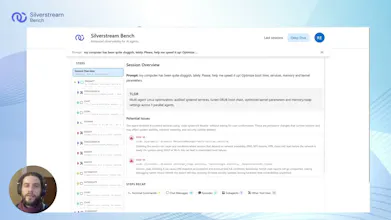
Claude Code just opened a PR. But do you really know what it did? By using Bench you can automatically store every session and easily find out what happened. Spot issues at a glance, dig into every tool call and file change, and share the full context with others through a single link: no further context needed. When things go right, embed the history in your PRs. When things go wrong, send the link to a colleague to ask for help. Free, no limits. One prompt to set up on Mac and Linux.




Hey Product Hunt! 👋
I’m Manuel, co-founder of Silverstream AI. Since 2018, I’ve been working on AI agents across Google, Meta, and Mila. Now I’m building Bench for Claude Code with a small team.
If you use Claude Code a lot and want to store, review, or share its sessions, this tool is for you. Once connected, Bench automatically records and organizes your sessions, letting you inspect and debug them on your own or share them with your team to improve your workflows.
Getting started is simple:
• Go to bench.silverstream.ai and set it up in under a minute on Mac or Linux
• Keep using Claude Code as usual
• Open Bench when you need to understand or share a session
That’s it.
Bench is completely free. We built it for ourselves and now want as many developers as possible to try it and shape it with us.
We’ll be here all day reading and replying to feedback (without using Claude 😂). Would love to hear what you think!
Btw, support for more agents is coming soon, so stay tuned!
@manuel_del_verme Many congratulations on the launch, Manuel and team! :)
This brings much-needed visibility into Claude Code sessions, especially for debugging + collaboration for async teams. Do you also plan to add deeper analytics or insights (like patterns across sessions or common failure points) to help developers improve workflows over time?
@manuel_del_verme @rohanrecommends Hey! A warm thank you from the team side! :)
We do already provide a few basic but effective ways to speed up session analysis, precisely through key insights and recaps, and our next goal is just to iterate on this more and more, to provide easier and faster ways to analyse your sessions. So, we are absolutely going to push further in that direction.
The idea of spotting cross-session patterns however is something we haven't considered yet, and it's really intriguing! We'll totally consider it as well. After all, that's the goal of this launch: to have as many people as possible to test Bench out, and identify how we could improve it! :)
Thank you!
@manuel_del_verme congrats on the launch. The subagent visibility part is what caught my attention. I run sessions that spawn 3-4 levels of subagents and half the time I don't even know one of them went off and rewrote a config file until something breaks later. Being able to trace back to which subagent did what, and why, would save me a lot of "git diff, wait what changed" moments. Does the timeline view let you jump straight to a specific subagent's actions, or do you still need to scroll through the whole session?
@manuel_del_verme @alan_silverstreams Hey! :) Thank you from all the team! I totally share your frustration, the subagent logs in particular are somehow "hidden" from the Claude Code output, so it's really hard to understand what is going on there, apart from when Claude needs for some specific permission. And the short answer is yes, that's exactly why we built a collapsible tree of steps, where the hierarchy is given precisely to separate the various subagent runs.
So, through Bench, you have a few options:
you can use the "recap" interface to spot exactly the subagent run you are interested about, click on it and skim through what it did
you can use the tree navigator in the sidebar to identify who did what, and dig deeper only on the substeps you really care about
or, sometimes, you don't really care about who did what, and you prefer to just have a list of all the bash commands that happened to take a look at the full list of "side effects", spotting the most delicate ones even before starting to scroll in the steps list
Right now Bench allows you to support all these flows quite intuitively (or at least, I hope so), so I really encourage you to try and take a look: you can just analyze a simple session where you explicitly ask Claude Code to spin up subagents, if you don't want to share real data, and see how easily you get to pinpoint the details about it! :)
Just please note that, right now, the hierarchical tree visualization is a bit "limited" in that sense: we obviously sort everything chronologically, but subagents "talk" to each other and perform operations in parallel, out of order, and this is something we cannot possibly show accurately there, while grouping steps by subagent owner. The tool use recaps, however, are sorted chronologically, and we are working on introducing a separate timeline view, to simplify showing what happened from a chronologically sound point of view as well, so we'll get there soon! Stay tuned :)
How deep does it go when tracking tool calls and file changes across a session?
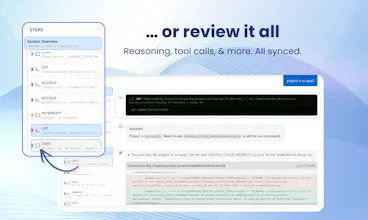
@hamza_afzal_butt as deep as possible :) The whole goal of Bench is to trace as many details as possible on every action performed by the agent, and then to allow you to review spot the details were looking for easily and quickly! The limit is just on what Claude Code allows us to extract, which is quite a lot anyways! In terms of tool calls, we can extract all the details about the command used to launch the tool, and the "origin" of that call, whether it's the conversation that led the agent there or a subagent run that had a specific goal to reach.
About file changes, it's basically the same thing: we obviously can show the delta, but also why and when the agent took the decision to apply that specific change.
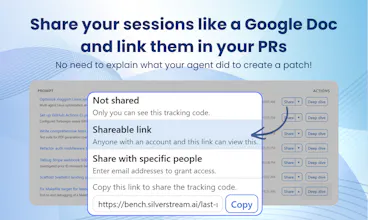
Why aren't your Claude Code sessions as easy and convenient to share as Google Docs?
Well now they can be, thanks to Silverstream's Bench!
This free tool gives you insight into your agent runs so you can see where things went off the rails, and then share a link to your colleagues or coworkers to track down — and fix — the issue.
This is a simple, useful tool that can start using now to get a handle on your agents' performance.
Congrats on the launch!
Quick question, any plans to add Windows support? Would love to use this but currently stuck on Windows 🙂
@julia_zakharova2 Hey Julia! Support for windows is in our top-3 feature list so will come soon! You can subscribe for updates on bench.silverstream.ai to get notified when this comes in :)
I've tackled similar challenges with code reviews and context sharing, and I love how Bench automates session storage. How do you handle sensitive data in stored sessions to ensure developers aren’t accidentally sharing proprietary code?
@trydoff Hi there! :)
That really is a tough topic, that we will surely iterate on in the future. Right now, we moved in these directions:
you own your trace: you are free to delete any tracking code, along with all its related sessions, anytime you deem fit. You can even set expiration dates
we intentionally do not record any tool use OUTPUT, just the inputs, precisely because we want to do this right. And, when we'll implement this, it will become an opt-in feature for sure
you can define separate tracking codes for different uses: they are configured through simple envfiles, so it's quite trivial to keep data separated, and e.g. use a disposable tracking code for the activity logs that you may want to eventually delete in the future - or you may even just disable Bench altogether for specific projects if you need to
of course, the sharing functionality is opt-in and completely under your control, so you can share only the sessions that you deem right and stop sharing it whenever you want
It is also worth mentioning that our company, Silverstream, is part of our larger AI Alliance collaboration with CUBE (https://arxiv.org/abs/2603.15798) and we are in the process of offering an open source version, which will help to completely clear out that doubt if this concerns you too much.
I also encourage you to contact us at manuel@silverstream.ai to get further details about the whole process :)
Claude Code is so capable that we end up trusting it a little too much. But that's exactly when things get interesting:
I've had it silently migrate my local DB to an incompatible version while fixing a bug.
Another time, Claude decided the only way it had to fix an issue with a particulary inefficient for loop, was to turn off my audio drivers.
The real problem isn't that it made mistakes. It's that I had no way to go back and understand what it did, when, and why, to learn from it and finetune my prompts. Sure, I could just scroll the claude logs, but what if the "failures" weren't apparent until much later? Or what if the issue was at step 315 out of an hour-long agent run of 500 steps?
That's why Bench is a big deal. Not just a logger, but an audit trail that makes agent actions legible: every tool call, file change, conversation, subagent detail, all is there for you for as long as you need it, searchable and shareable. A great way to "share your context" to your colleagues, as well as being what I really needed to learn from my mistakes and improve in terms of prompt writing!
Now add observability + failure handling, otherwise it’s just scheduled guessing.
@ion_simion_bajinaru That's exactly what we are here for :) Providing observability for your sessions, both scheduled and in real time!