a browser-based studio for product teams designing ui sounds — clicks, toggles, confirmations, errors. shape them with faders or a full synth chain, then export ready-to-use web audio, swift, or kotlin code. no sample packs, no install, no account to start.
No reviews yetBe the first to leave a review for blipblip
Maker
📌
hey hunters 👋
quick thing first: use code HUNTER at checkout for 50% off lifetime access — $3.50 instead of $7, one payment, unlimited exports for good.
i built blip blip because every time our team needed a ui sound (a toggle click, a success chime, an error tone, a notification) we'd end up doing the same thing: digging through a stock sfx pack, previewing sample after sample that was almost right, and still worrying about license terms just to ship one click. even the sound we settled on rarely matched our product's actual character, and once we'd picked something, getting it into real ios, android, or web code meant treating it as a one-off asset instead of something we could tune and reuse. that whole loop is what blip blip replaces.
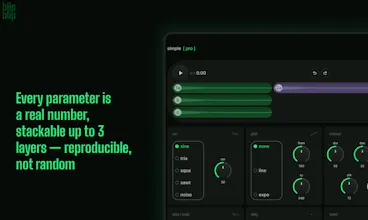
it's a browser-based sound design studio: no install, and you can open it, design a sound, preview it, and browse the preset library without even signing in. there are two ways to shape a sound. simple mode is four faders (direction, length, variation, loudness) plus an xy pad for brightness/space, fast and ear-driven. pro mode exposes the full synth chain (oscillator, pitch, envelope, filter, drive/crush, delay, reverb, output), stackable up to 3 layers, where every parameter is a real number instead of a vague “take,” so what you make is reproducible. there's also composer mode: a 16-pad grid mapped to your keyboard for performing and recording short rhythmic sequences in real time, like a multi-step success chime. if you'd rather start from something built, there's a preset library crossing 17 product contexts (input, navigation, feedback, reward, commerce, and more) with 5 tonal characters. the part i care about most is export: you don't get a wav file, you get synthesis code — web audio javascript, swift (avaudioengine), or kotlin (audiotrack) — with per-play variation baked in as constants so it doesn't sound robotic by the hundredth click. one export unlocks all three formats.
honest note on where it's rough: blip blip itself is web-only today, there's no native desktop or mobile app to design in, only a browser studio whose output targets web, ios, and android. composer mode is the one i trust least: 16 pads and a fixed keyboard mapping work fine for a short chime, but i'm not sure it holds up once people try longer or more complex sequences.
two specific things i'd genuinely like feedback on: if you're an ios or android dev, does the exported swift or kotlin code drop into a real project cleanly, or is there friction in how it's structured? and if you're on the design side, does browsing presets by 17 categories × 5 characters actually help you land on a sound faster, or would you rather describe what you want and have it generated? try it without an account first (only export and cloud saves are gated) and tell me where it breaks or where it's not obviously better than what you were doing before.