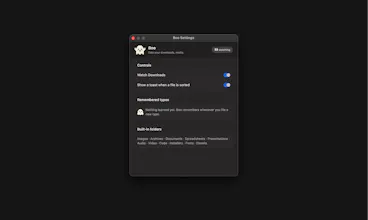
Boo is a free, open source menu-bar app for macOS that quietly sorts your Downloads folder as files arrive. Known file types move into the right folder automatically, no setup, no rules to write. See a file type Boo hasn't met before? It pops up once, asks where it goes, then remembers for good. Native Swift, a couple MB, no Electron. Built because Downloads folders shouldn't be a landfill.
No reviews yetBe the first to leave a review for Boo
Maker
📌
Hey ProductHunt 👋
I built Boo because my Downloads folder was a disaster and I was tired of manually sorting it every week.
It's a tiny ghost that lives in your menu bar. Drop a file in Downloads and it either eats it silently (known file types go straight to the right folder) or looks confused and asks where it should go if it's never seen that type before. It remembers your answer after that, so it only ever asks once per file type.
Fully native Swift, no Electron, no background bloat. Free and open source, MIT licensed, would love contributions or ideas for what to add next.
Happy to answer anything about how it works or what's coming.
Report
Swift native is a nice touch, does it handle files that get renamed or moved by other apps later, or only catch them at the moment they hit Downloads?
Report
Maker
@metehangndzzzv Good question. Boo watches your Downloads folder in real time, so it catches new files, renames, and deletes happening right there, not just fresh downloads.
One limit: once a file gets moved into a subfolder like Images or Archives, Boo stops watching it. So if you rename something after it's already been sorted, Boo won't notice. It's built to keep Downloads itself tidy, not to track files everywhere on your Mac.
Report
Fun idea for those who have a mess in Downloads:) And I love the idea of character. Just one crazy idea - as a person who have mess in downloads all the time I would love character asking me some fun questions to stimulate me giving a bit more attention to sorting, for example `are you sure to lose it for years'?, 'should it go directly to the bin'? `is this file life changing for you' 'if this picture was a treasure, where should I hide it'? :)
Report
Maker
@julia_shtogren Thanks! Love this idea. Boo stays quiet for files it already knows, but something like this could be fun for a "spring cleaning" mode later. Bookmarking it :)
Report
finally something that tames the chaos in my Downloads folder. loved that it asked once about a weird project file and then quietly handled it forever after.
Report
Maker
@tugay810771 Thanks! Yeah, thats my favorite part too, glad it caught your weird file correctly.
Report
Native Swift over Electron is a real flex here, and you can feel it in how light the app sits in the menu bar. The one-time "where should this go" prompt is a genuinely thoughtful touch.
Report
Maker
@sema1l0d Thanks! Yeah, native was a deliberate choice, wanted it to feel invisible in the menu bar, not another Electron app eating memory. Glad the prompt landed well too.
Report
Native Swift at a couple MB is such a refreshing change of pace. Love that it just learns where things go instead of throwing a config screen at you on day one.
Report
i find this very relatable as someone who's download folder is in chaos, and sometimes i just forget to organize it and then everything just piles up. the name is cute too, thanks, this was a need!!
Report
Maker
@diksha_k Thanks! Yeah, that pile-up-and-forget thing is exactly why I built it. Glad it's relatable. Hope it earns its spot in your menu bar.


Swift native is a nice touch, does it handle files that get renamed or moved by other apps later, or only catch them at the moment they hit Downloads?
@metehangndzzzv Good question. Boo watches your Downloads folder in real time, so it catches new files, renames, and deletes happening right there, not just fresh downloads.
One limit: once a file gets moved into a subfolder like Images or Archives, Boo stops watching it. So if you rename something after it's already been sorted, Boo won't notice. It's built to keep Downloads itself tidy, not to track files everywhere on your Mac.
Fun idea for those who have a mess in Downloads:) And I love the idea of character. Just one crazy idea - as a person who have mess in downloads all the time I would love character asking me some fun questions to stimulate me giving a bit more attention to sorting, for example `are you sure to lose it for years'?, 'should it go directly to the bin'? `is this file life changing for you' 'if this picture was a treasure, where should I hide it'? :)
@julia_shtogren Thanks! Love this idea. Boo stays quiet for files it already knows, but something like this could be fun for a "spring cleaning" mode later. Bookmarking it :)
finally something that tames the chaos in my Downloads folder. loved that it asked once about a weird project file and then quietly handled it forever after.
@tugay810771 Thanks! Yeah, thats my favorite part too, glad it caught your weird file correctly.
Native Swift over Electron is a real flex here, and you can feel it in how light the app sits in the menu bar. The one-time "where should this go" prompt is a genuinely thoughtful touch.
@sema1l0d Thanks! Yeah, native was a deliberate choice, wanted it to feel invisible in the menu bar, not another Electron app eating memory. Glad the prompt landed well too.
Native Swift at a couple MB is such a refreshing change of pace. Love that it just learns where things go instead of throwing a config screen at you on day one.
i find this very relatable as someone who's download folder is in chaos, and sometimes i just forget to organize it and then everything just piles up. the name is cute too, thanks, this was a need!!
@diksha_k Thanks! Yeah, that pile-up-and-forget thing is exactly why I built it. Glad it's relatable. Hope it earns its spot in your menu bar.