Launching today

Free and private AI Notetaker
Stop paying for Granola
37 followers
Stop paying for Granola
37 followers
Bookipi AI Notetaker is a free meeting notetaker that runs natively on your Mac. No account needed: download the AI models once and start recording right away. Transcription and summaries happen locally, with no bots joining your calls, no subscription and no data uploaded. Ask AI about past meetings, dictate into any app, organize notes by people and folders, import your notes from Granola, and connect your own AI model if you prefer. Requires macOS 26 on Apple Silicon.


Hey Product Hunt! 👋
We built Bookipi AI Notetaker because we wanted a meeting notetaker that’s free, local and private, and actually nice to use. The ones we tried either sent everything to the cloud or felt clunky, so we made our own.
💸 Free. There’s no subscription and no limits on meetings. You get every feature without paying anything.
💻 Local. Recording, transcription and summaries all happen on your device. No bot joins your call, and you don’t have to upload anything.
🔒 Private. Your conversations stay on your Mac. That matters for client calls, legal conversations and personal meetings. Because there’s no bot to signal that the call is being recorded, Notetaker notifies about consent first. Being private shouldn’t mean being invisible.
✨ What else it does:
🎙️ Dictation: speak, and the text appears wherever you’re typing
💬 Ask AI: ask questions about your meetings and get answers from your notes
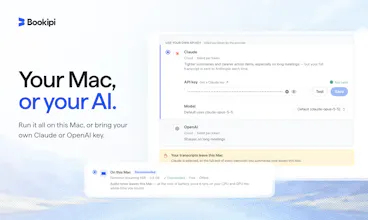
🔌 Bring your own model: local is the default, but you can connect a third-party model if you prefer
📥 Granola import: bring your history with you if you’re switching
🗂️ Notes organised by person and folder
📅 Syncs with Google, Outlook and Apple Calendar
🗣️ Local speaker identification and labeling for better transcripts
We’d love to hear what you think of the whole flow, from hitting record to reading your summary, taking notes, using Ask AI and dictation.
👉 It’s free on Mac. Give it a try!
Curious to see how will this blend with my current workflow. The Claude Code connection is one of the features i'm looking for on a notetaker.
Hi @tagti_bism , so glad you found it useful! Initially, we only added 3rd party support via API keys, but then we realised people might want to use their existing AI subscription and have a simpler way to connect.
Please share how it'll go with your workflow 🤖 - I'm super interested to know the results!
Glad you included a reminder to tell people the call is being recorded. Removing the meeting bot makes that easier to forget.
Hey@oleksii_sekundant , thanks for noticing it!
We are also working on a video watermark feature to make it more obvious that the call is being recorded. Hopefully we can include it in the upcoming update soon!
I just tested it, and actually the first integration was quite smooth, connecting to my claude account and google calendar was seamless. The UI seems aesthetic and native!
I am waiting on to encounter the actual meeting to see how this app works 👍 Nice work!
Hi@js_pk, thanks for trying out our app! So glad you found the experience really smooth. We have a lot more features in development, so hope you stick around and please let us know how your first meeting goes! 🙏
My only concern for note takers before was privacy. Love that this one runs locally. It was also really easy to setup 🙌
Hey@jeffreynerona , that was our concern too. There were a lot of alternatives, but they didn't feel very polished. We spent a lot of time making sure the UX makes sense and the product was easy to setup and use. Let us know if you have any features you'd like to see!
No subscription and everything runs locally. Very ideal for those of us that don't want conversations going God knows where.
Hey @resty_artiaga ! Really appreciate the support! We also got tired of not knowing where our conversations go, so we built the best app we could imagine for ourselves <3
We also added support for 3rd party AI just in case you need that extra frontier boost for some meetings 😉
So, I was casually scrolling through Reddit and Product Hunt, hunting for a Granola alternative. Don't get me wrong, Granola is great, but it was getting a bit pricey! I wanted something free, local, and just as pretty.
I came across this app on my feed and decided to try it out for myself and wow, I am impressed. Moving my notes over from Granola was a breeze, so I just picked up right where I left off.
My favorite part is the voice transcription! I don't think I can ever go back to plain old typing. My slow fingers and terrible spelling no longer hold me back.
For a free app, I really didn't expect it to feel this smooth and high-quality. As a designer myself, I'm super picky about my MacOS apps, but this one just earned a permanent spot on my curated list.
I just hooked it up to my Google Calendar and can't wait to test it out in my next meeting. Fingers crossed I can finally ditch my Granola subscription for good... and spend that extra cash on coffee instead! ☕️
@louis_lo thanks for such detailed feedback, reading comments like this makes the whole journey of building this product worth it - especially coming from a designer! We also realised we didn't want to pay for other tools anymore since there are so many good local AI models now. Please let us know if you'd like to see any other features 🙌