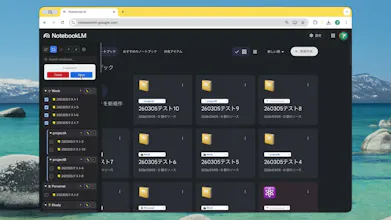
Google NotebookLM is powerful, but it lacks folder management. As your notebooks grow, finding the right one becomes frustrating. Bookshelf is a free Chrome extension that fixes this: 📁 Folders & Subfolders — organize notebooks in a tree structure 🖱️ Drag & Drop — rearrange notebooks intuitively 🔍 Search & Sort — filter instantly by name or date ☁️ Cloud Sync — sync across devices 🌙 Dark Mode support 🌐 6 Languages (EN/JA/ZH/KO/ES)
Hey Product Hunt! 👋
I built Bookshelf because I hit a wall with NotebookLM.
After creating 50+ notebooks for research and writing projects, I realized there's no way to organize them — just a flat, endless list. I wanted folders. Subfolders. A way to keep work and personal projects separate.
So I built this as a weekend project, and it became something I use every day.
What's in v2.0:
• Folders & Subfolders
• Drag & Drop to rearrange
• Search & Sort
• Cloud Sync across devices
• Bulk Edit mode
• Dark Mode
• 6 Languages
Everything is stored locally in your browser — no external servers, no tracking.
📖 Full story behind this project:
[https://medium.com/@south0120/i-...]
I'd love your feedback! What features would make your NotebookLM workflow better?
Thanks for checking it out 📚
Report
The flat list problem is real. I've been using NotebookLM for research lately and it already feels messy with just 15 notebooks 😂 Does the folder structure survive if NotebookLM updates their UI?
@ray_artlas
Totally agree — it gets messy surprisingly fast, even with just a handful of notebooks 😂
Great question as well!
Since Bookshelf runs as a Chrome extension, major UI changes in NotebookLM could potentially affect it.
That said, I’m actively maintaining it and keeping a close eye on updates, so I can quickly fix things if needed.
Also, your folder structure itself is stored locally (and synced), so your data stays safe.
Would love for you to try it out and see how it feels 🙌
Report
@south0120 Good to know the folder data is stored separately. I'll give it a try this week 👍
I built this because managing sources in NotebookLM quickly became messy as I used it more.
Bookshelf adds folders, search, and structure — making research workflows much easier.
Fun fact: I'm actually not a professional engineer. I built this using AI tools and a lot of trial and error.
Would love to hear your feedback or answer any questions 🙌
Report
Congrats on launching and building! 🔥
This resonated with me because I'm also at a point where I have a lot of things in my NotebookLM, and I'm trying to find a way to keep everything organized 😅






Bookshelf for NotebookLM
The flat list problem is real. I've been using NotebookLM for research lately and it already feels messy with just 15 notebooks 😂 Does the folder structure survive if NotebookLM updates their UI?
Bookshelf for NotebookLM
@south0120 Good to know the folder data is stored separately. I'll give it a try this week 👍
Bookshelf for NotebookLM
@ray_artlas
Glad that helped, thanks! 🙌
Would love to hear what you think once you’ve tried it — always looking to improve.
Hope it makes things a bit more manageable for you 👍
Bookshelf for NotebookLM
Hi everyone! I'm the maker of Bookshelf 👋
I built this because managing sources in NotebookLM quickly became messy as I used it more.
Bookshelf adds folders, search, and structure — making research workflows much easier.
Fun fact: I'm actually not a professional engineer. I built this using AI tools and a lot of trial and error.
Would love to hear your feedback or answer any questions 🙌
Congrats on launching and building! 🔥
This resonated with me because I'm also at a point where I have a lot of things in my NotebookLM, and I'm trying to find a way to keep everything organized 😅
Bookshelf for NotebookLM
@ruxandra_mazilu
Thank you so much! 🔥
That’s exactly the problem I ran into as well — things get messy really quickly as you add more notebooks 😅
Bookshelf was built to solve that, so I’d love for you to give it a try!
Would be really curious to hear how it works for you 🙌