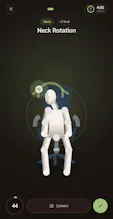
I am thrilled to officially launch Cherry Timer! Built specifically for developers and remote professionals, it’s a clean Pomodoro timer that transforms passive countdowns into active breaks. Instead of scrolling your phone, the app guides you through desk stretches, quick movement, and eye-care routines to combat burnout and back strain right at your workstation. 100% private, with no ads or tracking. Protect your health without breaking your workflow. Check it out on Google Play!
Hey everyone! Thanks for checking out Cherry Timer.
The inspiration behind this app comes from personal frustration. As a software developer, I spend hours glued to my desk. I used standard Pomodoro apps, but during the breaks, I found myself either staring at the empty countdown or mindlessly scrolling on my phone. My mind wasn’t recharging, and my body was paying the price with constant back stiffness and eye strain.
I wanted a frictionless tool that combined focus blocks with quick, zero-setup physical well-being—specifically designed for digital professionals who just need to release tension without leaving their workstation.
How the project evolved:
Initially, I set out to build a very simple, lightweight kitchen timer clone with basic stretch reminders. However, as I spent more time developing it, the scope completely evolved based on what I actually needed in my daily workflow.
I realized reminders weren't enough, so I built out full, guided animations for desk stretches. Then, I wanted to address digital eye strain, which led to the integration of the science-backed 20-20-20 rule. Finally, I wanted to push the technical boundaries of what a premium helper app could do, which inspired me to develop an optional camera-based posture tracking system to count reps and check form in real time—keeping it 100% private and processed entirely on-device.
I built this because it’s the exact tool I desperately needed for my own routine, and I wanted to make sure it felt like a clean, professional utility: no ads, no trackers, and no mandatory sign-ups.
I’d absolutely love to hear your thoughts, feedback, or any feature suggestions you have. What do your remote work or study breaks look like right now? Let me know in the replies!
Report
Love the focus on active breaks over passive scrolling, really needed this. One thing that would push it over the top for me: a quick way to pause or skip an exercise mid-routine without resetting the whole timer, since sometimes a Slack message lands at the worst moment.
Report
Maker
@baharrwev Ah, good catch! You're totally right—the pause functionality is actually working for exercises, but it looks like I missed keeping that same behavior for the stretch routines.
Thanks for pointing that out! It should be a quick fix on my end to bring that pause/skip capability over to the stretches so Slack doesn't ruin your flow. I'll get that sorted out in the next update.
Really appreciate you digging into it and helping me spot this!
Report
Tried it during a coding sprint and the desk stretch prompts actually felt doable in a small apartment. Love that there's no sign-in or ads getting in the way of just hitting start.
Report
Maker
@ayferkeskide6x Awesome to hear that! Knowing it fits perfectly into a coding sprint—and a tight apartment space—is exactly what I was hoping for.
I really wanted to keep the friction at absolute zero, because the last thing you want when you're in the zone is to battle with a login screen or close a popup ad just to take a quick break.
Thanks a ton for trying it out during your workflow, comments like this make the whole build worth it!
Report
No reviews yetBe the first to leave a review for Cherry Time. Active Breaks
Love the focus on active breaks over passive scrolling, really needed this. One thing that would push it over the top for me: a quick way to pause or skip an exercise mid-routine without resetting the whole timer, since sometimes a Slack message lands at the worst moment.
@baharrwev Ah, good catch! You're totally right—the pause functionality is actually working for exercises, but it looks like I missed keeping that same behavior for the stretch routines.
Thanks for pointing that out! It should be a quick fix on my end to bring that pause/skip capability over to the stretches so Slack doesn't ruin your flow. I'll get that sorted out in the next update.
Really appreciate you digging into it and helping me spot this!
Tried it during a coding sprint and the desk stretch prompts actually felt doable in a small apartment. Love that there's no sign-in or ads getting in the way of just hitting start.
@ayferkeskide6x Awesome to hear that! Knowing it fits perfectly into a coding sprint—and a tight apartment space—is exactly what I was hoping for.
I really wanted to keep the friction at absolute zero, because the last thing you want when you're in the zone is to battle with a login screen or close a popup ad just to take a quick break.
Thanks a ton for trying it out during your workflow, comments like this make the whole build worth it!