Supercharge your productivity by using ChatGPT on any tab without hassle of copy-pasting with our easy-to-use Chrome extension. Improve your writing, generate blog posts and crush coding issues with ChatGPT keyboard shortcut.
Hello Product Hunt✌️
We built this Chrome extension so you use ChatGPT on any tab without hassle of copy-pasting. Here is what you can do with the app:
👩🏼💻 Fix code bugs 10x faster
Quickly get code explanations and answers to hard coding issues not answered on StackOverflow. Right, again press Cmd/Alt + J.
🔍 Get human-like answers to your searches
Get the answer you need instantly, without searching through pages of Google results. Don't press anything! We've got you covered.
💌 Write emails like a native speaker
Feel confident about your grammar, spelling and writing style. Simply select the text and press Cmd/Alt + J.
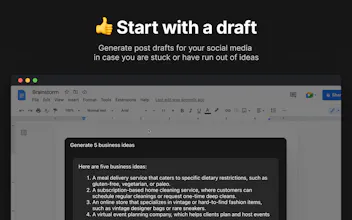
👍 Boost your social engagement
Generate post drafts for your social media in case you are stuck or have run out of ideas. Simply press Cmd/Alt + J.
I really hope you like it! But in any case, we would love to hear your feedback!
By the way, feel free to subscribe to my Twitter!
https://twitter.com/yrebryk
Super useful. With the 2 x faster access on your basic plan, are you tapping into the priority access from the OpenAI $20 plan released recently? In other words is your Basic plan a way to get all that extra functionality plus better AI speeds and uptime for the same price?
@webbuzzau actually we are not using the OpenAI premium plan in our premium plan, but if you decide to buy their plan, it will work with your CmdJ extension on the free plan out of the box
We are using OpenAI GPT3 API for our premium plan, where we use the same AI version as ChatGPT + custom prompts, which gives 2x faster speed and the quality is around the same (and with this approach, we have the flexibility to improve it in the future)
Let me know in chat support at https://cmdj.app if you have any issues with any premium you decide to choose
Report
@daniel_dhawan Thanks good to know. I notice now that each Google search produces a chatGPT answer. My first thoughts were that this can't be sustainable for you from a data cost / API call perpective. Isn't this going to blow the budget on a gazillion google searches from subscribers that didn't necessarily want a ChatGPT answer for every search?
Hello guys.
Be aware, before using this extension: it reports every opened web page to owners and third-party metrics.
Can you explain - why you report every visited website to api2.amplitude.com?
Every opened page report to this API includes domain (in headers - referrer and origin), my telemetry (os, lang, browser and version).
How can I disable it?
@hormold yeah, we collect that to know websites distribution, so we can make the app work smoothly on the most popular ones.
you can switch on any adblocker, that would help
@hormold TL;DR this is a bug that will be fixed ASAP, but to be fair we can't see the origin and referrer in Amplitude (so we don't actually track every opened page)
I apologize for this, the only intended behavior is to anonymously track websites where the CmdJ panel is opened. All other requests aren't intended and will be stopped in the next release.
Amplitude is a product analytics software, so this data is collected only to improve the product. You can use uBlock adblocker extension to avoid being tracked by analytics like Amplitude.
Awesome product, @rebryk! Wish that ChatGPT wasn't experiencing outages today 😅
How do you guys fix it?
Report
@rebryk@ilya_shigabeev I even looked at the PRO version, but it didn't work either! Good thing it was fixed after a couple of hours and I was able to keep working 😁😁
@ilya_shigabeev@wllrsvlcff today's outages were unpreceded: OpenAI API was down for everyone along with ChatGPT. It should work now though, so let us know what you think of CmdJ!
Amazing product, congratulations on launching! ChatGPT is such a cool new tool, our startups-helping team behind adstra.ai will check it out. Just a quick question, will this work on all sites inside google chrome or are there any limitations?
Great job! Btw it seemed natural for me that the text selected on the page should auto-copy to prompt by cmd+J. I'm surprised that it doesn't work like this. What do you think about such feature?
Fluently: AI English coach
Rork
Morejust: store
Rork
Rork
Rork
Fluently: AI English coach
Rork
Unpredictably.io
Fluently: AI English coach
Langswap.app - a video translator tool
Rork
Adstronaut by Adstra
Fluently: AI English coach
Adstronaut by Adstra
VEED
Fluently: AI English coach