Launching today

Cuey
Compare ChatGPT, Claude & Gemini answers in one tab.
52 followers
Compare ChatGPT, Claude & Gemini answers in one tab.
52 followers
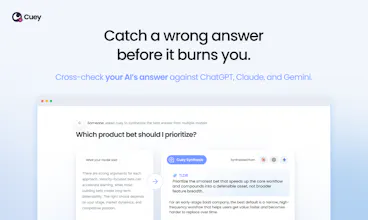
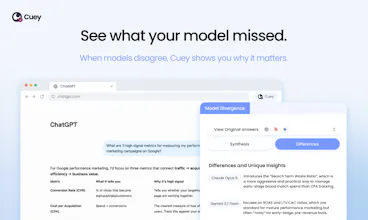
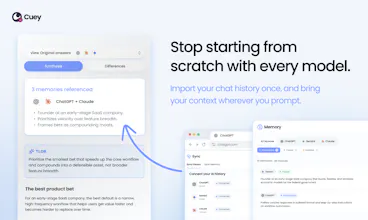
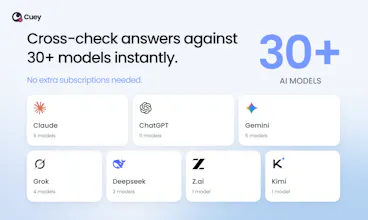
AI gives you wrong answers in the same confident tone as right ones. You don't know which is which until it's too late. Cuey gets you an effortless second opinion. It sends your prompt to ChatGPT, Claude, Gemini, or 30+ other models, and shows when they disagree. No juggling tabs, no repeating yourself, no stack of subscriptions. And your memory travels with you, so every model knows your context. One prompt, one place, multiple perspectives. On work that matters, one opinion is never enough.


Cuey
Hey Product Hunt! 👋
Longtime hunter, first-time maker here. After years of discovering products on PH, it feels pretty special to help launch Cuey here today.
We’ve probably all had that moment when we’re about to act on an AI answer that sounds completely convincing…until we realize it’s wrong. The problem is that getting a more trustworthy answer still takes a surprising amount of work: copying prompts across models, comparing their responses, and repeatedly providing the same context.
We built Cuey to make that power-user workflow easier, and in many cases automatic.
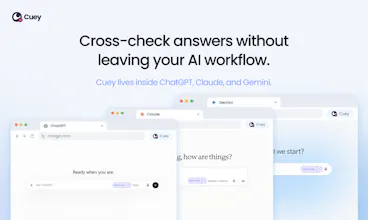
Cuey is a Chrome extension that works alongside ChatGPT, Claude, and Gemini. It compares responses from leading models in the background, highlights meaningful disagreements, and surfaces when another model may have a better answer. It also carries your context across AI tools, so every second opinion considers the information that actually matters.
The idea is simple: get more confidence in the AI you already use, without changing how you work.
We’d love for you to install the extension, try it out and tell us where it helps or falls short.
Curious: when AI gives you an answer you’re not sure about, how do you check it today?
Cuey
Hey @producthunt community, help us shape our onboarding...
Can you remember a time when AI gave you a super confident answer that turned out to be completely wrong? We're always looking for new prompts to feature 😉
minimalist phone: reduce your screentime
Wow! How long did it take you to get 2k users of the extension? And what helped you to get there?
And will you include answers from other LLMs (e.g. Grok, Perplexity etc.?)
Cuey
@busmark_w_nika Hi Nika, I'm a proud follower of yours! I actually lead marketing, so I'm heavily involved in promoting the Chrome extension. We hit 2k in just over 3 months. We targeted AI power users, the ones that are in Reddit threads complaining about hallucinations or having to switch AI models. We've all been there. In terms of channels, it was a healthy mix of newsletters and paid ads with emphasis on iterating on successful creative and messaging. Next steps are to build out our content marketing.
We currently let users cross-check their AI's answers against all major models like GPT-6.0 Sol, Opus 5.5, Grok 4.6, and many more. We onboard as fast as the models release. Same day.
I've had a few cases where I got a confident Ai answer, used it and only later found something was wrong :D. The annoying part is open chatgpt, claude, and gemini separately and ask the same thing again. Cuey is I think made for ppl like me who compare different Ai answers before deciding which one to trust.
Cuey
@tahir21 Music to our ears... though not the part where AI confidently sent you in the wrong direction ;)
That’s exactly the annoying workflow we’re trying to make disappear with Cuey. Definitely let us know what works, what doesn’t, or where it still feels like too much effort. This is very much the use case we’re building for.
EverTutor AI
Great idea! Curious to know how exactly it compares the responses in the background without interrupting the workflow. Congrats on the launch would love to connect and follow what you’re building!
Cuey
@suryansh_tiwari2 Thanks for the support! Cuey's a Chrome extension that lives inside of ChatGPT, Claude, Gemini, and a few other AI models. When you ask your host AI a question, Cuey works quietly in the background by sending the same prompt to three other models to check whether they're likely able to offer a meaningful delta versus your host AI's response. If the other models have something meaningful to share, you get a notification and you can open a sidebar to compare them. If not, your workflow stays uninterrupted.
You can also trigger a comparison manually if you feel strongly about getting a second opinion on your host AI's answer.
Let's connect, and thanks again for checking us out!
EverTutor AI
@mani_kabir Thanks for the detailed reply
I’m curious though how you decide when a difference in responses is worth notifying the user
Would love to discuss this more and learn about what you’re building
@suryansh_tiwari2 @mani_kabir the "meaningful delta" check is the part i'd get stuck on. last month i ran the same 25 questions about hiring in one small niche through a few models, mostly to see which job sites they'd name. nearly all the disagreement was cosmetic, same handful of sources in a different order and different wording, and the one difference that mattered (a source named by one model and missing from the others) was easy to miss by eye. a plain text diff would have flagged everything. do you compare extracted claims and named entities between answers, or is it a judge model scoring the two responses as a whole?