DemoFly turns what you're building into a professional demo video automatically. No screen recording, no scripting, no editing. Point it at a branch, a local dev server, or a new feature. DemoFly's AI navigates your product, captures the key flows, adds natural voiceover, and produces a polished video ready to share. CLI-first, built for dev workflows — generate demos from your terminal or CI pipeline. Edit and share from the dashboard. Free tier includes every feature.
No reviews yetBe the first to leave a review for DemoFly — Demos that record themselves
Maker
📌
Hey Product Hunt! I'm Rachel, one of the makers of DemoFly. 👋
You know that thing where you finish building a feature and then spend 45 minutes trying to record a decent demo? Recording, messing up, re-recording, editing out the dead air. What should be a quick "check this out" becomes a whole production.
DemoFly automates it all. Install it, point it at your app, and let it go. DemoFly explores the code, navigates the app, and produces a narrated video walkthrough. No screen recording. No script writing. You build the feature, DemoFly makes the demo.
Right now it works as a Claude Code plugin, but where we're headed is making this part of your development workflow end-to-end. Think: push a branch, generate a demo, share it. "Take a look at this branch" becomes "watch this 2-minute walkthrough." That's the vision we're building toward and we're genuinely excited about it.
Once your demo is generated, you can push it to the DemoFly dashboard to get a share link, regenerate with different narration, or run it through premium text-to-speech models for a more polished result. It's not just a one-shot generation, you can iterate on the output.
Free tier is live, no credit card, and every feature is available. Same product as paid, just fewer credits.
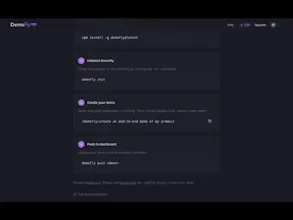
Getting started takes a couple minutes: 1. Install the DemoFly CLI: `npm install -g demofly`
2. Run `demofly init` in your project 3. Inside Claude Code, run `/demofly:create` to generate your first demo
Would love to hear what you think! Try it on your app and let us know how the demos turn out. We are working hard to improve output quality and adding new features. 🚀
I'm really excited to launch DemoFly! (and a little nervous too)
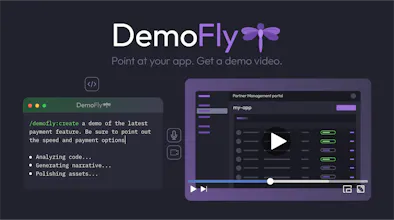
BTW, you could probably tell, but our quick demo video was generated entirely by DemoFly. Look 'ma! No hands!
The team and I are really interested to see how you all use (and break) DemoFly. Give it a go and post your demos here in the comments!
We’re hanging out here all day. Grab the CLI, run your first demo, and roast our AI's narration! We’re ready for the feedback. I think...
Report
Hey guys, I just tried using DemoFly for the first time for my project as I thought it was a great idea and gave you an upvote here on ProductHunt. But when I tried installing it with demofly init, it got stuck on ffmpeg... for around 10 minutes. After a while I actually just killed the terminal because of this. Please have a look into it, hope to use this soon, it is a great idea!
Report
@_arbio thanks for trying it and providing this feedback! Are you on Mac, Linux, or Windows? We'll get this fixed up and let you know!




Hey Product Hunt! I'm Rachel, one of the makers of DemoFly. 👋
You know that thing where you finish building a feature and then spend 45 minutes trying to record a decent demo? Recording, messing up, re-recording, editing out the dead air. What should be a quick "check this out" becomes a whole production.
DemoFly automates it all. Install it, point it at your app, and let it go. DemoFly explores the code, navigates the app, and produces a narrated video walkthrough. No screen recording. No script writing. You build the feature, DemoFly makes the demo.
Right now it works as a Claude Code plugin, but where we're headed is making this part of your development workflow end-to-end. Think: push a branch, generate a demo, share it. "Take a look at this branch" becomes "watch this 2-minute walkthrough." That's the vision we're building toward and we're genuinely excited about it.
Once your demo is generated, you can push it to the DemoFly dashboard to get a share link, regenerate with different narration, or run it through premium text-to-speech models for a more polished result. It's not just a one-shot generation, you can iterate on the output.
Free tier is live, no credit card, and every feature is available. Same product as paid, just fewer credits.
Getting started takes a couple minutes:
1. Install the DemoFly CLI: `npm install -g demofly`
2. Run `demofly init` in your project
3. Inside Claude Code, run `/demofly:create` to generate your first demo
Walkthrough here → demofly.ai/getting-started
Would love to hear what you think! Try it on your app and let us know how the demos turn out. We are working hard to improve output quality and adding new features. 🚀
JSON Web Token (JWT) Debugger
Hi PH! 👋 I’m Matt, another of DemoFly's creators.
I'm really excited to launch DemoFly! (and a little nervous too)
BTW, you could probably tell, but our quick demo video was generated entirely by DemoFly. Look 'ma! No hands!
The team and I are really interested to see how you all use (and break) DemoFly. Give it a go and post your demos here in the comments!
We’re hanging out here all day. Grab the CLI, run your first demo, and roast our AI's narration! We’re ready for the feedback. I think...
Hey guys, I just tried using DemoFly for the first time for my project as I thought it was a great idea and gave you an upvote here on ProductHunt. But when I tried installing it with demofly init, it got stuck on ffmpeg... for around 10 minutes. After a while I actually just killed the terminal because of this. Please have a look into it, hope to use this soon, it is a great idea!
@_arbio thanks for trying it and providing this feedback! Are you on Mac, Linux, or Windows? We'll get this fixed up and let you know!
JSON Web Token (JWT) Debugger
@_arbio we just released v0.2.11 of the DemoFly CLI, which should fix the issue you ran into. Try it out and let us know!