

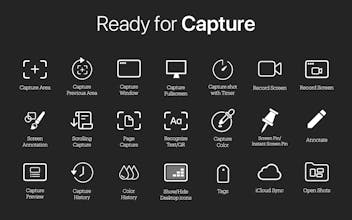
Deskeen — Screenshot. Elevated Deskeen is the best screenshot and screen recording app for Mac with Capture Color, OCR, a built-in annotation tool, Screen Annotation, Page Capture, Scrolling Capture, Capture History, Rename with AI, and a lot more.

Deskeen 2 — We’ve reimagined screen capture.
Taking daily screenshots, recording your screen, and organizing materials takes far more time than you might think. Existing tools often offer only partial functionality—or require you to hop between multiple apps. Deskeen was born out of this very inconvenience.
The reason you need this app is simple: it brings the entire process of capturing, organizing, and retrieving your screen content into one seamless workflow. No complicated shortcuts. No digging through endless folders. Just instant access to exactly what you need, the moment you need it.
As a result, you can collect resources faster, manage them more neatly, and share them more securely. Deskeen 2 is not just another capture tool—it’s a productivity platform that reimagines your entire workspace.
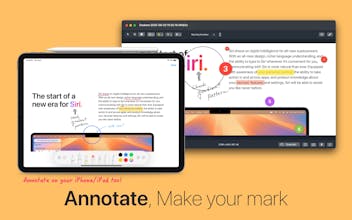
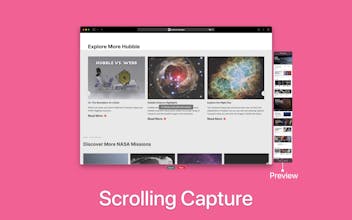
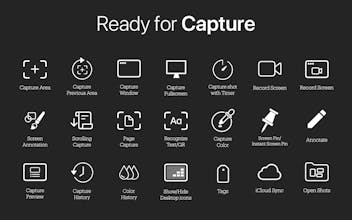
In particular, Deskeen 2 introduces Screen Annotation, a new feature that transforms your Mac’s display into a creative canvas. Naturally, it’s fully integrated with both capture and screen recording functions, and includes Scrolling Capture, which is perfect for grabbing long or continuous content.
It also comes with the remarkable Page Capture feature, which automatically captures any content you specify—whether it’s ePub files, webcomics, manga, or anything visible on your screen—and turns it into images, animated GIFs, or PDFs.
This is why Deskeen 2 isn’t simply a tool for “taking” screens, but the starting point for completely redesigning your workflow. It’s a small beginning, but one we’ll continue to strengthen and grow—always by your side. We look forward to your support as we move ahead.
Deskeen 2.1 Released!
What's New in Version 2.1: https://youtu.be/Q4WCQKqfXnY
Introducing Glance. Organize your scattered Screen Pins into a beautiful overview with a single keystroke. View every capture at a glance and stay in control of your creative workflow.
Significantly improved scrolling capture accuracy and quality while reducing memory usage.
Added the ability to support "Auto-Scroll" in Scrolling Capture mode.
A new Window Background" feature has been added that captures the background wallpaper along with the window. In settings, you can choose from system wallpaper, custom wallpaper, or solid color options. Padding and blur effects can also be configured.
Added the ability to use "Simple Crop" in the Annotation window.
Added the ability to use "Simple Annotation" in the Annotation Window, making it easy to add rectangles, ovals, lines, arrows, and text.
Added the ability to set the "aspect ratio of a selected area" in Screen Recording and Precision Capture mode.
Added the ability for “Rename with Ai” to support Apple Intelligence. (requires macOS 26 or later)
Added "Apple Intelligence" option in Settings for file renaming using Ai. (requires macOS 26 or later)
Added the ability to set "a background image when capturing windows", now available in Settings.
Added an option to include a "Date-Time Separator" when configuring the File Name pattern in Settings > Advanced.
Improved "the intuitive display of status information" for items being annotated in the Capture Preview window.
Improved "filter functionality in Capture History" for more convenient access to Screen Annotation and Scrolling Capture.
Fixed an issue where window shadows were still captured in Freeform mode, even when the “exclude window shadows” setting was enabled.
Fixed a problem where duplicate entries were shown in Capture Preview after restoring from Capture History.
Fixed a problem where the Screen Pin window did not correctly handle the image size and window size.
Fixed a minor Ui issue in the Screen Annotation.
Fixed a minor Ui issue in the Record Window.

Was expecting to be able to save scrolling screen captures as PDF, but seems it's PNG or JPEG only - any plans to add this ?
@the_pitbullch Thanks for great your feedback. We will support it in the future updates. Thanks.
Deskeen 2.0.1 has been released.
Today, we have our first update version available, so I'd like to give you a brief introduction.
This update is the first update for Deskeen 2, and the following areas have been updated.
Added What's New and Deskeen Tip display features on app launch.

Added the ability to adjust window transparency from the contextual menu of ScreenPin/Instant Screen Pin.

Added a feature and option to display keystrokes during screen recording.

Added microphone source selection feature for screen recording.

Added the ability to export WebP images in Capture Preview and Capture History.

Added ability to export original image, HEIC, and WebP images in Annotation.
Added the Show Keystrokes option in Settings > Recording.
Improved Screen Pin/Instant Screen Pin contextual menu UI and added Export feature.
Improved functionality has been added to automatically adjust the size of the capture button based on the size of the selection area displayed for capturing.
Improved Recording UI in Settings
Improved the color information display UI for the selected color format in Settings > Color Picker > Color Format.
Fixed a problem where the Presenter Overlay position was not properly updated when adjusting the selection area position with the keyboard during screen recording.
Fixed a problem where minor issue occurred when performing Hide Desktop Icons.
Thanks for reading!
Deskeen 2.0.3 now available!
https://apps.apple.com/app/id6746357941?mt=12
Fixed an issue where images were not captured correctly in Precision Capture Mode.
Fixed an issue where the cursor was captured when using Precision Capture Mode in a multi-display environment.

Deskeen 2.0.4 now available!
https://apps.apple.com/app/id6746357941?mt=12
Added the ability to toggle the guide text displayed during screen recording.
Text Capture (OCR) on macOS 26 supports Czech, Danish, Dutch, Indonesian, Malay, Norwegian, Polish, Romanian, Swedish, and Turkish.
Added the ability to customize the filename prefix in Settings > Advanced.
Added the ability to use the macOS color picker, which can be configured in Settings > Color Picker.
Added the ability to automatically copy a screenshot to the clipboard when captured.
Improved the precision of color information display based on the position of the color picker.
Deskeen 2.0.5 is now available!
https://apps.apple.com/app/id6746357941?mt=12
Added the ability to toggle the Capture Preview window.
Added an option in Settings > Advanced > Double-Click Action to rename filename when double-clicking in Capture History.
Added the ability to manually edit a filename in Capture History.
Added the ability to automatically save images after capturing.
Fixed an issue where the Capture Preview window did not appear after Scrolling Capture.
Fixed an issue in which the edit image feature failed to function in the Annotation Window on macOS 26.0. (Requires upgrade to macOS 26.1)





Thanks for purchasing Deskeen.
I read the review that you registered on the app store. I will reflect what you said. Thank you again for your good feedback.