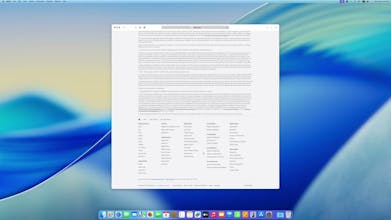
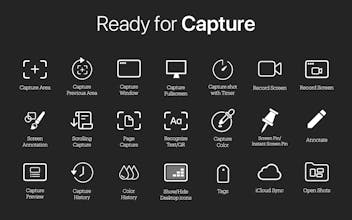
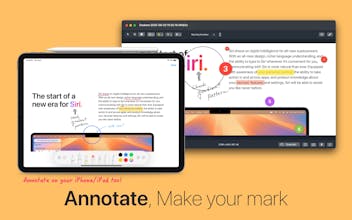
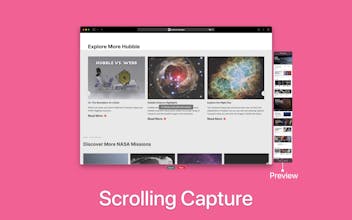
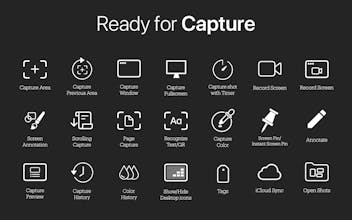
Deskeen — Screenshot. Elevated Deskeen is the best screenshot and screen recording app for Mac with Capture Color, OCR, a built-in annotation tool, Screen Annotation, Page Capture, Scrolling Capture, Capture History, Rename with AI, and a lot more.
* Added an option in Settings > Advanced > Double-Click Action to immediately restore when double-clicking in Capture History.
* Added the Auto-Hide Preview Item on Copy/Save feature to the Capture Preview window.
* Improved drag and drop of the Capture Preview window.
* Improved Capture Preview window to keep showing when switching Spaces on macOS.
* Improved usability for new Deskeen users by showing the menu bar when the application is first launched.
* Improved Setting UI in macOS 26.
* Fixed an issue where the Screen Pin option in the contextual menu was not enabled when selecting text and color in Capture History.
* Fixed an issue in macOS 26 where the Save button in Annotation was not displayed correctly.
* Fixed the problem that the Drag Me function of Annotation does not work well in macOS 26.
Report
Maker
Happy new year! We are currently working on Version 2.1, our first major update that includes a variety of new features. Newly added functionalities are continuously being included in the release notes, and we are sharing ongoing updates via Twitter, so we kindly ask for your continued interest.
Currently, version 2.1 is in progress. I will introduce the Window Background function, which is one of the functions included in 2.1. You can set wallpapers, custom options, or solid colors for window capture, with optional Blur effect. Included in version 2.1. (Captured sample and settings screen attached.)
Report
Maker
In version 2.1, Auto-Scroll mode is supported in Scrolling Capture mode.
Report
Maker
In Version 2.1, a new option has been added to file rename using AI.







Deskeen 2.0.6 now available!
https://apps.apple.com/app/id6746357941?mt=12
Added shortcut keys for Toggle Capture Preview window and Open Settings.
Improved multi-object selection feature in the Annotation Window (supports mouse drag and full selection with Command + A).
Improved the What’s New window to be resizable.
Fixed incorrect time display in the menu bar during screen recording.
Minor bug fixes and improvements.
To celebrate our launch, we’re sharing a few redeem codes exclusively for Product Hunt users!
YPAET7N6E397
NM7HEMTAPXJN
XTXFPTARL3PH
WW6AYYHYMP3P
374T4E4399YL
RLTE6663WWM6
ME63RXLKYP6Y
67XE7KA3HET9
HXMFXKL4RHW6
JMH3M67LWJNY
If you have used the Redeem code, please leave a comment on the code you used for others.
@young_ho_kim3 RLTE6663WWM6 redeemed. Thank you.
Deskeen 2.0.2 now available!
* Added an option in Settings > Advanced > Double-Click Action to immediately restore when double-clicking in Capture History.
* Added the Auto-Hide Preview Item on Copy/Save feature to the Capture Preview window.
* Improved drag and drop of the Capture Preview window.
* Improved Capture Preview window to keep showing when switching Spaces on macOS.
* Improved usability for new Deskeen users by showing the menu bar when the application is first launched.
* Improved Setting UI in macOS 26.
* Fixed an issue where the Screen Pin option in the contextual menu was not enabled when selecting text and color in Capture History.
* Fixed an issue in macOS 26 where the Save button in Annotation was not displayed correctly.
* Fixed the problem that the Drag Me function of Annotation does not work well in macOS 26.
Happy new year!
We are currently working on Version 2.1, our first major update that includes a variety of new features. Newly added functionalities are continuously being included in the release notes, and we are sharing ongoing updates via Twitter, so we kindly ask for your continued interest.
https://hohoinc.notion.site/Deskeen-Release-Notes-165daae97b9280b2bc75c45d644fe646?pvs=4
https://x.com/hohoincapp
Thanks.
Currently, version 2.1 is in progress. I will introduce the Window Background function, which is one of the functions included in 2.1.
You can set wallpapers, custom options, or solid colors for window capture, with optional Blur effect. Included in version 2.1. (Captured sample and settings screen attached.)
In version 2.1, Auto-Scroll mode is supported in Scrolling Capture mode.
In Version 2.1, a new option has been added to file rename using AI.