

Dessix
Visual workspace to capture, organize, and create with AI
659 followers
Visual workspace to capture, organize, and create with AI
659 followers
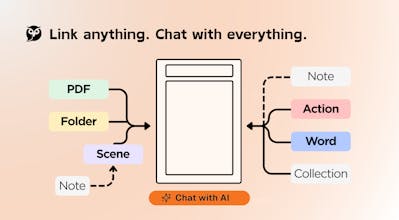
Dessix is a logic-first visual space for deep creators. Instead of wrestling with prompts, you build context visually, making AI an extension of your own thinking. Achieve true alignment—you know what the AI knows, and it grasps your goals. Ditch the black box, accelerate your creation, and finally, take control.



If the functionality is more robust, would it be more suitable for programming and testing, of course, at present
Vozo AI — Video localization
Hi Hsiang, congrats! Yes, I;m definitely one of those tired of copying and pasting the texts back and fourth.
One quick question: since Gemini is now deeply embedded in Chrome and tools like Atlas are emerging, what would you say is Dessix's biggest edge in terms of workflow and context handling?
Dessix
@jojo_li
Regarding Gemini and Atlas, Dessix's core competitive advantage in "workflow and context handling" lies in these key areas:
Visual Context Alignment: Dessix's "what you see is what AI sees" visual workspace ensures the AI natively understands your layout and connections, eliminating the "black box" effect and aligning human-AI perspectives.
Dynamic Context, Instant Impact: Any change you make to your visual workspace is immediately reflected for the AI, maintaining a fluid thought process without re-uploading or repetitive explanations.
Knowledge Base as Living Context: Your entire Dessix knowledge base serves as the AI's background context. It automatically leverages your accumulated insights for deeper, more relevant collaboration.
Multi-Step AI Agents: With the "Dessix Magician," you can easily build complex, multi-step AI agents using simple descriptions, transforming AI into a powerful planning and execution partner.
Dessix empowers you to be a "thought designer," accelerating creation and expanding cognition through seamless human-AI collaboration.
Dessix
@jojo_li To be honest, we can't compete with giants like Chrome or Atlas on general capabilities.
The biggest difference lies in Definition and Transparency. In Dessix, YOU define who you are and what context matters. You know exactly what the AI knows because everything is "White-box"—visible and editable by you.
We offer total control, not just "black box magic." That is our edge.
Makers Page
Feels like a mind map where the AI actually sees what I see. I lose context hopping between tabs/docs. Focus-as-prompt makes sense. Scenes to fight tunnel vision… smart. I’ll throw my next research brief at it and see if it keeps me sane.
Dessix
@alexcloudstar
That’s a perfect use case! Many users are actually using it right now for their Year-End Reviews—just laying out their projects side-by-side to chat. No need to manually select context; what’s on screen is what the AI uses.
You are spot on about the constraints. That is a deliberate design choice: using the physical limits of the screen to enforce cognitive focus. It’s a fascinating way to keep both the human and the AI aligned.
Hope it helps with your research brief!
SigniFi
I rarely see AI tools explicitly designed to combat 'confirmation bias'. Usually, they just act as yes-men. 🧐 Regarding the 'Actions' and 'Scenes' features: are there built-in templates or workflows specifically designed to challenge my own logic (e.g., a 'Devil's Advocate' mode), or do I need to configure these prompts myself?
Dessix
@yoang_loo This is a brilliant question that touches the core of why we built Dessix—to prevent AI from becoming an echo chamber.
You don't need to configure everything from scratch. We provide "cognitive guardrails" in two ways:
Dessix Store: You can find ready-to-use 'Actions' and 'Scenes' specifically designed to challenge your logic, such as Socratic Questioning workflows and deep inquiry frameworks (similar to the "5 Whys" or rigorous critical thinking models).
Built-in Tools: For objective reality, the system has a native Fact Check Assistant specifically designed to verify claims and validate facts instantly.
We want Dessix to be a partner that helps you think deeper, not just faster.
Dessix
@yoang_loo You are absolutely right. It is a double-edged sword.
Current AI models act like incredibly powerful engines—they follow instructions so perfectly that if the pilot is off-course, the AI will just accelerate them into the wrong direction. That is exactly why we need a matching "Chassis" (Control System).
This is the core purpose of Scenes. We built-in templates like "Socratic Questioning" and "Critical Thinking" specifically to introduce external perspectives and prevent users from falling into cognitive traps or echo chambers.
Amplifying thought is great, but keeping it on the right track is critical.
Several of our team mates are using Dessix. It's UX is unique and the "TAB-fill" function is amazing. Great app!
Dessix
@shawnxiao76 Thrilled that you enjoy the unique UX and the flow of "TAB-fill". Thanks for the support
Minara
Dessix is addressing the “black-box trust” problem in a very practical way: making context visible and controllable so teams can reason about why an output happened (and keep it consistent when collaborating).
does the model’s final context come strictly from the current focus / selected columns, or do you also do an automatic “relevance expansion” behind the scenes? That one choice really impacts reproducibility and team alignment.
Dessix
@lowesyang Dessix rigorously controls context priority to ensure precise AI alignment with user intent, fostering transparent and controllable collaboration:
1. Workspace Style Config: Defines the overall working environment and user identity.
2. Topic: Sets the focused scope for the current conversation or view.
3. Fixed Blocks: Core materials actively "pinned" by the user, serving as a structured framework and authoritative knowledge source.
4. Focused Block: The content block currently being viewed or edited by the user, representing the AI's primary area of attention.
5. Linked Blocks: Content blocks explicitly linked to the focused block, providing direct contextual connections.
6. Visible Blocks: Auxiliary content visible within the workspace, offering ambient environmental context.
7. Related Blocks: Algorithmically recommended supplementary information.
This hierarchical management ensures "what you see is what AI sees," meaning the AI's contextual understanding is always precisely synchronized with user intent, leading to reproducible and explainable collaboration.
For more details, please refer to [Organizing Context](https://docs.dessix.io/guide/feature/context).
Congrats! Dessix seems like a real time-saver. Reducing a lot of repetitive prompt input and avoids having to restate the same context across different sections. I especially like how the context is structured and arranged when having multiple events on the board, better than treating everything as isolated prompts.
Dessix
@asheley_wi24789 Thanks! Glad you like the structured approach.
"No more repeating yourself" is one of our core goals. Once you arrange the context on the board, it becomes the AI's shared memory—no need to restate it ever again.