Free macOS app for running multiple Claude Code sessions side by side. Split panes, 7 themes, command palette, agent kanban board, AI memory, prompt compression, usage tracking, and broadcast mode. Native Swift/AppKit. Signed and notarized.
Hey everyone. I'm Brandon, and I built Flock because I was tired of the options for running Claude Code.
Most terminal apps look like they were designed in 2005. VS Code and Cursor work, but opening a full IDE just to run terminal sessions felt wrong. And no matter what I used, running multiple Claude Code sessions meant juggling tabs and losing track of what each agent was doing.
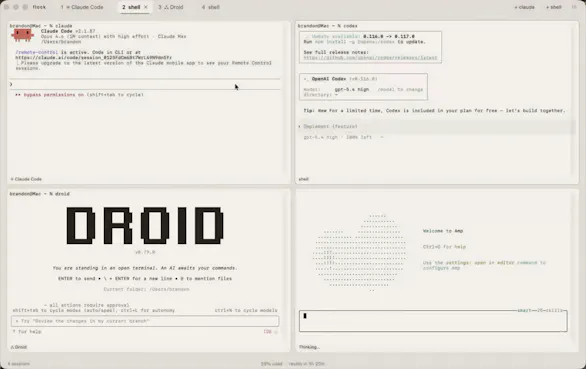
So I built what I actually wanted: a native macOS app that looks good, runs fast, and is purpose-built for parallel AI coding sessions. Each pane shows live activity indicators, token usage, and status. You see everything at a glance.
What makes it different: - Split panes with auto-tiling (Cmd+D / Cmd+Shift+D) - 7 hand-picked themes from light to dark - Command palette (Cmd+K) for fast navigation - Agent mode with a kanban board for parallel tasks - Wren compression that cuts token usage by up to 60% - Built-in usage tracking so you never hit your limit by surprise - Broadcast mode to type into all panes at once
It's free, open source, and native Swift/AppKit. No Electron.
Would love your feedback. What features would make this more useful for your workflow?
what does broadcast mode actually do here, does it fire the same prompt at every agent at once, or is it more of a task distributor that splits work across sessions?
if it's the former, same prompt to all, then you could run the same instruction across multiple worktrees simultaneously and see which approach holds up best. that's less about orchestration and more about parallel experimentation, which nobody else seems to be building toward.
the kanban board on top of that changes the mental model completely. instead of context-switching between terminals, you're actually managing a swarm.
@gabrielpineda Broadcast sends the same prompt to all sessions at once. I originally built it just to save time when I needed to let claude agents know I made a change all at once, but the parallel experimentation thing is a really interesting way to use it. Running the same task across different worktrees and comparing results isn't something I designed for explicitly, but it definitely does works well for that. Appreciate you checking it out!
Report
How well does the wren compression work? Multiple Claude sessions running at the same time sounds like a token killer, which I expect is what spurred the wren compression. Is this condensing all the prompts I give and how could I be sure it kept the details of what I say?
@cameron_pampena Good question. Wren is a separate open-source project (https://github.com/baahaus/wren) that Flock integrates with if you have it installed. It's not bundled automatically.
It's a small LoRA fine-tuned model (1.5B params) that runs locally on Apple Silicon and compresses prompts and tool output before they hit Claude's context window. Two modes: input mode strips filler and repetition from your prompts, output mode compresses tool results but hard-preserves file paths, line numbers, errors, and CLI flags verbatim.
It won't touch anything under 100 characters or where savings would be less than 20%. Negation words (NEVER, don't, unless) are treated as safety-critical and always kept. On verbose prompts you're looking at 60-80% savings, on structured tool output closer to 40%. The model is scored across 6 dimensions with value preservation and negation preservation weighted highest, so the training literally optimizes for keeping the details you're worried about losing.
You nailed the motivation though. Running multiple Claude sessions simultaneously burns tokens fast, so Wren was built to make that sustainable. Appreciate you taking the time to check Flock out. Hopefully it helps your workflow.
Report
Really cool concept — managing multiple Claude Code agents in one window is something I've wished for. I'm building a native macOS video editor as a solo dev, and I regularly run parallel agents for different parts of the codebase.
This would save me a lot of window juggling. Nice work!
@cyberseeds Thank you! That's exactly the workflow Flock was built for. Running parallel agents across different parts of a codebase is where it really shines. The tab system with live status indicators means you always know what each agent is doing without cycling through terminal windows.
Also, a native macOS video editor is such a cool project. There's definitely a real gap there for something well-crafted. Would love to hear how Flock works for you if you give it a try.





flock
Hey everyone. I'm Brandon, and I built Flock because I was tired of the options for running Claude Code.
Most terminal apps look like they were designed in 2005. VS Code and Cursor work, but opening a full IDE just to run terminal sessions felt wrong. And no matter what I used, running multiple Claude Code sessions meant juggling tabs and losing track of what each agent was doing.
So I built what I actually wanted: a native macOS app that looks good, runs fast, and is purpose-built for parallel AI coding sessions. Each pane shows live activity indicators, token usage, and status. You see everything at a glance.
What makes it different:
- Split panes with auto-tiling (Cmd+D / Cmd+Shift+D)
- 7 hand-picked themes from light to dark
- Command palette (Cmd+K) for fast navigation
- Agent mode with a kanban board for parallel tasks
- Wren compression that cuts token usage by up to 60%
- Built-in usage tracking so you never hit your limit by surprise
- Broadcast mode to type into all panes at once
It's free, open source, and native Swift/AppKit. No Electron.
Would love your feedback. What features would make this more useful for your workflow?
Features.Vote
what does broadcast mode actually do here, does it fire the same prompt at every agent at once, or is it more of a task distributor that splits work across sessions?
if it's the former, same prompt to all, then you could run the same instruction across multiple worktrees simultaneously and see which approach holds up best. that's less about orchestration and more about parallel experimentation, which nobody else seems to be building toward.
the kanban board on top of that changes the mental model completely. instead of context-switching between terminals, you're actually managing a swarm.
flock
@gabrielpineda Broadcast sends the same prompt to all sessions at once. I originally built it just to save time when I needed to let claude agents know I made a change all at once, but the parallel experimentation thing is a really interesting way to use it. Running the same task across different worktrees and comparing results isn't something I designed for explicitly, but it definitely does works well for that. Appreciate you checking it out!
How well does the wren compression work? Multiple Claude sessions running at the same time sounds like a token killer, which I expect is what spurred the wren compression. Is this condensing all the prompts I give and how could I be sure it kept the details of what I say?
flock
@cameron_pampena Good question. Wren is a separate open-source project (https://github.com/baahaus/wren) that Flock integrates with if you have it installed. It's not bundled automatically.
It's a small LoRA fine-tuned model (1.5B params) that runs locally on Apple Silicon and compresses prompts and tool output before they hit Claude's context window. Two modes: input mode strips filler and repetition from your prompts, output mode compresses tool results but hard-preserves file paths, line numbers, errors, and CLI flags verbatim.
It won't touch anything under 100 characters or where savings would be less than 20%. Negation words (NEVER, don't, unless) are treated as safety-critical and always kept. On verbose prompts you're looking at 60-80% savings, on structured tool output closer to 40%. The model is scored across 6 dimensions with value preservation and negation preservation weighted highest, so the training literally optimizes for keeping the details you're worried about losing.
You nailed the motivation though. Running multiple Claude sessions simultaneously burns tokens fast, so Wren was built to make that sustainable. Appreciate you taking the time to check Flock out. Hopefully it helps your workflow.
Really cool concept — managing multiple Claude Code agents in one window is something I've wished for. I'm building a native macOS video editor as a solo dev, and I regularly run parallel agents for different parts of the codebase.
This would save me a lot of window juggling. Nice work!
flock
@cyberseeds Thank you! That's exactly the workflow Flock was built for. Running parallel agents across different parts of a codebase is where it really shines. The tab system with live status indicators means you always know what each agent is doing without cycling through terminal windows.
Also, a native macOS video editor is such a cool project. There's definitely a real gap there for something well-crafted. Would love to hear how Flock works for you if you give it a try.
@baahaus
Will definitely give it a try — parallel agents are my daily workflow now. Thanks for building this!
The video editor is NexClip AI — topic-based clipping for long videos. Launching on PH April 14th if you want to check it out 🙌
Wait this is super needed - we run claude CLI on our terminals and the windows can get crazy. Very much needed. Congrats!