I recently had the chance to try out FocuSee, and it has completely transformed my screen recording experience. Let me share with you the standout features that have me excited
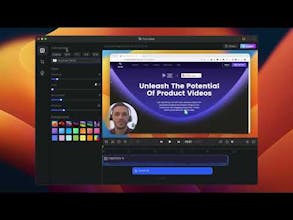
🎯Automated Editing
FocuSee's automated editing feature is a game-changer. It simplifies the editing process, saving me time and ensuring my content looks professional. No need for external software – it's all in one place.
🎯Customizable Zoom Effects
I love how FocuSee allows me to add customizable zoom effects. It's fantastic for drawing my viewers' attention to important details, making my tutorials more engaging.
🎯2x Highlighting with Spotlight
For my presentations and tutorials, the '2x Highlighting with Spotlight' feature has been invaluable. It lets me emphasize crucial points, making my content more impactful.
🎯Cursor Customization
The ability to choose from various cursor styles and click effects is a delightful touch. It adds a professional look to my videos and keeps my audience engaged.
FocuSee has become my go-to screen recording tool. It's user-friendly, and these fantastic features have elevated the quality of my content. If you're a content creator, educator, gamer, or professional, give FocuSee a try. It's a game-changer.
you can watch my review via on
YouTube -
YouTube
LinkedIn -
LinkedIn



Gemoo
FocuSee
FocuSee
Seems a great tool. How is it in comparison to WonderShare Demo Creator 8? Would love to try it.
Kyligence Copilot
Gemoo
FocuSee