Shot film style photos like Fuji, Hasselblad and Ricoh color sense, and professional photo retouching tool, "Funfor Cam" has various professional processing functions to meet the needs of mobile phone retouching, such as HSL, curve, etc.
As a developer and a photography enthusiast, I wanted to develop my own photography app for a long time. But the development is intermittently. Since the autumn of last year (2021), I have gradually mastered more photography knowledge. In order to learn photography knowledge, I also bought many professional cameras and lenses. I gradually have a deeper understanding of photography and color and image processing knowledge. Therefore, I started the consecutive development of app. Finally, it comes.
The main functions of the "FunFor Cam" can be summarized as follows: shot film style photos directly and professional photo retouching tools. There are two suitable groups for her. The first is people who like to take film style photo with their mobile phones. Open App's camera and choose a film color solution they like, adjust the grain strength and just shoot; The second is those who like to retouch photos with mobile phones, App has various professional processing functions to meet the needs of mobile phone retouching, such as HSL, curve, etc.
Some key features:
1. The film color style camera can easily take photos with Fuji, Hasselblad and Ricoh color sense;
2. When taking photos, user can choose face thinning and face beauty, and can also adjust the grain strength;
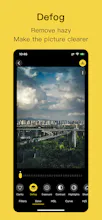
3. Defog adjustment, which is a function to make photos more clear and remove haziness. It has a good effect of increasing clear for some foggy photos;
4. HSL: through the HSL function, the hue, saturation and brightness of a single color can be adjusted independently, including red, orange, yellow, green, cyan, blue, purple and magenta;
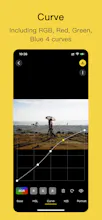
5. Curve: a total of 4 curves can be adjusted, namely RGB, red, green and blue. Each curve can be adjusted freely. You can click the new adjustment node or select an adjustment point to delete;
6. Portrait mode - background blur. App automatically separates the portrait from the background through AI technology, and can adjust the blur degree and brightness of the background;
7. Photo frame function.
More detail introduction please visit:
https://uzero.cn/funforcam/funfo...





MissTime