Harmony, a UI color palette prioritizing accessibility, utilizes advanced color tech and features, serving as a reliable companion for design systems. Access it for free as a Figma file and npm package.
@a007mr Hi Anton! A good question. The palette consists of 11 levels - from 50 (pale, almost white color) to 950 (dark, almost black). We have divided all levels into two groups. Colors in levels 50 to 500 are compared to black, colors 600 to 950 are compared to white. These are the values specified in each color slot in the Figma file. If you use, say, red-800 on a black background, you will get some other contrast value than the one shown by the big number.
@a007mr thank you, Anton!
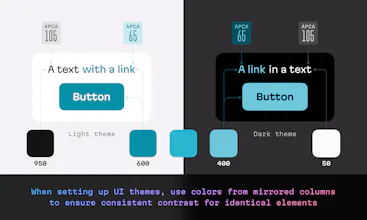
Firstly, Harmony employs the innovative APCA algorithm instead of the OKLCH Lightness parameter. This decision ensures that the perceived lightness of all samples remains extremely consistent on both light and dark backgrounds.
Secondly, we concluded that since dark colors are intended for light UI themes and light colors for dark themes, we could organize them accordingly. In Harmony, Blue 600 has a contrast level of 65 against a white background, while Blue 400 has the same 65 value against a black background. This approach yields consistent results when both themes consider this mirrored design.
Check out my Twitter thread to learn more about it: https://twitter.com/romanshamin_...


Kuasar Video AI
Polychrom—APCA Contrast Checker
SMM Agent
Harmony: Accessible UI Color Palette
Polychrom—APCA Contrast Checker
Crustdata
Morph
Sortbird